monitoring a patientchapter 77-10
Warning
• If the lab-measured value is outside the operating range for a
parameter, the user may not be able to adjust the CDI System 550
measured value to the lab-measured value. Accuracy has not
been established for displayed values outside the operating range;
therefore, displayed values outside the operating range should not be
used for patient management. While this condition exists, continue
patient management with another source (e.g., laboratory or point- of-
care blood gas analyzer).
Caution
• Ensure that the stored and recalled temperature mode are the same as
the laboratory sample to ensure proper calibration. Calibrating to different
temperature modes will compromise the system accuracy limits, as
described in Appendix B.
2 Draw a blood sample from each port that corresponds to values being
recalibrated.
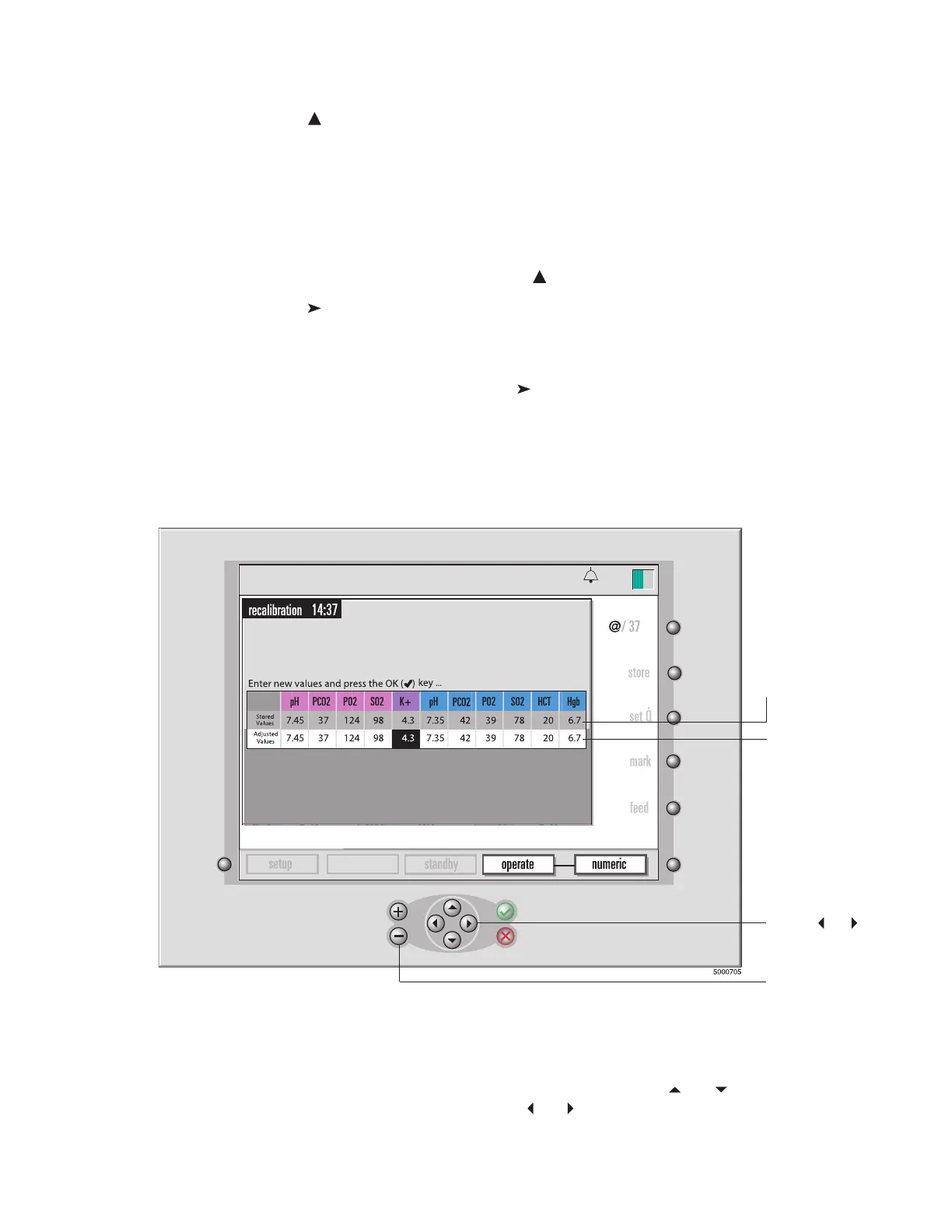
3 When the laboratory results are obtained, press the “recall” key.
The recalibration screen opens, as shown in the next figure.
4 Adjust the potassium stored value to match the lab value.
To adjust the highlighted value, use the + and − or and keys.
To move the highlight, use the and keys.
calibration
13:26
9-25-18
pH-stat
°
C
The top line displays
the stored values.
The bottom line
will reflect any
changes you
make in the
values.
Use the
and
keys to move
the highlight.
Use the + and –
keys to change
the value of the
selected
parameter.








 To Next Page