12
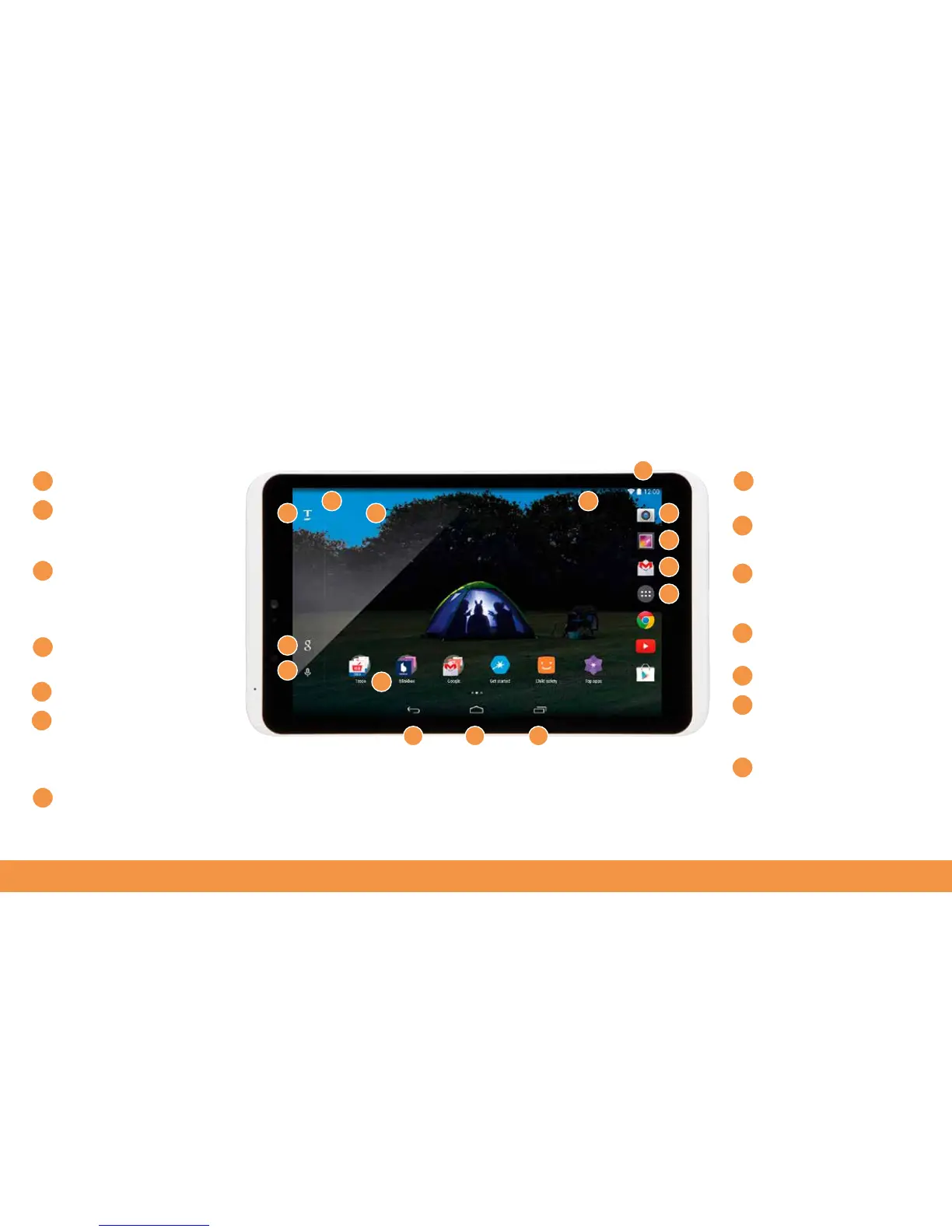
hudl2 screen basics
Home screen
Google search box
tap
and type search
queries here
Voice command/search
tap to enable the microphone
then tell Google what you
need
Notifications emails and
app updates are shown here
Tesco and blinkbox apps
Quick Access Area
swipe
down from here to see Wi-Fi
connections, battery levels
and other hudl2 settings
Status bar Wi-Fi, Battery
indicator and Time
Camera take photos and
shoot videos on the hudl2
Gallery photos stored on
your hudl2
Gmail email app that
can be used if you have a
Gmail account
All Apps what’s installed
on your hudl2
Back
Home button
tap this
anytime to get back to the
main homescreen
Active Apps quickly
return to where you were
on an active app
5
1 8
9
10
11
12
13
14
2
3
4
5
6
7
6
7
8
9
10
11
2
3
1
12 13 14
5
4



 To Next Page