16
IV. FRONT PANEL
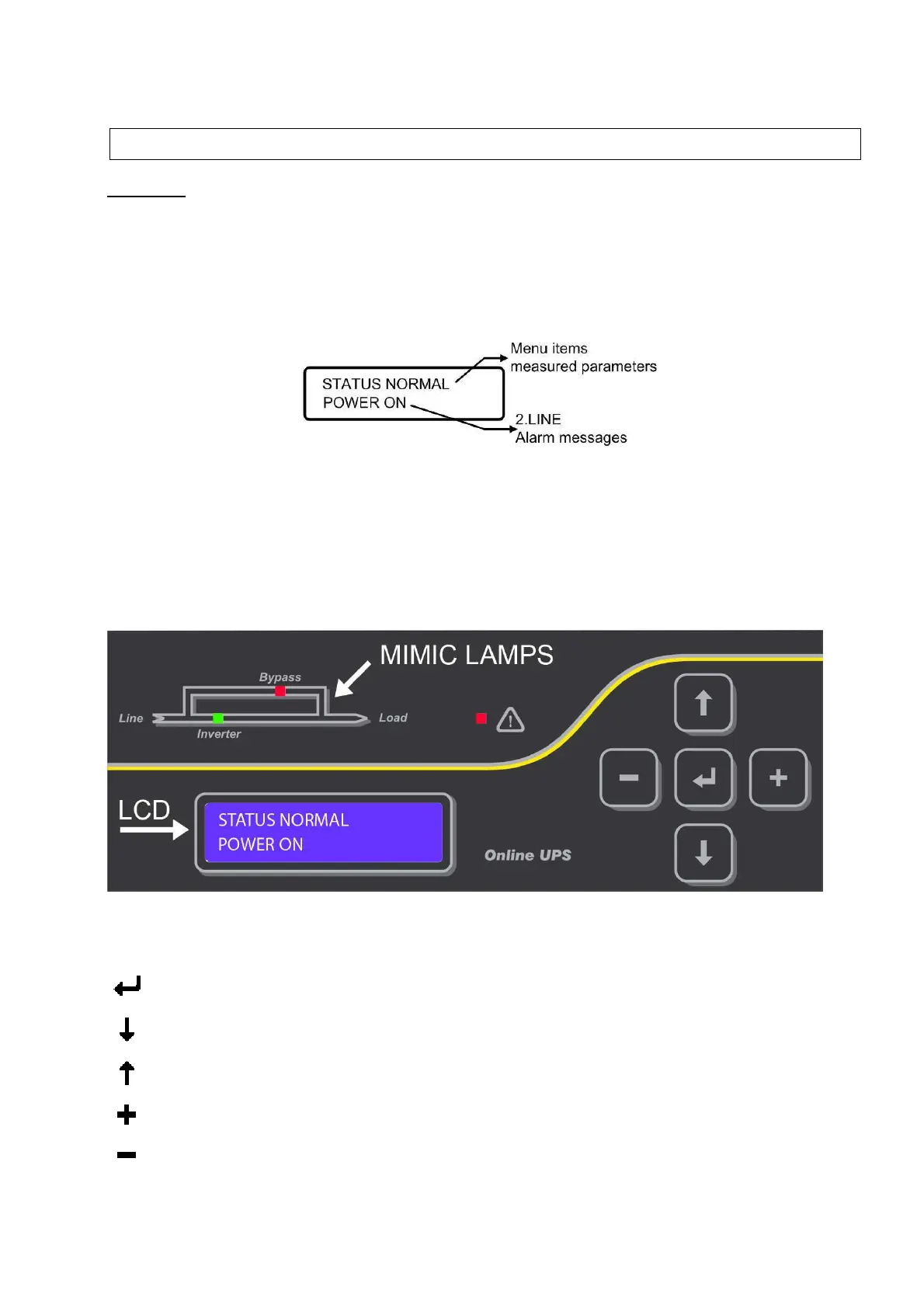
DISPLAY
At the center of the control panel, there is a 2 lines/16 alphanumeric characters display, which provides a
detailed overview of the current status of the UPS. Directly from front panel you can control the UPS, monitor
the electrical values of the inputs, output etc..and change the main settings.
The LCD display has 2 lines and the functions of lines are as follows:
First line: Operation status, menu items and measured parameters
Second line: Time shared indication of alarms
The tag AXX at the beginning of the alarm message on the second line, is the standard alarm code for a
particular alarm condition .The remaining message part can be different in each language, but the alarm code
is always the same regardless of the selected display language.
MIMIC DIAGRAM
There are two lamps on the mimic panel and one lamp for alarm indication on the control panel of the UPS.
On the mimic panel: Red LED->Bypass, Green LED->Inverter.
Alarm indication : Red LED
KEY SYMBOLS
There are 5 control keys which provide flexible move on menus, these are:
ENTER button to enter menu or to confirm a selection
Move 1 step down on menu
Move 1 step up on menu
Move on options or move cursor to right 1 step
Move on options or move cursor to left 1 step


 To Next Page