EasyManua.ls Logo

Texas Instruments LaunchPad MSP430FR2355 - User Manual

Texas Instruments LaunchPad MSP430FR2355
32 pages
Print Icon
To Next Page IconTo Next Page
Loading...
1
SLAU680May 2018
Submit Documentation Feedback
Copyright © 2018, Texas Instruments Incorporated
MSP430FR2355 LaunchPad™ Development Kit (MSP
EXP430FR2355)
User's Guide
SLAU680May 2018
MSP430FR2355 LaunchPad™ Development Kit
(MSP
EXP430FR2355)
The MSP-EXP430FR2355 LaunchPad™ Development Kit is an easy-to-use Evaluation Module (EVM) for
the MSP430FR2355 microcontroller (MCU). The kit contains everything needed to start developing on the
ultra-low-power MSP430FRx FRAM microcontroller platform, including onboard debug probe for
programming, debugging, and energy measurements. The board also features onboard buttons and LEDs
for quick integration of a simple user interface, an onboard Grove connector for external Grove sensors,
as well as an ambient light sensor to showcase the integrated analog peripherals.
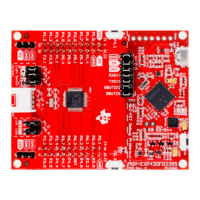
Figure 1 shows the MSP-EXP430FR2355 LaunchPad development kit.
Figure 1. MSP-EXP430FR2355 LaunchPad Development Kit

Table of Contents

Question and Answer IconNeed help?

Do you have a question about the Texas Instruments LaunchPad MSP430FR2355 and is the answer not in the manual?

Overview

The MSP-EXP430FR2355 LaunchPad™ Development Kit is an easy-to-use evaluation module (EVM) for the MSP430FR2355 microcontroller (MCU). It provides a comprehensive platform for developing and debugging embedded applications, particularly those leveraging the ultra-low-power MSP430FRx FRAM microcontroller platform. The kit includes all necessary components to begin development, such as on-board emulation for programming, debugging, and energy measurements.

Function Description

The MSP-EXP430FR2355 LaunchPad Development Kit serves as a rapid prototyping and evaluation platform for the MSP430FR2355 MCU. It demonstrates the capabilities of the device, including its Smart Analog Combo (SAC) peripherals, integrated analog features, and ultra-low-power operation. The kit is designed to facilitate the development of applications requiring low-power consumption, extended data logging, and enhanced security.

The Out-of-Box Experience (OOBE) preprogrammed on the LaunchPad demonstrates key features of the MSP430FR2355 MCU. This includes two primary modes:

  • Light Sensor Mode: This mode utilizes the SAC0 and SAC2 pair, two Timer_B modules, and the ADC of the MSP430FR2355 MCU, in conjunction with an on-board photodiode (D1) and LEDs (LED1 and LED2). SAC2 is configured as a generic op-amp, implementing a transimpedance amplifier with R3 and C6 to convert photodiode current to voltage. This voltage is then fed through SAC0 (configured as a buffer) to the ADC. LED1 (red) and LED2 (green) illuminate or dim based on ambient light intensity, with a default brightness threshold. Users can recalibrate this threshold using button S1 or influence light detection by covering D1 or using a flashlight.
  • Function Generator Mode: This mode employs SAC1 configured as a Programmable Gain Amplifier (PGA) to manipulate an input signal, which is then captured by the internal ADC. The LaunchPad continuously measures and transfers this data to a PC via UART. Initially, it generates a 1-Hz inverted sine wave at 0.8-V amplitude using the SAC3 DAC, which is fed into SAC1 in inverting PGA mode with a gain of 1. A cloud-based GUI (MSP-EXP430FR2355 OOB GUI) visualizes the ADC measurements and allows users to change signal type (sinusoidal, square, sawtooth), frequency, and amplitude, as well as configure PGA mode (inverting/noninverting) and gain.

The kit supports various powering methods, including via the onboard eZ-FET debugger or an external BoosterPack plug-in module. It also features an isolation jumper block (J101) to separate the debug probe from the target MCU, enabling accurate current draw measurements and the use of the eZ-FET with different target devices.

Important Technical Specifications

  • Microcontroller: MSP430FR2355 16-bit MCU
    • Memory: 32KB embedded FRAM (ferroelectric random access memory), 4KB on-chip RAM. FRAM offers ultra-low power, high endurance, and high-speed write access.
    • Operation Voltage: 1.8-V to 3.6-V
    • Architecture: 16-Bit RISC architecture up to 24-MHz system clock and 8-MHz FRAM access.
    • Peripherals:
      • 12-channel 12-bit ADC
      • Two enhanced comparators with integrated 6-bit DAC as reference voltage
      • Four Smart Analog Combo (SAC-L3)
      • Three 16-bit timers with three capture/compare registers (Timer_B3)
      • One 16-bit timer with seven capture/compare registers (Timer_B7)
      • 32-bit hardware multiplier (MPY)
      • 44 GPIOs
  • Debug Probe: Onboard eZ-FET debug probe for programming, debugging, and EnergyTrace™ technology for real-time power profiling.
  • Connectivity:
    • 40-pin BoosterPack™ plug-in module headers for expansion with a wide range of BoosterPack modules.
    • Micro USB cable for connecting to a computer.
    • Grove connector for Analog and Digital Grove modules (routed to 3.3V, GND, P1.1, and P1.4).
    • Backchannel UART (eUSCI_A1) for communication with the USB host, enabling graphical user interfaces (GUIs) and other PC applications.
  • User Interface: Two buttons (S1, S2) and two LEDs (LED1, LED2) for user interaction.
  • Sensors: Ambient light sensor (photodiode D1) for the Out-of-Box Experience demo.
  • Clocking: External 32.768-kHz 12.5-pF crystal for lower LPM sleep currents and internal clocks (MCLK, SMCLK: DCO at 1 MHz; ACLK: REFO at 32.768 kHz).
  • Power Supply: 5-V from USB, regulated to 3.3 V for eZ-FET and target operation. Jumper J101 controls power to the target.

Usage Features

  • Rapid Prototyping: The 40-pin BoosterPack headers allow for quick addition of features like wireless connectivity, graphical displays, and environmental sensing using various BoosterPack plug-in modules.
  • Out-of-Box Experience (OOBE): Preprogrammed code demonstrates the device's light sensing and function generation capabilities, providing an immediate hands-on experience.
  • Cloud-Based GUI: The OOBE includes an accompanying cloud GUI for visualizing ADC measurements and controlling signal generation parameters in Function Generator mode. This GUI is built with GUI Composer 2.0 and accessible via Chrome, Firefox, and Safari browsers.
  • Flexible Debugging: The eZ-FET debug probe supports EnergyTrace technology for ultra-low-power debugging and can be used with different MSP430 target devices by disconnecting jumpers in the isolation block.
  • Software Development Tools: Compatible with TI's Eclipse-based Code Composer Studio™ IDE (CCS) and IAR Embedded Workbench® IDE, both supporting EnergyTrace technology. TI Resource Explorer Cloud and Code Composer Studio Cloud offer web-based development environments.
  • Grove Connector: Simplifies prototyping with Seeed Studio's Analog and Digital Grove modules, eliminating the need for a Grove Base BoosterPack.
  • Backchannel UART: Provides a communication channel to the PC host, enabling custom GUIs and applications to interact with the LaunchPad.

Maintenance Features

  • Driver Installation: Proper operation requires drivers, which are typically installed with IDEs like TI's CCS or IAR EW430, or can be downloaded from www.ti.com/MSPdrivers.
  • Current Draw Measurement: The J101 isolation block allows for easy measurement of the MSP430 MCU's current draw by removing the 3V3 jumper and attaching an ammeter. This is crucial for optimizing energy performance.
  • BoosterPack Checker Tool: A dedicated tool helps users verify the compatibility of BoosterPack plug-in modules with the LaunchPad development kit, ensuring proper pin function configuration.
  • Documentation and Design Files: Comprehensive design files, including schematics, layout, bill of materials (BOM), Gerber files, and software examples, are available for download, aiding in design and troubleshooting.
  • Software Updates: Access to MSPWare provides a collection of code examples, software libraries, data sheets, and other design resources, including a high-level API called MSP Driver Library for easy interaction with MSP hardware.
  • Hardware Change Log: A detailed log of hardware revisions is provided, ensuring users have access to historical information and any updates.
  • ESD Protection: The kit includes warnings about electrostatic discharge (ESD) and recommends storage in a protective ESD bag to prevent degradation or failure.

Texas Instruments LaunchPad MSP430FR2355 Specifications

General IconGeneral
BrandTexas Instruments
ModelLaunchPad MSP430FR2355
CategoryMicrocontrollers
LanguageEnglish

Related product manuals