Wiring
Serial Communications
RS232 Wiring
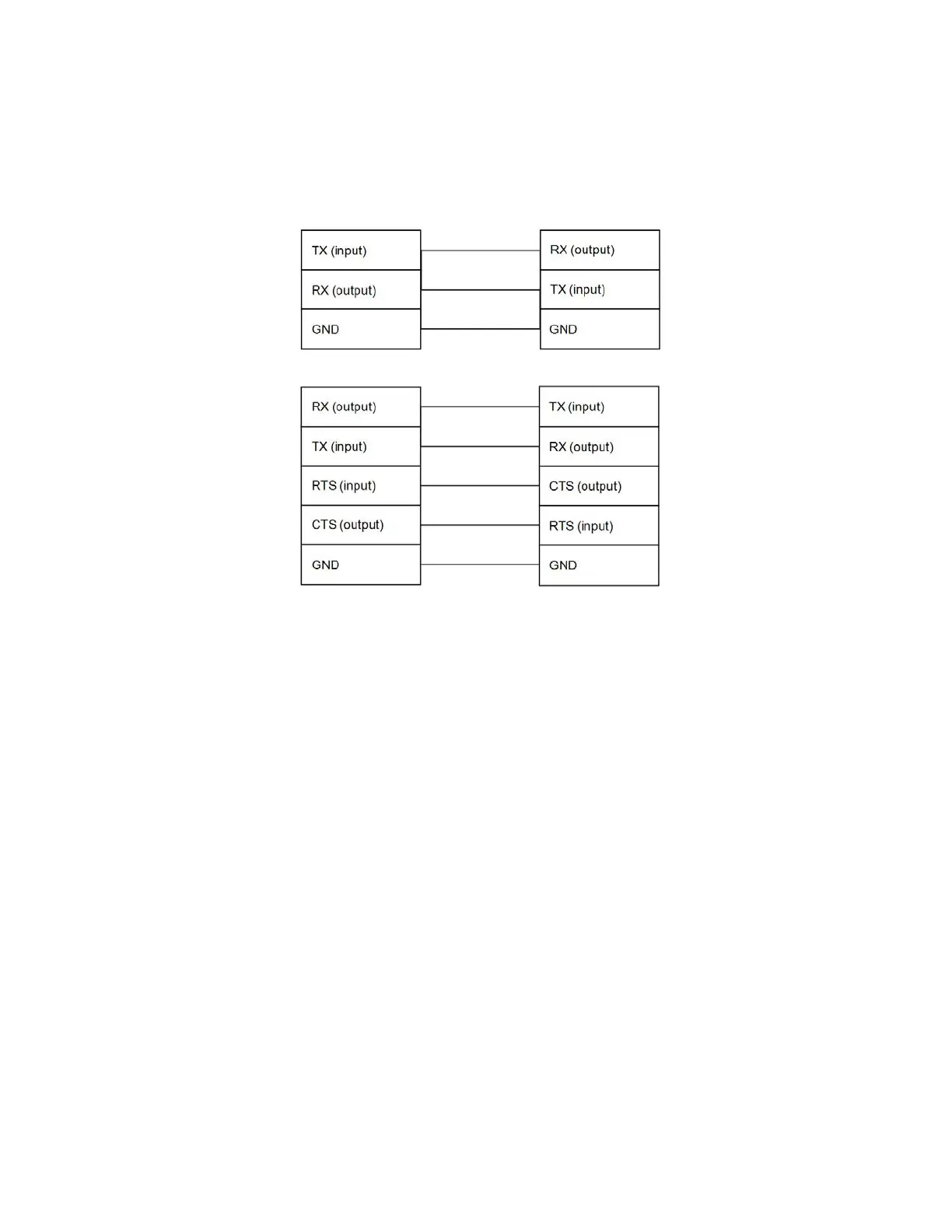
The serial port on a PC (COM1 or COM2) can connect directly to the gauge’s RS232
port. The RS232 port connector J2A is located on the Main CPU board. Standard
connections are shown in the figures below.
– Do not exceed ±15 VDC on any of the communication lines.
– The RS232 bus can drive up to 50 feet of cable.
Figure 4-1. Customer Communication Equipment (2-wire RS232)
Figure 4-2. Customer Communication Equipment (RS232 with RTS/CTS)
To communicate with the gauge from a PC, the PC must be running the Thermo
Scientific EZ Cal II software.
The default communication settings for the RS232 and RS485 ports of the gauge and
for the Thermo Scientific EZ Cal II are:
– 8 data bits
– No parity
– 1 stop bit
– 9600 baud rate
Refer to the DensityPRO Measurement System User Guide (p/n 1-0702-016) for
additional details about configuring and using serial communications.
Thermo Scientific DensityPRO Installation Manual 4-5








 To Next Page