Wiring
Serial Communications
RS485 Wiring
Connecting a PC serial port (COM) to the RS485 port on the gauge requires an
RS485/RS232 converter, p/n 670045. Refer to the DensityPRO System installation
wiring drawing (p/n 1-0702-016).
Make the RS485 connections as follows:
1. Connect RS485 connector J2B to the corresponding connections on the
RS485/RS232 converter.
2. Connect the RS485/RS232 converter to the PC using a standard DB9 serial cable.
• Do not exceed ±15 VDC on any of the communication lines.
• The RS232 bus can drive up to 50 feet of cable.
• The RS485 bus can drive up to 4,000 feet of cable.
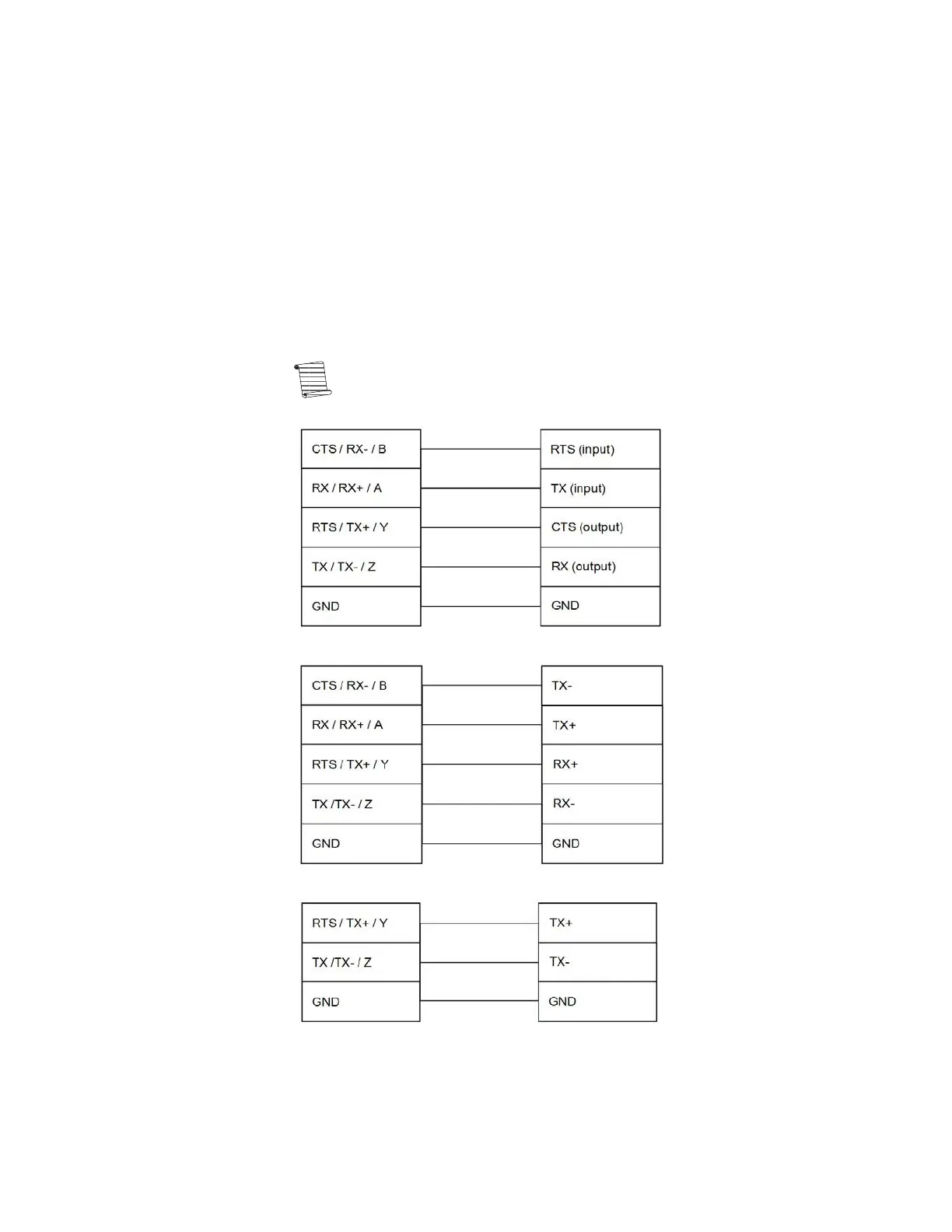
Note: This port is configurable as RS485 or RS232. When setting up an
RS232 configuration, refer to Figure 4-3. When setting up an RS485
configuration, refer to Figure 4-4 or Figure 4-5, as appropriate.
Figure 4-3. Customer Communication Equipment (RS232)
Figure 4-4. Customer Communication Equipment (4-wire RS485)
Figure 4-5. Customer Communication Equipment (2-wire RS485)
4-6 DensityPRO Installation Manual Thermo Scientific








 To Next Page