Chapter 3 | Replacing parts
3.6. Replacing the 50 and 500 L load cells
Use the following instructions to replace the load cells and rerouting the wires back into
the cart and into the summing block. It is recommended to replace one load cell at a
time. See Tables 3.1–3.3 for part numbers based on your system size.
WARNING: Do not attempt to remove or replace any 50 or 500 L DynaDrive
S.U.B. load cell cables without the use of a professional electrician. Damage to
the equipment and personal injury may occur.
3.6.1. Required parts and tools
• Spare 50 L load cell kit with summing block (part number SV50988.01)
• Spare 500 L load cell kit with summing block (part number SV50988.03)
• Allen wrenches: 1/8, 3/16, and 5/32 in.
• Flathead screwdriver
• Professional electrician
3.6.2. Preparation
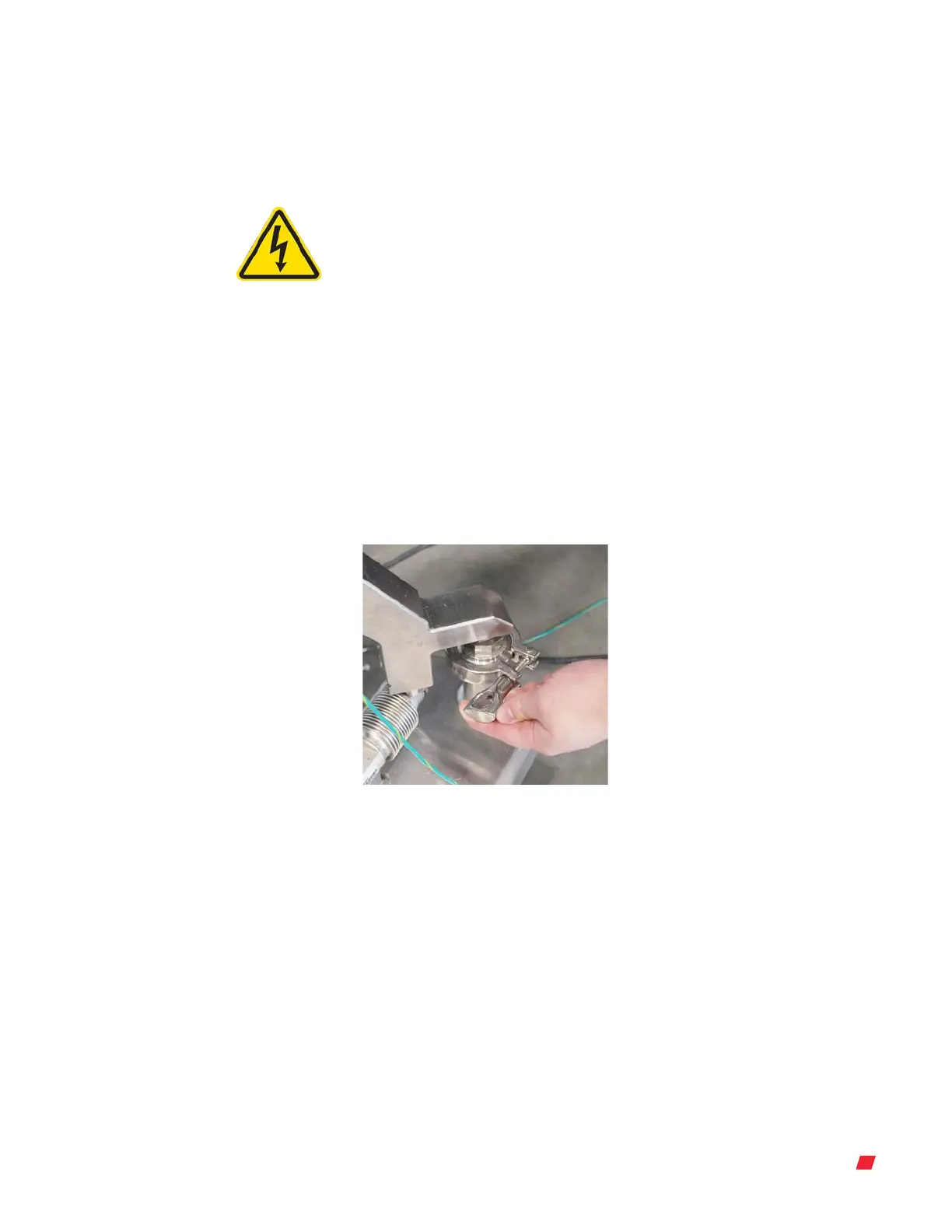
1. Ensure that all tri-clamps (three in total) are removed from the base of the legs of the
DynaDrive unit (Figure 3.35).
Figure 3.35. Removing the wing nut
tri-clamp.
2. Using a 1/8 in. Allen wrench, remove the two bolts that connect the load cell to each
of the base of the legs (3) (Figure 3.36).
Thermo Scientific 26DynaDrive S.U.B. Service Guide





 To Next Page