5.1. Hardware operation issues
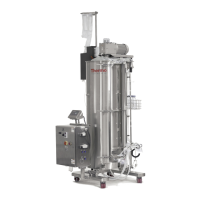
The DynaDrive S.U.B. will not operate.
Check the power supply.
• Verify the position of the main electrical plug connection at the wall outlet, the main
power disconnect, and the emergency stop switch.
• Verify the condition of the main electrical circuit breaker at your facility. If the
protection breaker has been tripped, determine the fault condition. The condition
may exist where other electrical systems are requiring current loads beyond those
allowed by the breaker. The DynaDrive S.U.B. system should be placed on its own
electrical circuit.
• Disconnect the main power cord. Inspect the electrical circuit breakers and fuses
inside the electrical box of the S.U.B. controller. Determine the fault condition by
visual inspection. If the fault condition cannot be determined by visual inspection,
contact the manufacturer.
The DynaDrive S.U.B. temperature is below target or slow to respond.
Check the temperature controller and sensor.
• Verify that the temperature probe (RTD) is not loose, and has been fully inserted into
the BPC thermowell.
• Verify that the thermowell has been filled with sucient glycerol to aid in heat transfer.
• Verify that the temperature control unit (TCU) is operating, and all of the ball valves
are open.
• Verify that the system is filled with a sucient volume of fluid. There must be enough
media (minimum volume) in the BPC to provide contact with the container. Add more
media if the BPC is not touching the heater area.
Noise is being emitted from the mixer assembly.
No action is required.
The bearing port assembly supplied with the DynaDrive S.U.B. is an important
component in maintaining a sterile environment during cell growth. The special seals
used in the DynaDrive S.U.B. may generate some noise during operation, particularly
after the first day of operation. This noise may vary in intensity and frequency, but
generally has no significant effect on performance or overall durability of the BPC during
the intended life of the product.
The mixer controller does not respond to user inputs.
Allow the speed to stabilize before using the keypad interface.
• Adjusting the speed control too rapidly may require several seconds for speed
stabilization.
• Wait ten seconds, then attempt to adjust the speed at the keypad interface.
• Verify the position of the input select switch of the variable frequency drive (VFD).
If the toggle switch is not in the middle position, the controller will not be able to
receive control inputs from the control keypad on the front panel.
Issue:
Issue:
Issue:
Issue:
Solutions:
Solutions:
Solution:
Solutions:
Chapter 5 | Troubleshooting and frequently asked questions
Thermo Scientific 59DynaDrive S.U.B. Service Guide





 To Next Page