5.SelectYesintheSetupConfirmationwindow.Thebuilt-inbatteryisdisabledandthecomputerturnsoff
automatically.Waitthreetofiveminutestoletthecomputercool.
Replacingthebottomcover
Beforeyoustart,read“Importantsafetyinformation”onpagevandprintthefollowinginstructions.
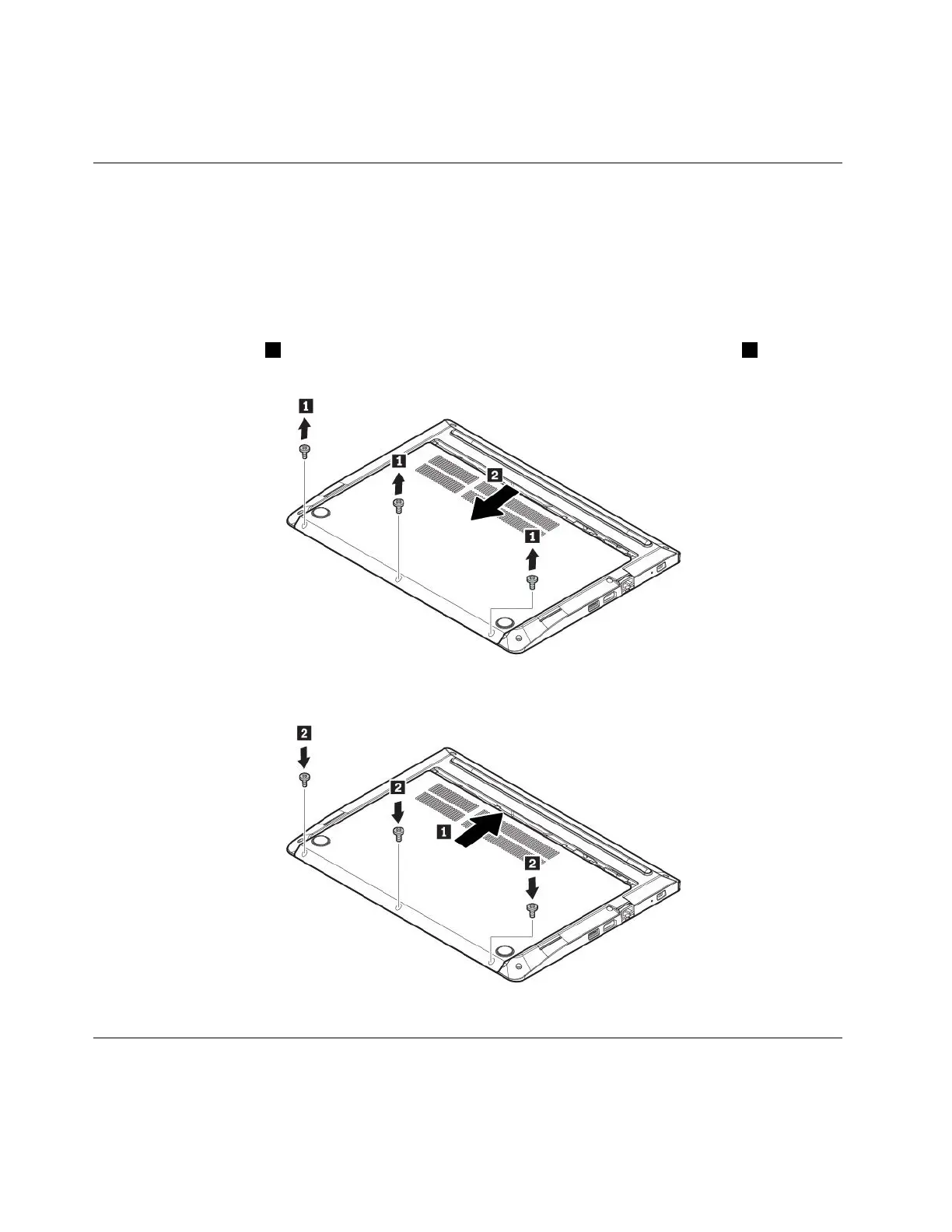
Toreplacethebottomcover,dothefollowing:
1.Disablethebuilt-inbattery.See“Disablingthebuilt-inbattery”onpage75.
2.Ensurethatthecomputeristurnedoffanddisconnectedfromacpowerandallcables.
3.Closethecomputerdisplayandturnthecomputerover.
4.Removethescrews1thatsecurethebottomcover,andthenremovethebottomcover2inthe
directionasshownbythearrow.
5.Alignthebottomcoverwiththeframeofthebasecoverassemblyasshown.Pushthebottomcover
intoposition.Installthescrewstosecurethebottomcover.
6.Turnthecomputerover.Connecttheacpoweradapterandallcablestothecomputer.
Replacingthememorymodule
Beforeyoustart,read“Importantsafetyinformation”onpagevandprintthefollowinginstructions.
76E470,E470c,andE475UserGuide



 To Next Page