Home
ThinkPad
Laptop
R500
Page 129
ThinkPad R500 - Page 129
226 pages
Manual
Save Page as PDF
To Next Page
To Next Page
To Previous Page
To Previous Page
Loading...
T
able
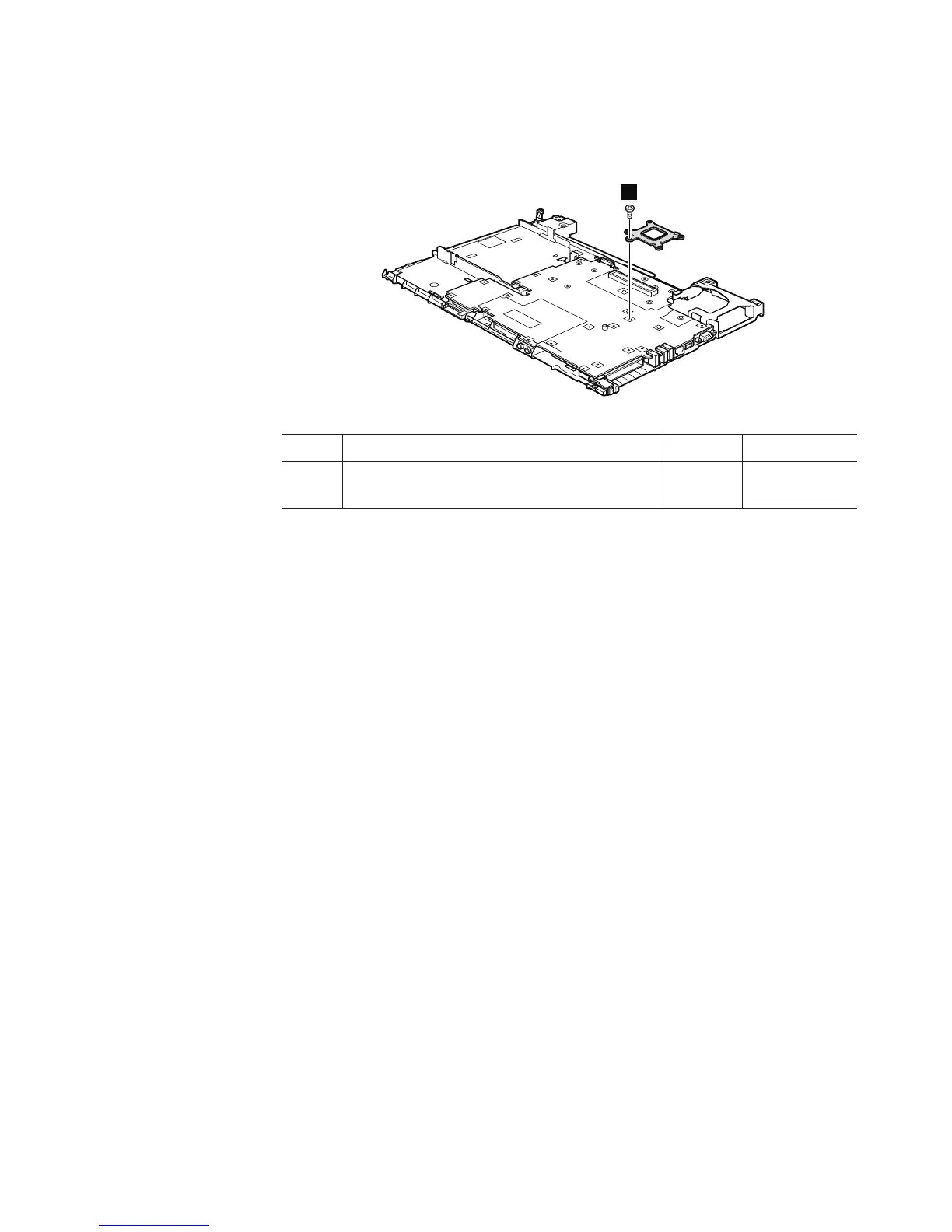
23.
Removal
steps
of
structure
frame
and
IEEE
1394
sub
card
(continued)
Remove
the
CPU
support
plate.
6
Step
Screw
(quantity)
Color
T
orque
6
M2
×
5
mm,
flat-head,
nylon-coated
(1)
Black
0.167
Nm
(1.7
kgfcm)
Removing
and
replacing
a
FRU
121
128
130
Table of Contents
Main Page
Default Chapter
5
Table of Contents
5
About this Manual
7
Safety Information
9
General Safety
10
Electrical Safety
11
Safety Inspection Guide
13
Handling Devices that Are Sensitive to Electrostatic Discharge
14
Grounding Requirements
14
Safety Notices (Multilingual Translations)
15
Laser Compliance Statement (Multilingual Translations)
36
Important Service Information
47
Strategy for Replacing Frus
47
Strategy for Replacing a Hard Disk Drive
48
Important Notice for Replacing a System Board
48
How to Use Error Message
48
Strategy for Replacing Frus for CTO, CMV, and GAV
49
Product Definition
49
FRU Identification for CTO, CMV, and GAV Products
49
General Checkout
51
What to Do First
52
Checkout Guide
53
Diagnostics Using PC-Doctor for DOS
53
Testing the Computer
54
Lenovo Thinkvantage Toolbox (Lenovo System Toolbox)
56
PC-Doctor for Windows
56
PC-Doctor for Rescue and Recovery
57
FRU Tests
58
Power System Checkout
60
Checking the AC Adapter
60
Checking Operational Charging
61
Checking the Battery Pack
61
Checking the Backup Battery
62
Related Service Information
63
Restoring the Factory Contents by Using Product Recovery Discs
63
Restoring the Factory Contents by Using Recovery Disc Set
64
Passwords
65
Power-On Password
65
Hard-Disk Password
65
Supervisor Password
66
How to Remove the Power-On Password
66
How to Remove the Hard-Disk Password
67
Power Management
68
Screen Blank Mode
68
Sleep (Standby) Mode
68
Hibernation Mode
69
Symptom-To-FRU Index
70
Numeric Error Codes
70
Error Messages
74
Beep Symptoms
75
No-Beep Symptoms
75
LCD-Related Symptoms
76
Intermittent Problems
77
Undetermined Problems
77
Status Indicators
79
Fn Key Combinations
83
FRU Replacement Notices
87
Screw Notices
87
Retaining Serial Numbers
88
Restoring the Serial Number of the System Unit
88
Retaining the UUID
88
Reading or Writing the ECA Information
89
Removing and Replacing a FRU
91
1010 Battery Pack
92
1020 Serial Ultrabay Enhanced Device
93
1030 Hard Disk Drive Cover, Hard Disk Drive, and Hard Disk Rubber Rails
94
1040 Palm Rest or Palm Rest with Fingerprint Reader
96
1050 DIMM
99
1060 Keyboard
100
1070 PCI Express Mini Card for Wireless LAN
102
1080 Intel Turbo Memory Minicard
106
1090 Backup Battery
107
1100 Keyboard Bezel and Speakers
108
1110 Fan Assembly
111
1120 Cpu
115
1130 LCD Assembly
116
1140 Base Cover and PC Card/Expresscard (or Expresscard/Smart Card) Bezel Assembly
119
1150 Structure Frame and IEEE 1394 Sub Card
127
1160 System Board, PC Card/Expresscard Slots (or Expresscard/Smart Card Slots) Assembly
132
2010 LCD Front Bezel
135
2020 Inverter Card or LED Control Card
136
2030 Bluetooth Daughter Card (BDC-2.1)
137
2040 Integrated Camera
138
2050 LCD Panel, LCD Cable, Hinges, and ALPET Sheets
139
2060 LCD Rear Cover and Wireless LAN Antenna Cables
143
Locations
145
Front View
145
Rear View
146
Bottom View
147
Parts List
149
Overall
150
LCD Frus
187
Keyboard
198
Miscellaneous Parts
200
AC Adapters
202
Power Cords
203
Recovery Discs
204
Windows XP Professional (32 Bit) Dvds
204
Windows Vista Starter Edition (32 Bit) Recovery Dvds
206
Windows Vista Home Basic (32 Bit) Recovery Dvds
207
Windows Vista Home Premium (32 Bit) Recovery Dvds
209
Windows Vista Business (32 Bit) Recovery Dvds
210
Windows Vista Business (64 Bit) Recovery Dvds
212
Windows Vista Ultimate (32 Bit) Recovery Dvds
213
Windows 7 Home Basic (32 Bit) Dvds
215
Windows 7 Home Premium (32 Bit) Dvds
216
Windows 7 Home Premium (64 Bit) Dvds
217
Windows Professional (32 Bit) Dvds
218
Windows Professional (64 Bit) Dvds
220
Common Service Tools
221
Notices
223
Trademarks
224
Related product manuals
ThinkPad T60
222 pages
ThinkPad X230
187 pages
ThinkPad T410
174 pages
ThinkPad X200
6 pages
ThinkPad T430
192 pages
ThinkPad E550
112 pages
ThinkPad E555
172 pages
ThinkPad T440p
106 pages
ThinkPad T420s
152 pages
ThinkPad X100e
134 pages
ThinkPad Yoga 14
102 pages
ThinkPad Helix 20CG
128 pages



 To Next Page