1.Turnoffthecomputer.
2.Removethebatterypack.
3.Connecttheacadapter.
4.Checkthatpowerissuppliedwhenyouturnonthecomputer.
5.Turnoffthecomputer.
6.Disconnecttheacadapterandinstallthechargedbatterypack.
7.Checkthatthebatterypacksuppliespowerwhenyouturnonthecomputer.
Ifyoususpectapowerproblem,seetheappropriateoneofthefollowingpowersupplycheckouts:
•“Checkingtheacadapter”onpage29
•“Checkingoperationalcharging”onpage29
•“Checkingthebatterypack”onpage30
•“Checkingthebackupbattery”onpage30
Checkingtheacadapter
Youareherebecausethecomputerfailsonlywhentheacadapterisused.
•Ifthepowerproblemoccursonlywhenthedockingstationortheportreplicatorisused,replacethe
dockingstationortheportreplicator.
•Ifthepower-onindicatordoesnotturnon,checkthepowercordoftheacadapterforcorrectcontinuity
andinstallation.
•Ifthecomputerdoesnotchargeduringoperation,goto“Checkingoperationalcharging”onpage29.
Tochecktheacadapter,dothefollowing:
1.Unplugtheacadaptercablefromthecomputer.
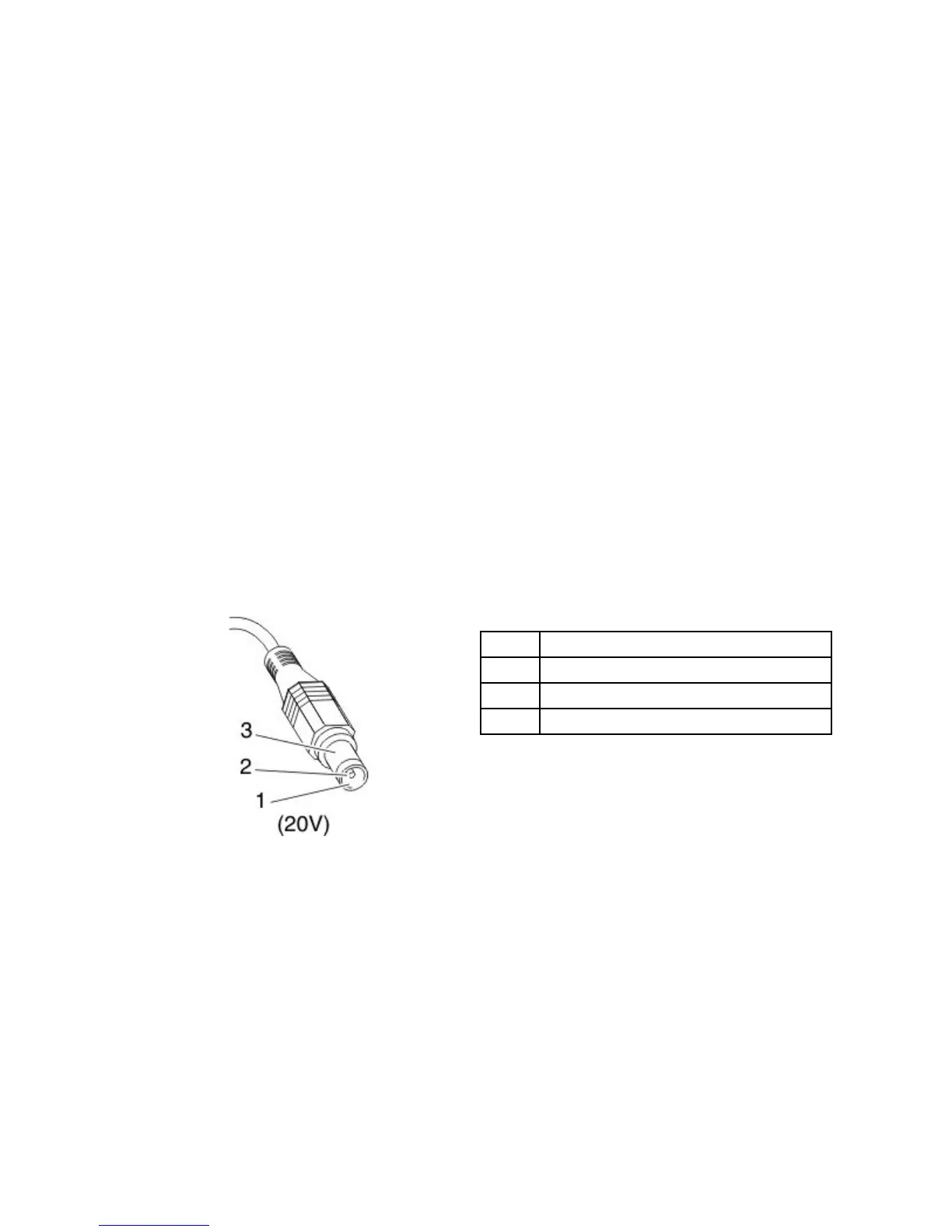
2.Measuretheoutputvoltageattheplugoftheacadaptercable.Seethefollowinggure:
Pin
Voltage(Vdc)
1+20
20
3
Ground
Note:Outputvoltageofpinno.2oftheacadaptermaydifferentfromtheoneyouareservicing.
3.Ifthevoltageisnotcorrect,replacetheacadapter.
4.Ifthevoltageisacceptable,dothefollowing:
•Replacethesystemboard.
•Iftheproblempersists,goto“FRUtests”onpage27
.
Note:Noisefromtheacadapterdoesnotalwaysindicateadefect.
Checkingoperationalcharging
Tocheckwhetherthebatterychargesproperlyduringoperation,useadischargedbatterypackorabattery
packthathaslessthan50%ofthetotalpowerremainingwheninstalledinthecomputer.
Chapter3.Generalcheckout29



 To Next Page