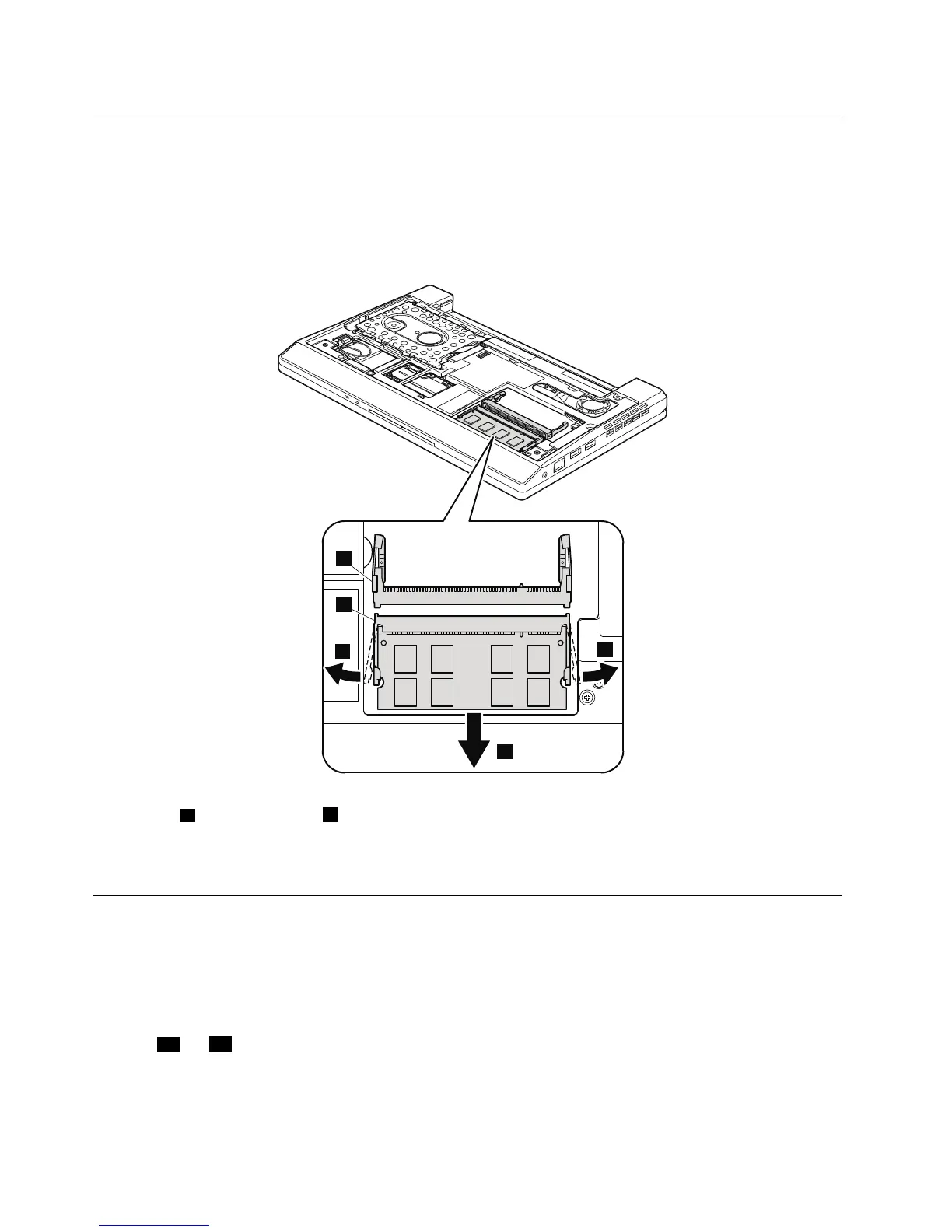
1040DIMM
Foraccess,removetheseFRUsinorder:
•“1010Batterypack”onpage54
•“1020Bottomdoor”onpage55
Table11.RemovalstepsofDIMM
Note:IfthecomputeryouareservicinghastwoDIMMslotsandonlyoneDIMMisused,thecardmustbeinstalled
inSLOT-0(
a),butnotinSLOT-1(b).SomemodelsonlyhaveoneDIMMslot.
Wheninstalling:InsertthenotchedendoftheDIMMintothesocket.PresstheDIMMrmly,andpivotituntilit
snapsintotheplace.Makesurethatitisrmlyxedintheslotanddoesnotmoveeasily.
1050PCIExpressMiniCardforwirelessLAN
Foraccess,removetheseFRUsinorder:
•“1010Batterypack”onpage54
•“1020Bottomdoor”onpage55
Table12.RemovalstepsofPCIExpressMiniCardforwirelessLAN
Instep1aand1b,unplugthejacksbyusingtheremovaltoolantennaRFconnector(P/N:08K7159)orpickthe
connectorswithyourngersandgentlyunplugthemindirectionofthearrow.
60HardwareMaintenanceManual



 To Next Page