Theonlyexceptiontothisisifthebatterypackisphysicallydamagedoracustomerisreportingapossible
safetyissue.
IfThinkVantageToolboxisnotinstalledinthecomputer,thecustomershoulddownloadthisprogram
beforeanon-physicallydamagedbatterypackisreplaced.Notethataphysicallydamagedbatterypack
isnon-warrantyreplacement.
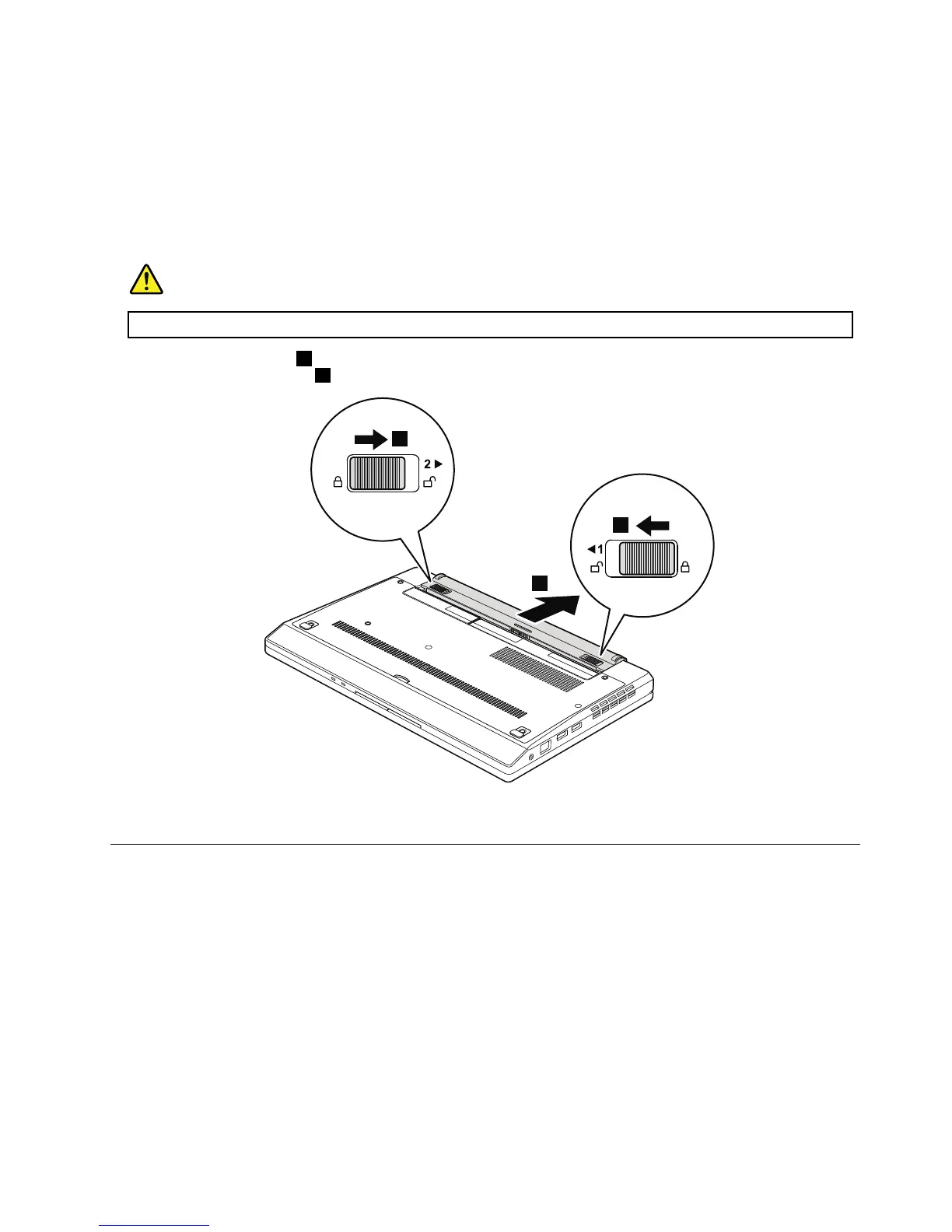
Table8.Removalstepsofbatterypack
DANGER
Useonlythebatteryspeciedinthepartslistforyourcomputer.Anyotherbatterycouldigniteorexplode.
Unlockthebatterylatches1.Holdingthebatterylatchesintheunlockedposition,removethebatterypackin
thedirectionshownbyarrow
2.
Wheninstalling:Installthebatterypackintheslot,andthenmakesurethatthebatterylatchisinthelockedposition.
1020Bottomdoor
Foraccess,removethisFRU:
•“1010Batterypack”onpage54
Chapter8.RemovingandreplacingaFRU55



 To Next Page