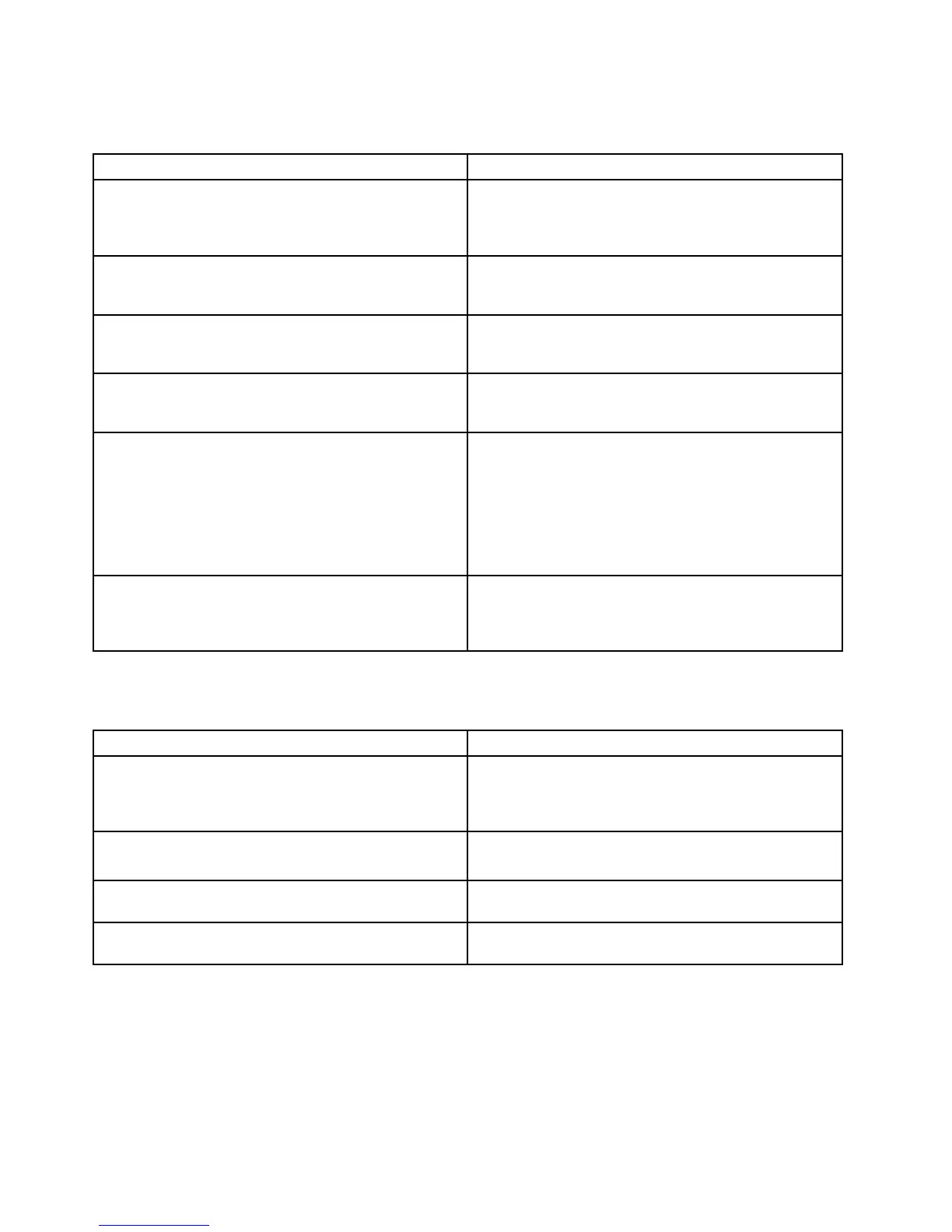
Errormessages
Table3.Errormessages
Symptomorerror(beeps,ifany)
FRUoraction,insequence
BadCRC2.EnterBIOSSetupUtility,andloadSetup
defaults.
(twoshortbeeps)
PressF1toenterBIOSSetupUtility(ThinkPadSetup
forThinkPadX120e).PressF9,andEntertoload
thedefaultsetting.Thensavethecurrentsettingby
pressingF10,andrestartthecomputer.
Fanerror.
(fourshortbeeps,onelongbeep)
1.Fan.
2.Thermalgrease.
3.Systemboard.
DRAMisunplugged.
(oneshortbeep,pause,threeshortbeeps,pause,three
shortbeeps,pause,oneshortbeep.)
Memorycardisnotinstalled.Installmemorycard.
DRAMisnotwellplugged.
(oneshortbeep,pause,threeshortbeeps,pause,three
shortbeeps,pause,oneshortbeep.)
Reinstallthememorycard.
Operatingsystemnotfound.1.Checkthattheoperatingsystemhasnofailure
andisinstalledcorrectly.
2.EnterBIOSSetupUtility(ThinkPadSetupfor
ThinkPadX120e)andseewhethertheharddiskdrive
isproperlyidentied.Ifyoustillseethesameerror
message,checkthebootsequence.
3.Reinstalltheharddiskdrive.
4.Reinstalltheoperatingsystem.
SystemCongurationDataReadError
(twoshortbeeps)
PressF1toenterBIOSSetupUtility(ThinkPadSetup
forThinkPadX120e).PressF9,andEntertoload
thedefaultsetting.Thensavethecurrentsettingby
pressingF10,andrestartthecomputer.
No-beepsymptoms
Table4.No-beepsymptoms
Symptomorerror
FRUoraction,insequence
Nobeep,power-onindicatoron,LCDblank,andno
POST.
1.Makesurethateveryconnectorisconnected
tightlyandcorrectly.
2.DIMM.
3.Systemboard.
Nobeep,power-onindicatoron,andLCDblankduring
POST.
1.ReseatDIMM.
2.Systemboard.
Thepower-onpasswordpromptappears.Apower-onpasswordorasupervisorpasswordisset.
TypethepasswordandpressEnter.
Thehard-diskpasswordpromptappears.Ahard-diskpasswordisset.T ypethepasswordand
pressEnter.
LCD-relatedsymptoms
Important:TheTFTLCDforthenotebookcomputercontainsmanythin-lmtransistors(TFTs).The
presenceofasmallnumberofdotsthataremissing,discolored,oralwayslightedischaracteristicofTFT
LCDtechnology,butexcessivepixelproblemscancauseviewingconcerns.
40HardwareMaintenanceManual



 To Next Page