1140LCDunit
Foraccess,removetheseFRUsinorder:
•“1010Batterypack”onpage54
•“1020Bottomdoor”onpage55
•“1030Harddiskdrive(HDD)”onpage58
•“1080Keyboard”onpage64
•“1090Palmrestassembly,power-onboardassembly(withcable),andmicrophone”onpage67
•“1100CRTboardassembly(withcable)”onpage72
•“1110Speakerassembly”onpage73
•“1120I/Oboard(forThinkPadX120e)”onpage74
•“1130Systemboard,fanassembly,andbackupbattery”onpage75
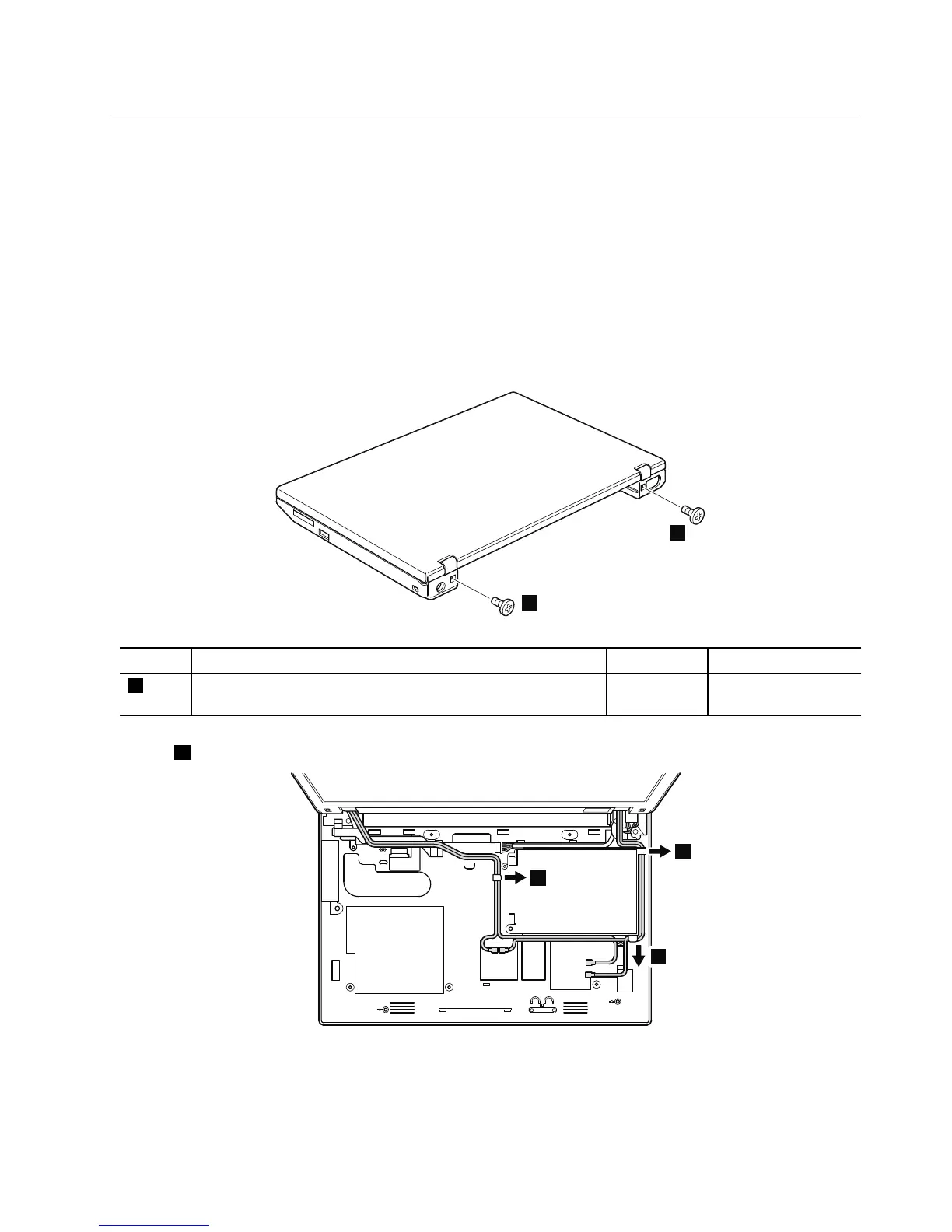
Table24.RemovalstepsofLCDunit
StepScrew(quantity)Color
Torque
1
ForThinkPadX100e,M2×3mm,wafer-head,nylon-coated(2)
ForThinkPadX120e,M2×4mm,wafer-head,nylon-coated(2)
Silver
0.181Nm
(1.85kgfcm)
Instep2,releasealloftheantennacablesfromthecableguides.
Wheninstalling:
•Makesurethatyouroutethecablesrmlyasshowninthisgure.
•Whenyouroutethecables,makesurethattheyarenotsubjectedtoanytension.Tensioncouldcausethecables
tobedamagedbythecableguides,orawiretobebroken.
Chapter8.RemovingandreplacingaFRU81



 To Next Page