Using the vehicle diagnosis and management feature (DriveX)
35
4.3 Diagnosing the vehicle
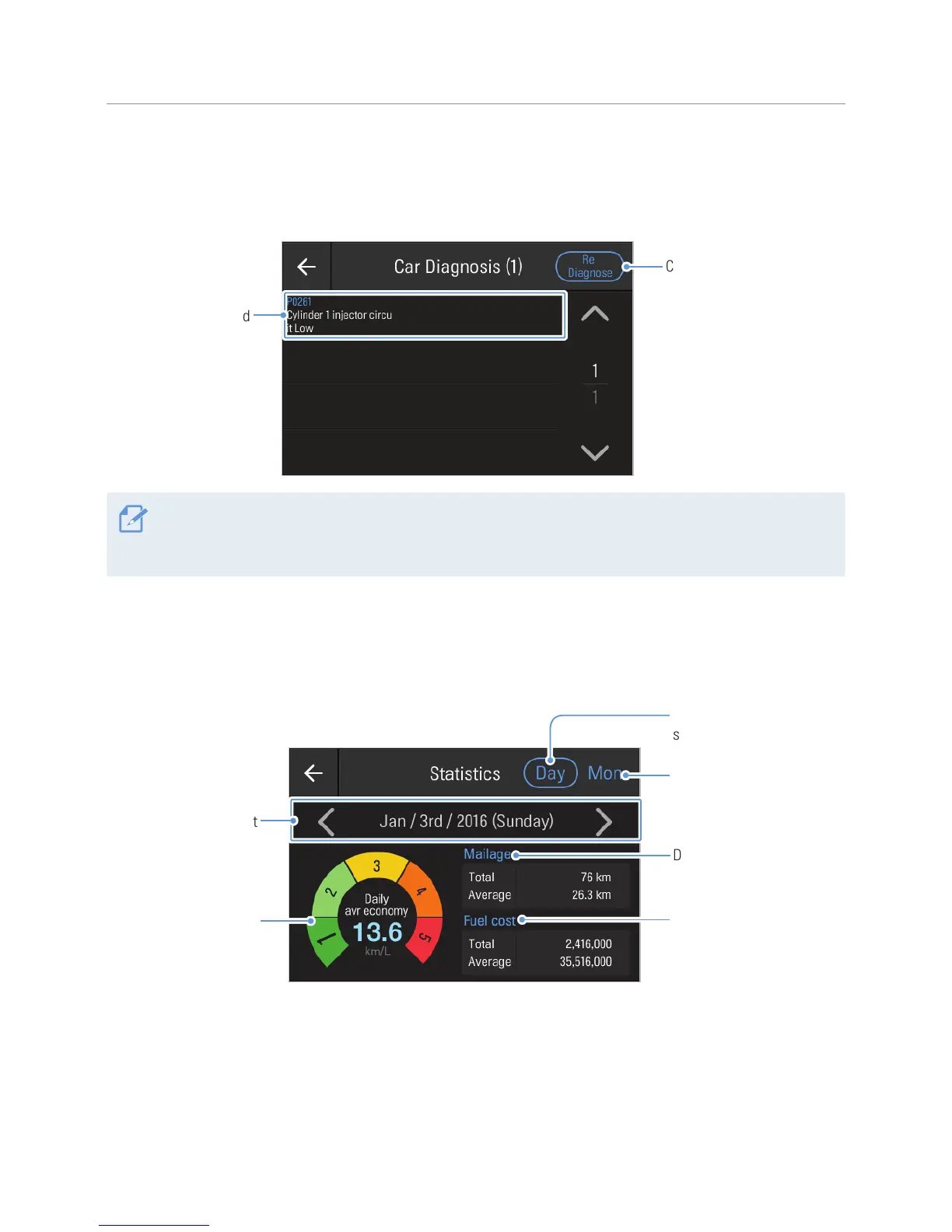
To view the current vehicle condition, tap Diagnosis on the DriveX screen. You can check the vehicle status
details as the following.
Check the vehicle's
status again and update
the information.
Displays detailed
vehicle information.
The vehicle diagnosis results provided by DriveX can be different from the actual vehicle condition. Use the
vehicle diagnosis results as a reference only. If a breakdown is reported by the diagnosis, visit a car repair
shop and check the vehicle.
4.4 Viewing the driving statistics
To view your vehicle’s driving statistics, tap Statistics on the DriveX screen. You can view the average fuel
cost, the mileage, and daily or monthly statistics of fuel cost as follows.
Displays monthly trip
statistics.
Displays the total and
average tip distances.
Displays the total and
average fueling costs.
Displays daily trip
statistics.
Tap the left/right
buttons to view the
previous/next statistics.
Displays daily/
monthly average fuel
consumption rates and
fuel economy ratings.



 To Next Page