Using recording features
26
3.7 Using the Ultra Night Vision
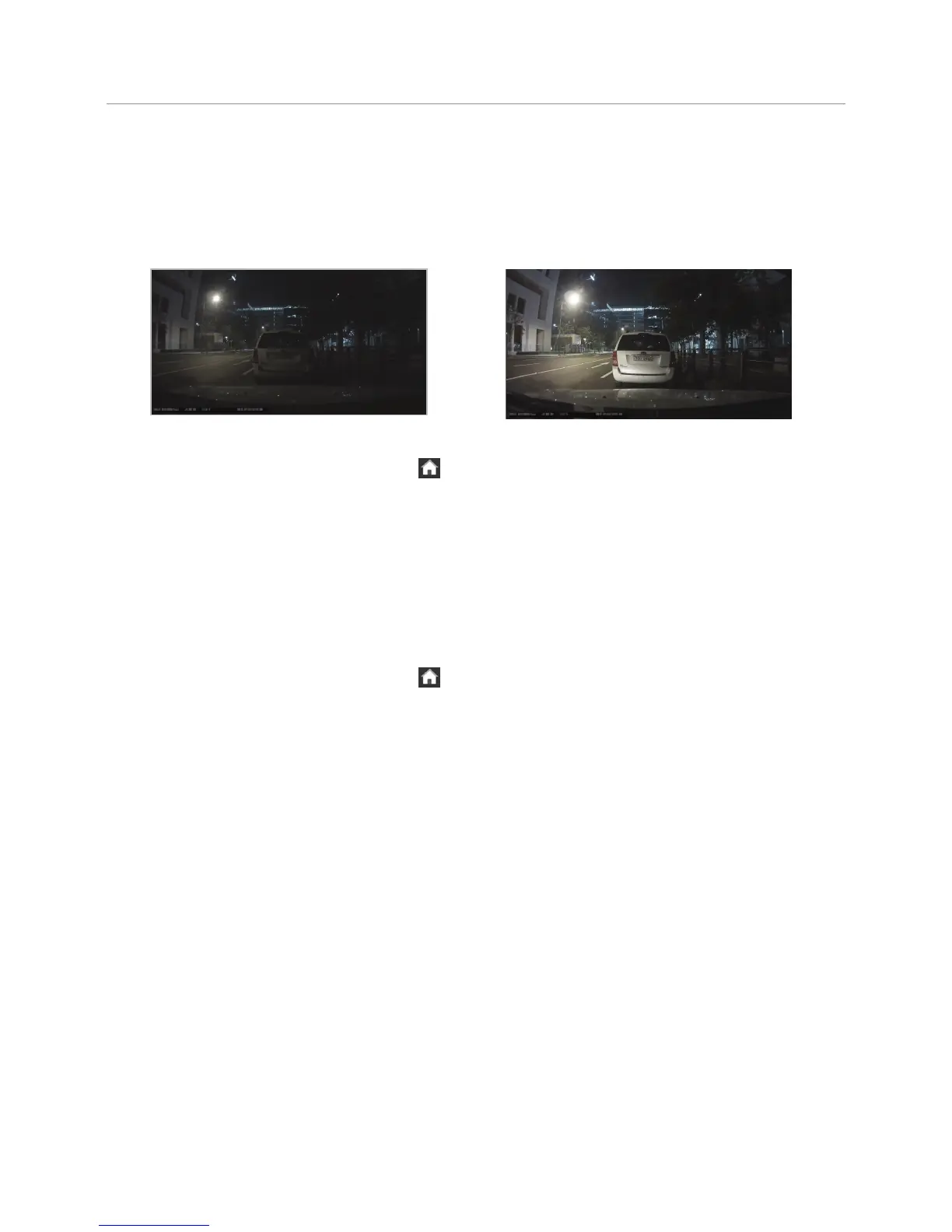
With the Ultra Night Vision feature, you can record videos that are up to 10 times brighter than videos
recorded without this feature. This feature is enabled by image signal processing (ISP) and real-time image
signal processing to improve the definition of videos recorded while driving or parking at night.
<When Ultra Night Vision is deactivated> <When Ultra Night Vision is activated>
To activate this feature, tap the Home button ( ) on the Live view screen
>
Settings
>
Record settings
> Setting button next to Ultra Night Vision, and then select the checkbox for Continuous Mode or Parking
Mode (or both) to select the recording mode. The Ultra Night Vision feature is activated in real time when
you record videos using the selected mode.
3.8 Intelligent detection (detecting minimal impact)
With the intelligent detection feature, the product detects minimal impacts down to minor shocks caused by
closing the door of a nearby vehicle and record videos.
To activate this feature, tap the Home button (
) on the Live view screen
>
Settings
>
Record settings and
tap the button next to Intelligent Detection under Parking Mode to ON.



 To Next Page