Using the PC viewer
63
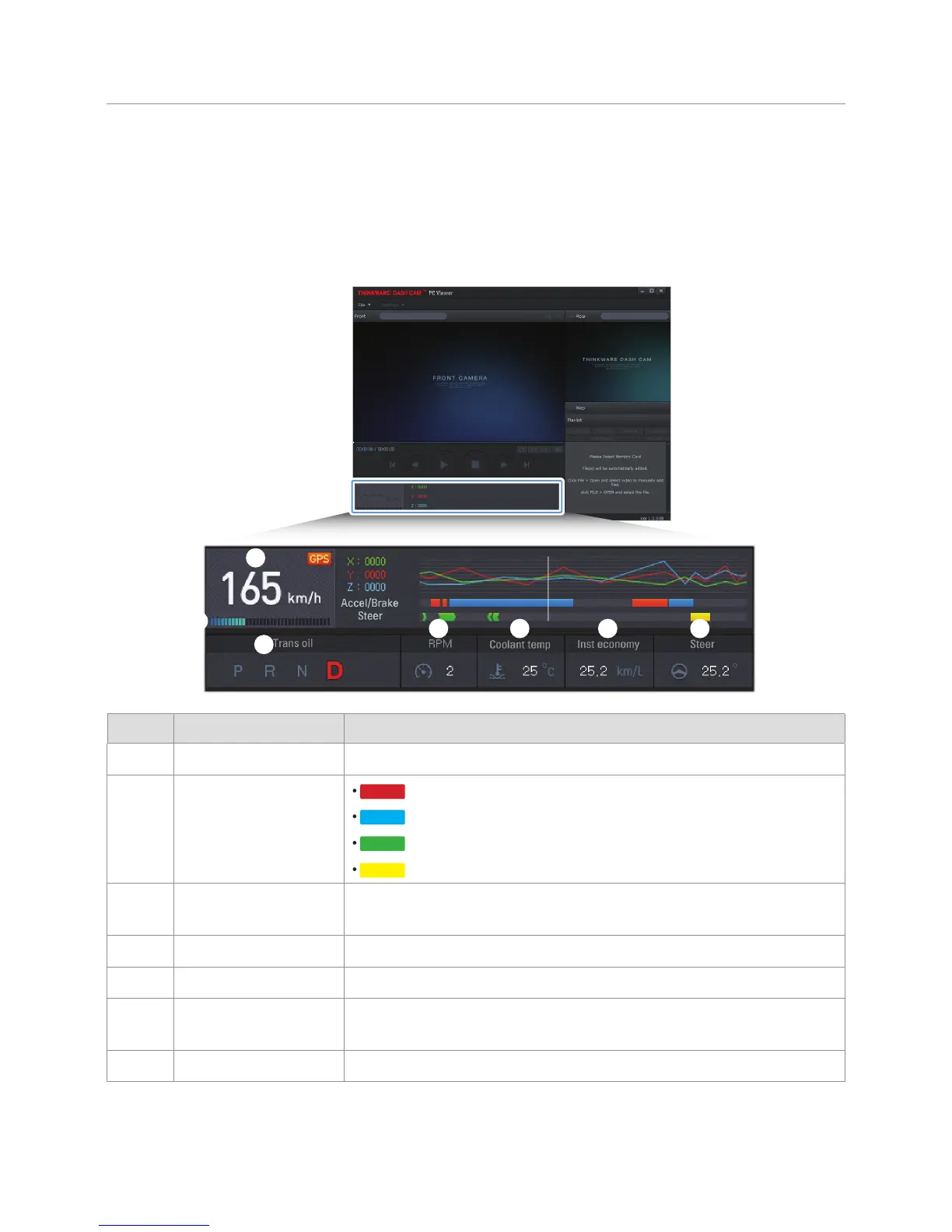
9.6 Driving information overview
Driving information other than the driving speed requires the OBD2 function, and is not available in some
countries. If you have installed the OBD2 cable, you can view the vehicle's driving information at the time
of the recording while playing the video files. The following explains the layout of the driving information
section.
➊
➋
➌
➍ ➎ ➏ ➐
Number Item Description
➊
Driving speed Indicates the vehicle’s driving speed at the time of recording.
➋
Accelerator/Brake/Turn
signal
•
: Indicates the brake pedal operation.
•
: Indicates the accelerator pedal operation.
•
: Indicates the left and right turn signal operation.
•
: Indicates the emergency signal light operation.
➌
Transmission
information
Indicates the transmission information. (P: Parking D: Driving R: Reverse N:
Neutral)
➍
RPM Indicates the engine RPM.
➎
Coolant temperature Indicates the coolant temperature.
➏
Current fuel
consumption rate
Indicates the real-time fuel consumption rate.
➐
Steering angle Indicates the steering angle of the parked vehicle.



 To Next Page