Using the PC viewer
60
9.3 PC viewer screen layout
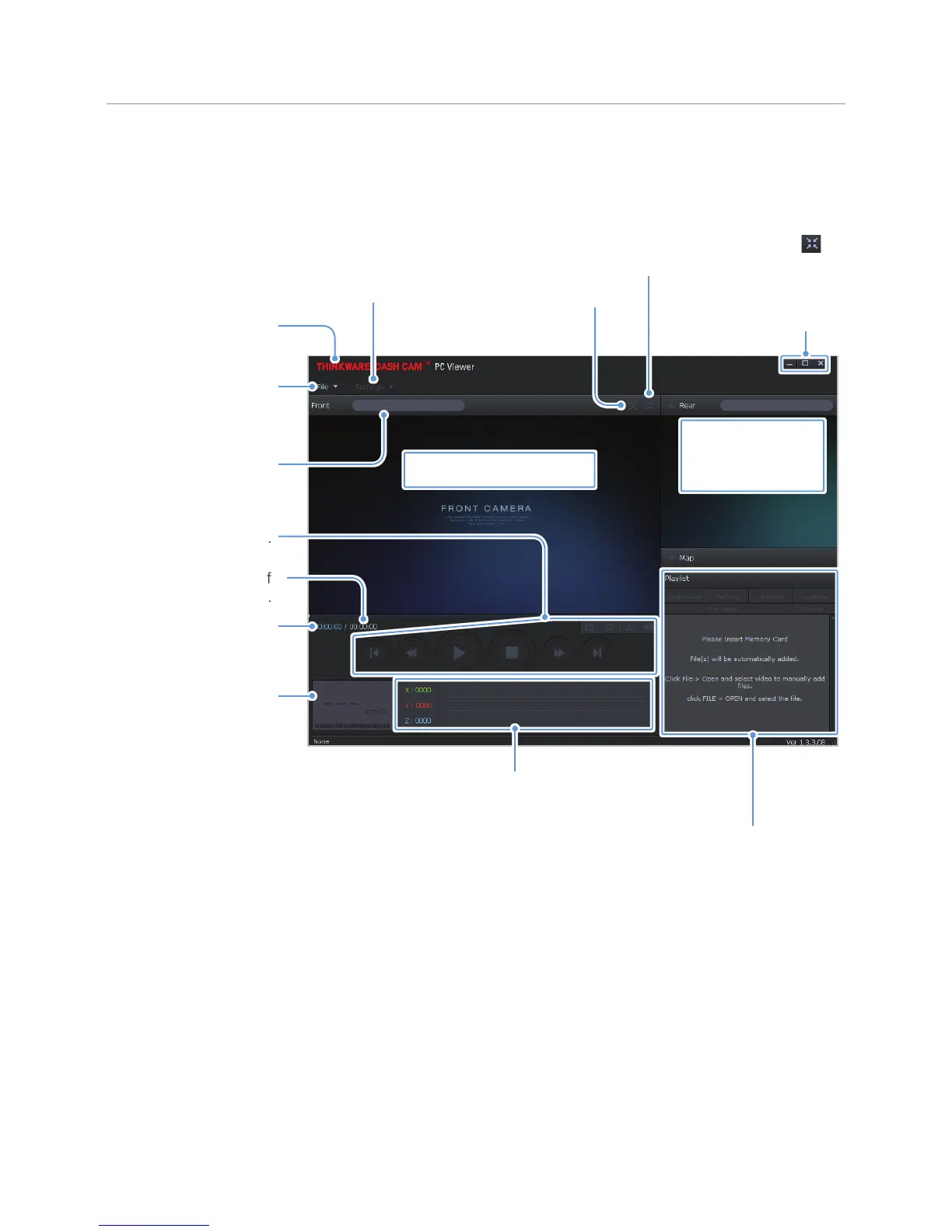
The following provides brief information about the PC viewer's screen layout.
Visit the THINKWARE
website.
View or configure the dash
cam settings, and set the
language for the PC viewer.
Open a file, or save a
video with a different
name.
Displays the current and
total running time of the
current video.
Indicates the vehicle's
driving speed at the time
of recording.
Displays the progress of
video playback.
Play or control a video.
Adjust the volume of the
current video.
Display the current video in full
screen. Tap the Back button (
)
to return to the previous screen.
Switch between the front and
rear videos.
Displays the play list.
Indicates the G sensor value
at the time of recording.
Minimize, expand, or close
the software.
Displays the current video.
Displays the GPS
information at the
time of recording.



 To Next Page