Using recording features
21
3.5 Using parking mode
When the product is connected to the vehicle via the hardwiring cable, the operating mode is switched to
parking mode after the engine or electrical accessories are turned off and the voice guide will indicate that
the parking mode has started.
• Parking mode operates only when the hardwiring cable is connected. The hardwiring cable must be
professionally installed to the vehicle by a trained mechanic.
• To use all recording modes, you must insert a memory card into the product.
• Depending on the battery charging status of the vehicle, the duration of parking mode may differ. If you
want to use parking mode for an extended period, check the battery level to prevent battery depletion.
If you do not want to use parking mode or you want to change the mode settings, from the mobile viewer,
tap Dash Cam Settings
>
Record Settings.
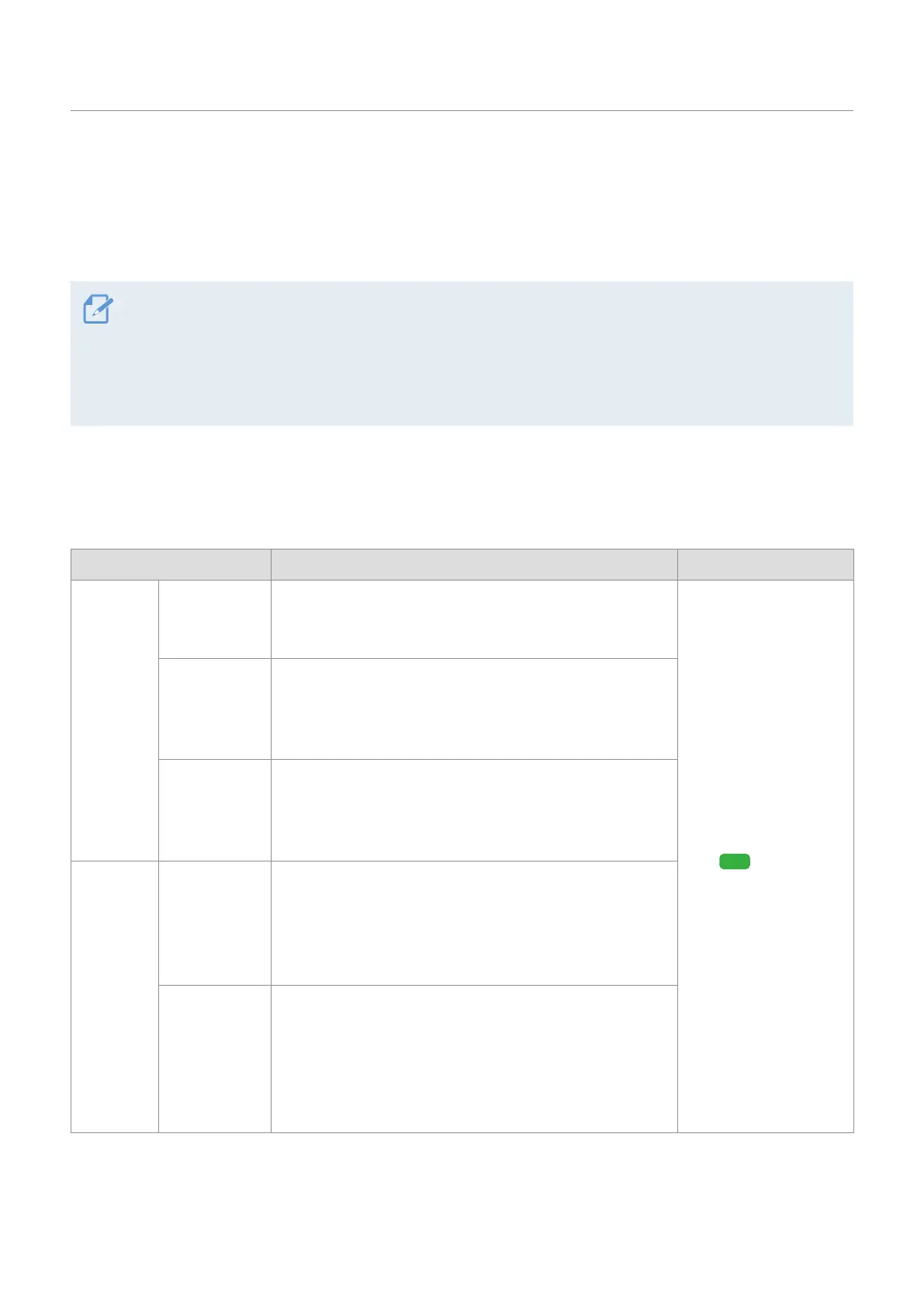
Refer to the following table to set the Parking Mode options.
Option Operation description LTE LED
Motion
Detection
No motion
or impact
detected
Monitors movement in the area or impacts to the vehicle.
Video will be recorded only when motion or an impact is
detected.
(light on)
Motion
detected
When a moving objects is detected while parking, a
video is recorded for 20 seconds (from 10 seconds before
detection to 10 seconds after detection) and stored in the
"motion_timelapse_rec" folder.
Impact
detected
When an impact is detected while parking, a video is
recorded for 20 seconds (from the moment 10 seconds
before detection to 10 seconds after detection) and stored
in the "parking_rec" folder.
Time
Lapse
No impact
detected
A videos is recorded at a rate of 2 fps for 10 minutes,
compressed into a 2-minute long file, and stored in
the "motion_timelapse_rec" folder. Since the video file
recorded with this option is small, you can record a long
video.
Impact
detected
When an impact is detected while parking, a video is
recorded for 100 seconds at a rate of 2 fps (from the
moment 50 seconds before detection to 50 seconds after
detection) and stored in the "parking_rec" folder after
being compressed into a 20-second long file. (The buzzer
will sound.)



 To Next Page