Chapter 5
Expert Configuration
E-DOC-CTC-20050429-0104 v1.0
129
5.3.4 IP Routing
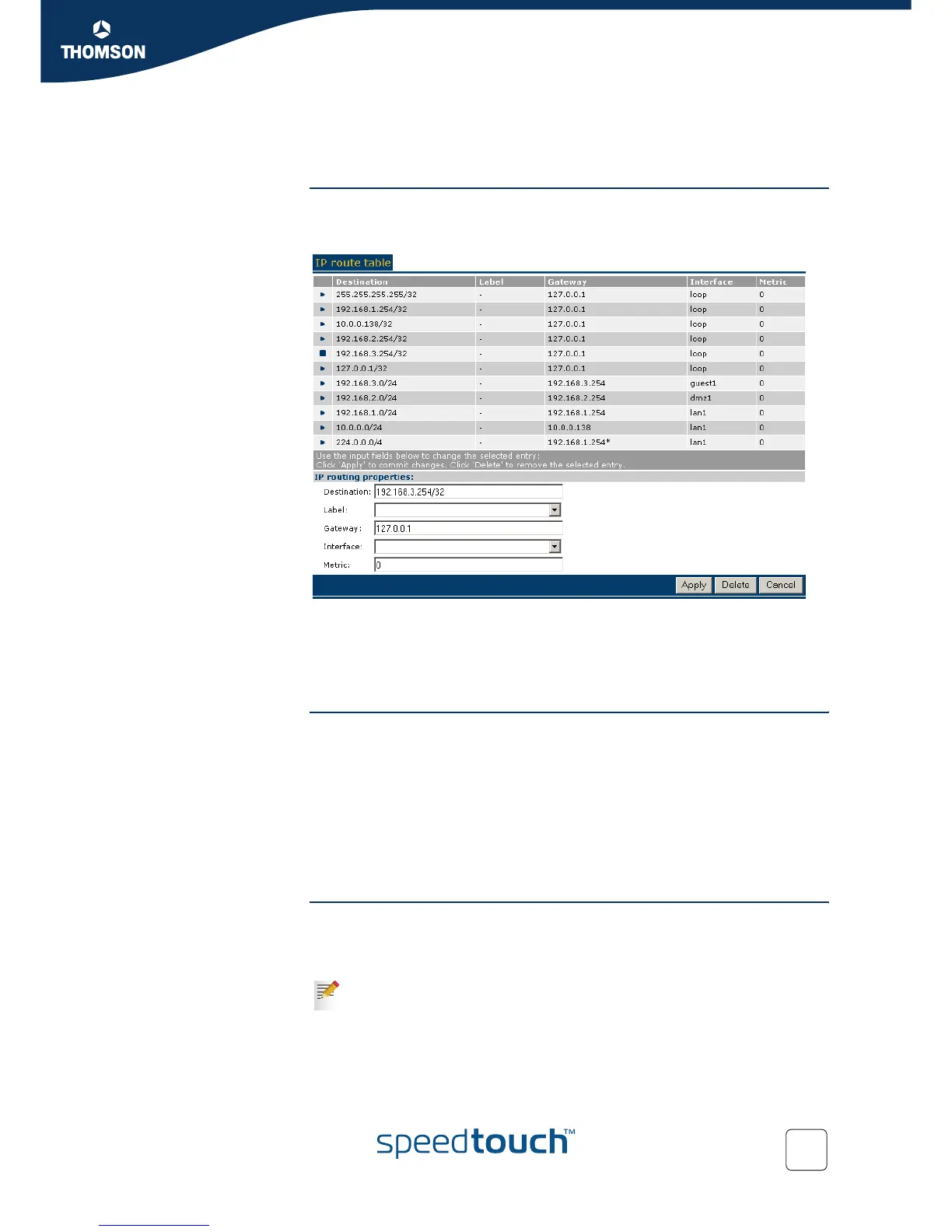
Overview The IP Routing table presents the current content of the SpeedTouch™ Routing
Information Base. It contains all routes to all possible destinations and is consulted by
the SpeedTouch™ any time prior to sending or forwarding any packets.
Similar to the IP address table, a number of IP Routes are pre-configured. Other
routes are either added via adding an IP address manually, or via the address
negotiation of a Packet Service connection session, e.g. for Routed PPPoA's or
Routed PPPoE's IPCP, via the DHCP client, e.g. for Routed Ethernet (MER), via pre-
configuration, for example for Routed IPoA, or by the Routing Information Protocol.
Adding an IP route To add an IP route:
1 Click New in the bottom row of the table
2 Specify the Destination IP prefix
3 If needed, select a packet-classification routing Label (in case the route applies
for classified packets)
4 Either specify the IP address of a directly connected Gateway OR select the
Interface to which the route should apply (mutually exclusive).
5 Click Apply.
Deleting an IP route To delete an IP route:
1 Select the IP route you want to delete
2 Click Delete.
An IP prefix is the combination of an IP address and (sub)net mask and e.g.
192.6.11.150/24.



 To Next Page