Getting started
11
Connecting
All of the necessary cables must be plugged in before you can start using your tel-
ephone.
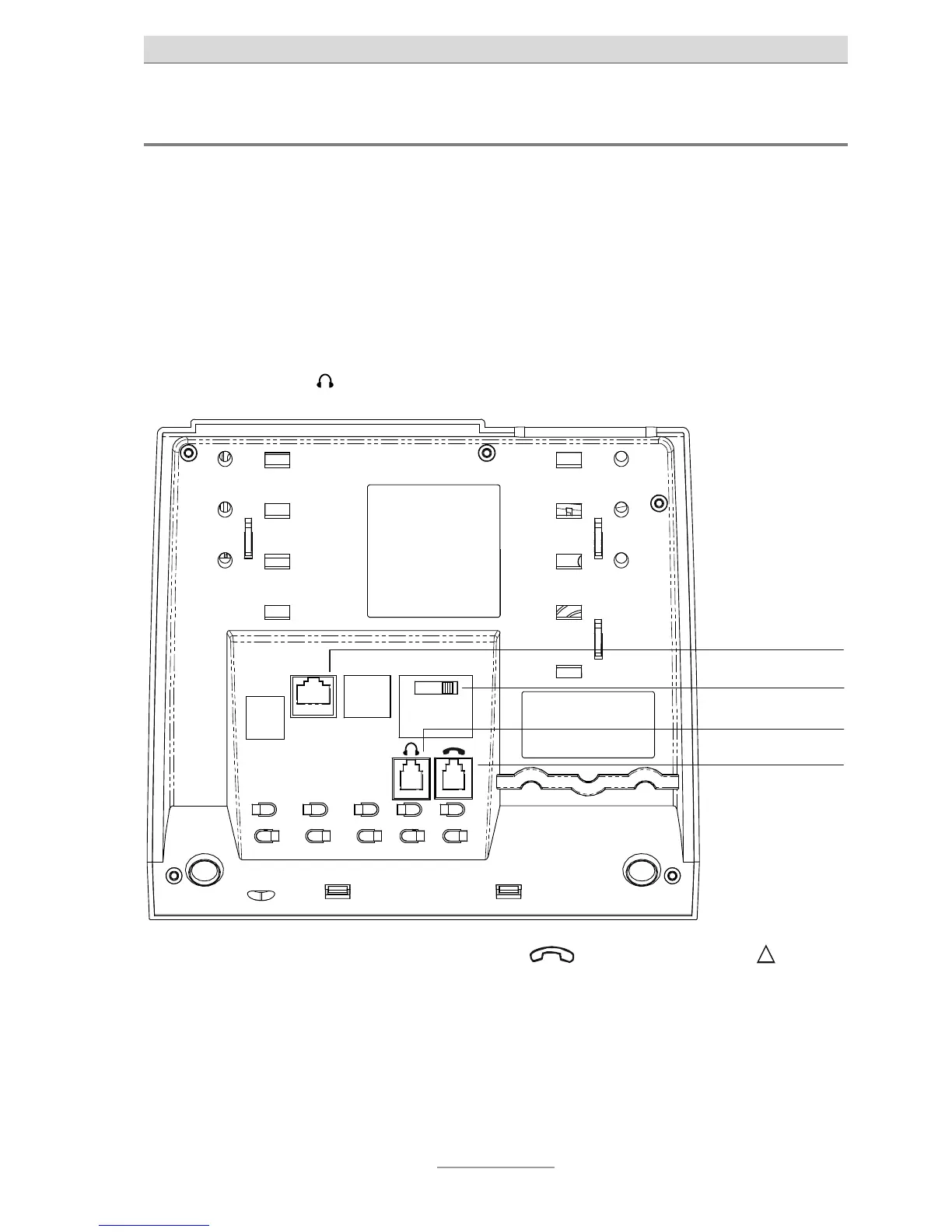
1 Plug the long end of the spiral cable into the jack with the receiver symbol and
the short end into the telephone receiver.
2 Plug the telephone connector cable with the small connector into the "LINE"
jack and the TAE connector into the telephone socket (slot F).
3 If you wish to use a headset (accessory), simply plug the connector into the
correct socket
.
LINE
PR1
PR2
HV
SR
MWI switch
Telephone connection
Headset
Receiver
In Austria, slot F corresponds to symbol and slot N to symbol . Use
the TST adaptor supplied instead of the TAE cable.
In Switzerland, a T+T83 A12 socket should be used (into which the T+T con-
nector cable supplied is inserted). Use an A6 to A12 adapter if required.



 To Next Page