TMQ AP4 Autopilot (AP4S10) 15 of 62 Version 4.96 9/10/2017
Jog Switch Steering
The boat may be steered using a jog switch input with push button select
switch. Special remote response mode r-7 or r-8 must be set depending on
remote control requirements.
A jog lever is a device comprising a lever under spring tension for centre
reference and two switches for bi directional control.
With AP4 set for JOG input, a number of operations have been included in the
software to extend the use of the AP4 control for some navigational situations
(refer to selection of special remote mode 908, r-7 or r-8 in the subsection
“Special Modes Display Selection” of “AP4 Special Modes”)
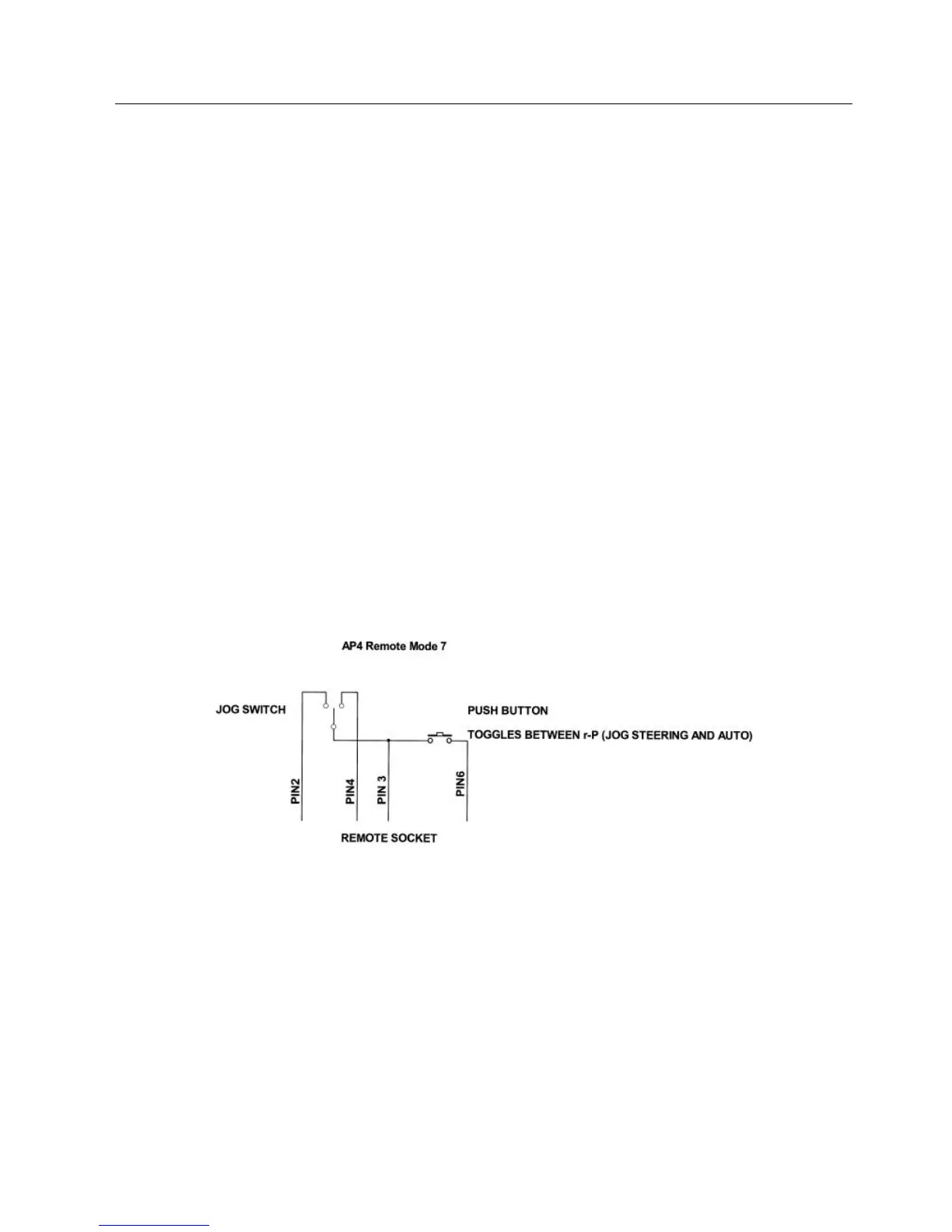
When special remote mode r-7 is set and the system is fitted with a jog lever
and separate push button select switch, the boat can be steered using the jog
lever either in AUTO JOG mode or POWER STEER JOG mode.
Jog Switch Wiring
Jog Switch Steering with AP4 in SET
Switch AP4 MODE switch to SET
Press jog lever select button
Boat is now in AUTO JOG under autopilot control
Change course by using jog lever – each jog switch movement gives 1º
course change and a “beep” will sound
For more rapid course change hold jog switch on – course will change
in 2º increments
For POWER JOG press the selection switch



 To Next Page