TMQ AP4 Autopilot (AP4S10) 38 of 62 Version 4.96 9/10/2017
Connect SIREN + lead (red) to 10V Power on T4
Connect SIREN – lead (black) Alarm Negative Output T4
Route siren wires through cut out at rear of AP4
Replace top cover of AP4
To enable the commercial watch alarm, refer pages 10 and 18.
Note: Once the commercial alarm is enabled, it cannot be reverted.
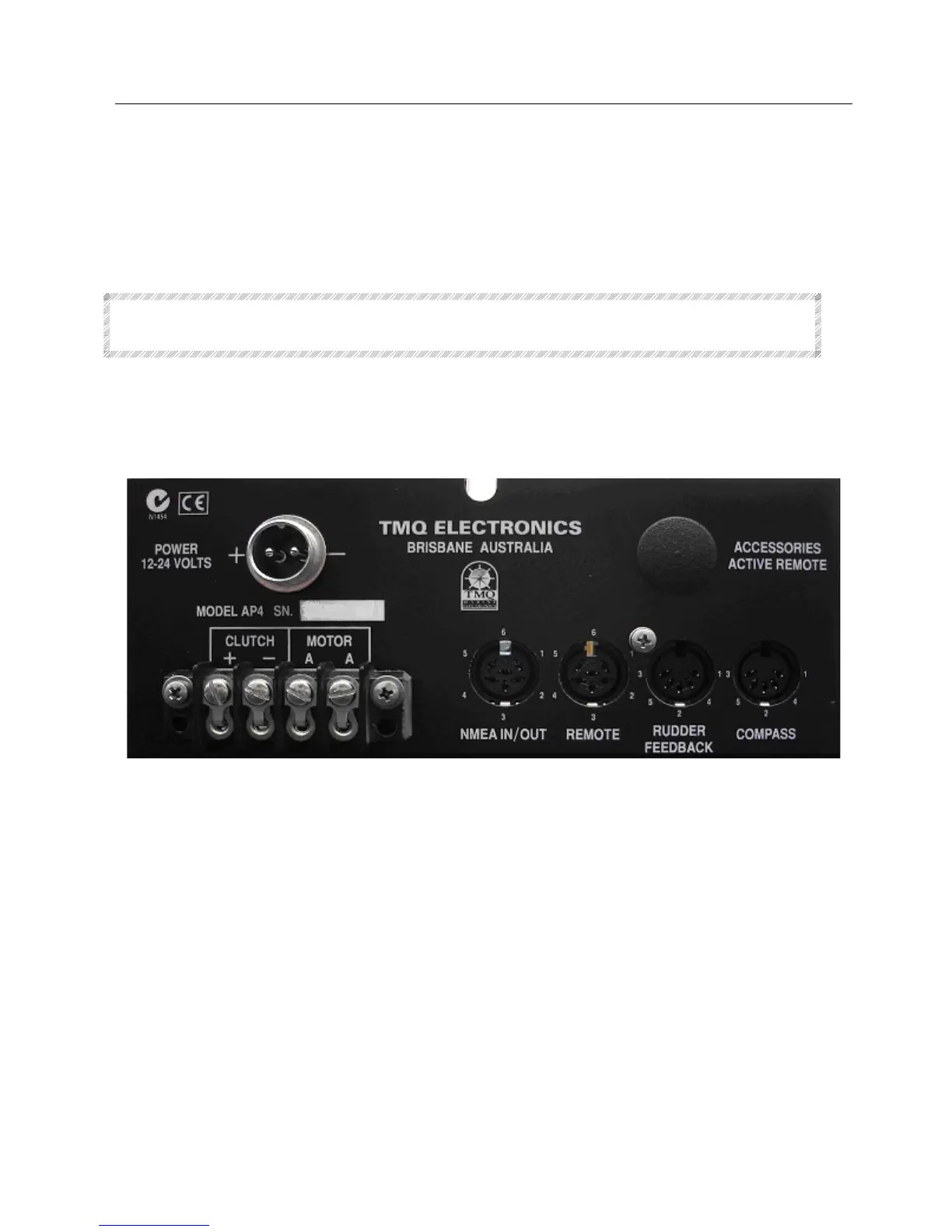
Wiring Connections – AP4 Rear Panel
Motor Terminals
Clutch + Power out to Clutch Normally High
Clutch – Switched to negative to operate Clutch
Motor A Normally High, Switched to negative to drive
Motor A Normally High, Switched to negative to drive
NMEA In / Out
1 GPS In
2 GPS Return
3 Data + Out to TMQ Display or PC
4 Negative and Data - common
5 Data + in from TMQ display or ELECOM Compass
6 + 10 V out



 To Next Page