25
Comp/Gate
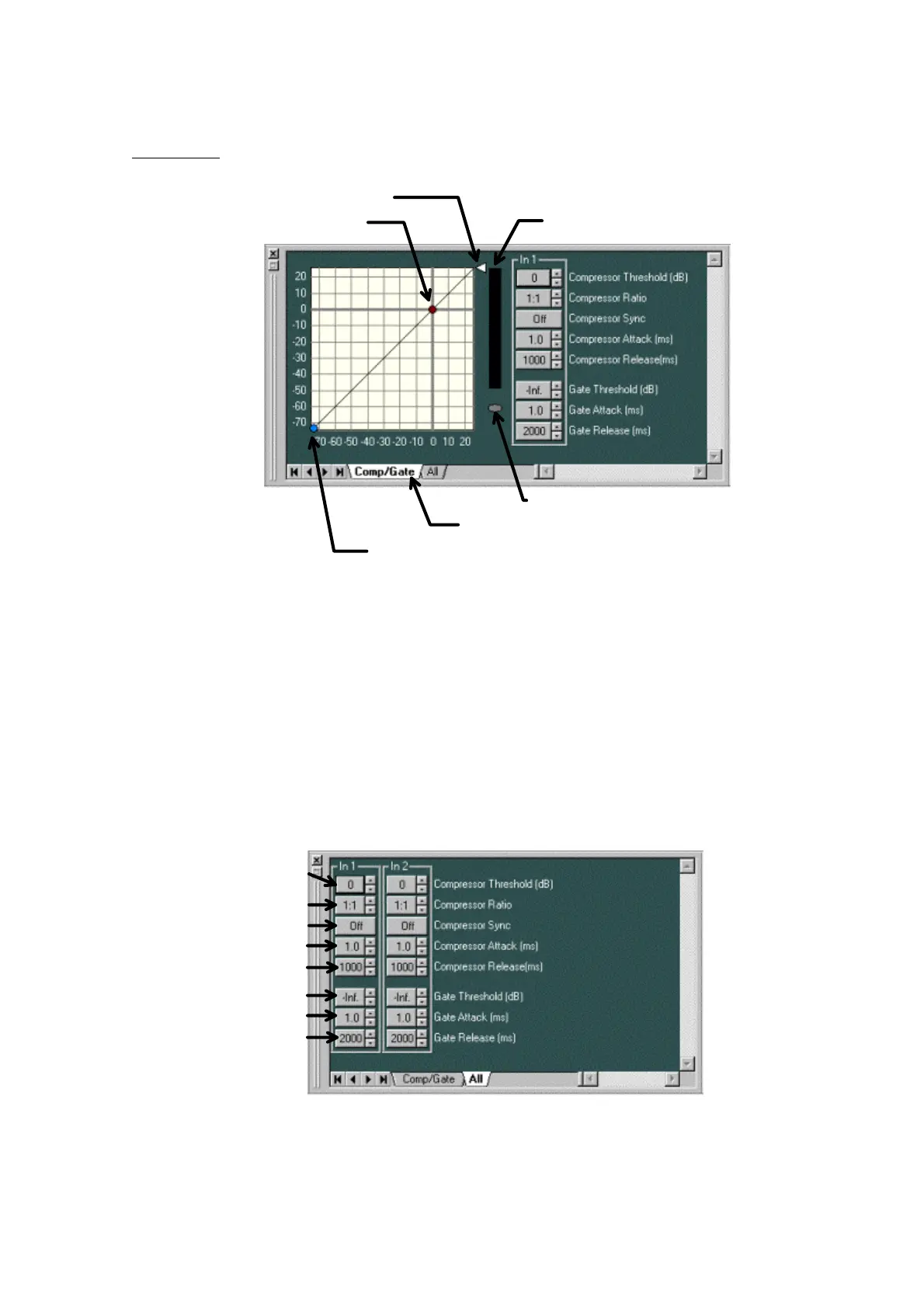
- By dragging the Compressor Threshold handle diagonally, you can change the compressor
threshold level.
- By dragging the Compressor Ratio handle up or down, you can change the compressor ratio.
- By dragging the Gate Threshold handle diagonally, you can change the noise-gate threshold
level.
- The effectiveness of the compressor is displayed with a yellow graph bar on the Compressor
Reduction meter.
While the Noise Gate is working, the Gate-status indicator lights blue.
- If you click the All tab, the setting window for all the channels of the unit is displayed.
- The compressor threshold level for each channel is indicated as a numerical value on the
Compressor Threshold button. Clicking the button enables you to directly input a numerical value.
Using the spin button on the right, you can move the numerical values up or down in increments
of 1 dB.
Compressor Ratio handle
Compressor Threshold handle(red)
Gate Threshold handle(blue)
Compressor Reduction meter
Gate-status indicator
Display-switching tab
Compressor Threshold button
Compressor Sync button
Compressor Ratio button
Compressor Attack button
Compressor Release button
Gate Threshold button
Gate Attack button
Gate Release button



 To Next Page