1-7
Chapter 1
NOMENCLATURE
2.2. RM-320F
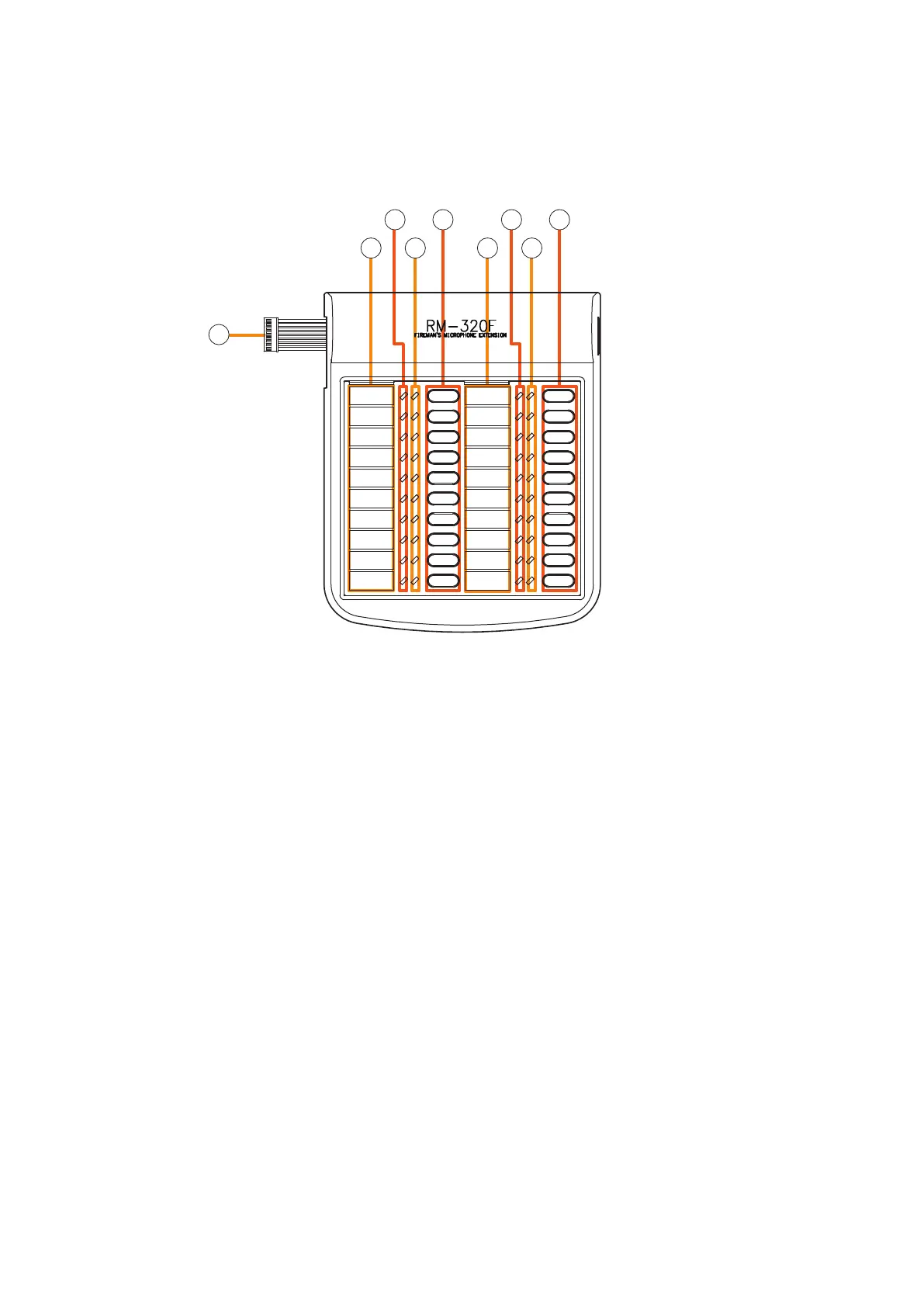
Each connected RM-320F Extension unit adds 20 Function keys to the base RM-200SF.
[Front]
5
1
2
3
4
5
2
3
4
1. Connection cable
Used for connection to the RM-200SF or other
RM-320F.
2.Indicationlabelinsertslot
The label can be printed using the VX-3000 Setting
Software. (See the separate Setting Software
Instructions, "PRINTING LABELS FOR REMOTE
MICROPHONES.")
3.Statusindicators(Red/Yellow/Green)
Light, ash, or go off depending on the current
operation state of function keys.
4.Selectionindicators(Green)
Light or go off depending on the current operation
state of function keys.
5.Functionkeys(1–20)
Keys are numbered from 1 to 10 from upper left
to bottom and from 11 to 20 from upper right to
bottom.
Pressing a specic function key executes the
function that has been assigned to that key by the
VX-3000 Setting Software. Assignment of functions
tospecickeysisdoneusingtheVX-3000Setting
Software.
(See the separate Setting Software Instructions,
"RM Event Settings.")



 To Next Page