2-27
Chapter 2
INDICATOR STATUS OF REMOTE MICROPHONES
2.11.IndicatorStateattheTimeofEmergencyBroadcastPatternStop
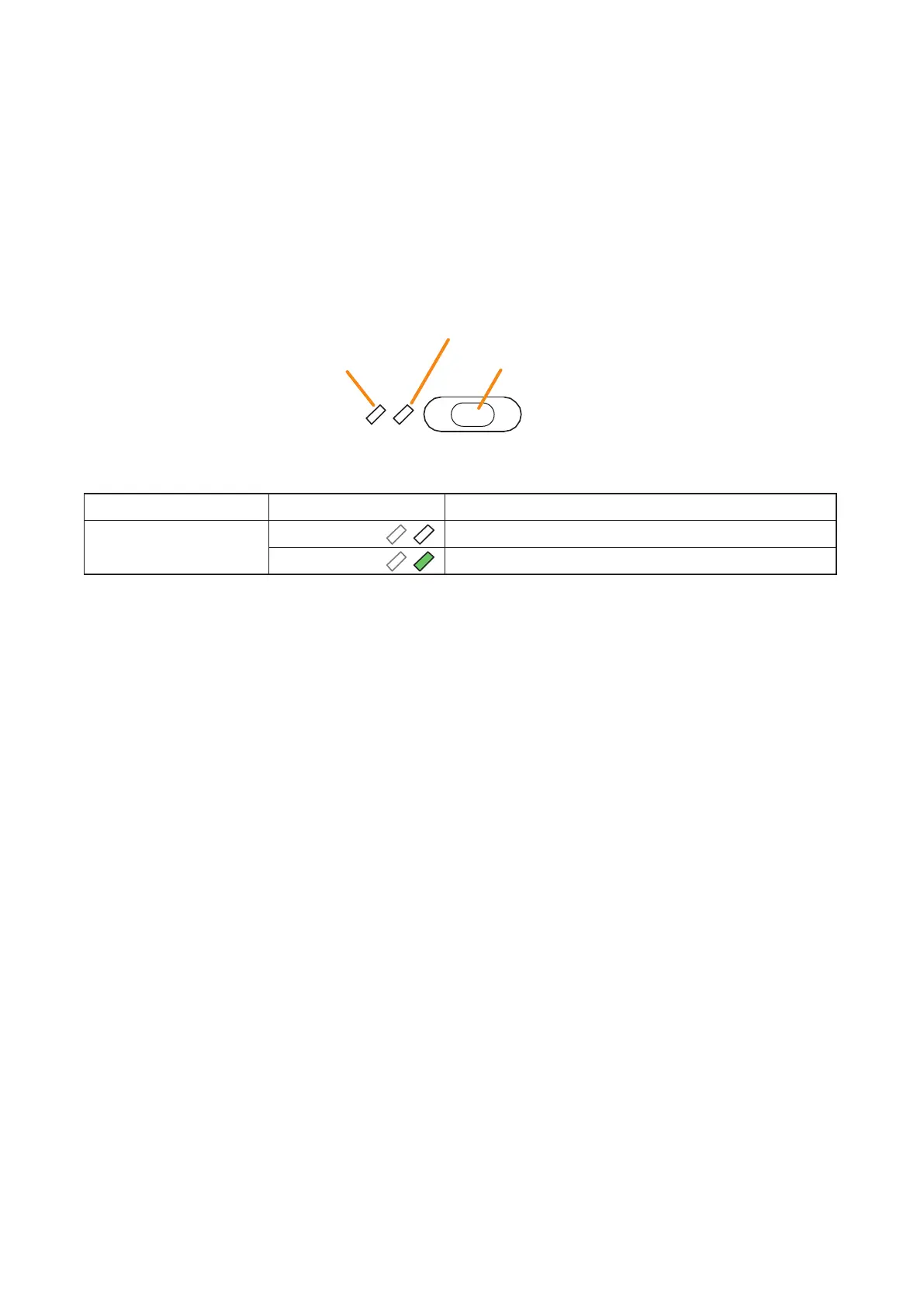
When the system is set to "Emergency" and the type of the RM-300X to "Emergency" or "Emergency/General,"
the emergency broadcast pattern stop function can be assigned to the Function key.
Pressing the function-assigned key causes the emergency broadcast pattern to stop. The indicator to the left
of the key lights only when the key is pressed.
Notes
• Fortheemergencyfunctionsettings,seetheseparateSettingSoftwareInstructions,"BASICSETTINGS."
• ForthetypeoftheRM-300Xsettings,seetheseparateSettingSoftwareInstructions,"UnitConguration
Settings."
• Forinstructionsonassigningfunctionstothefunctionkeys,seetheseparateSettingSoftwareInstructions,
"EVENT SETTINGS."
(Always unlit, not used)
Key ON/OFF Indicator
Function key (Emergency broadcast pattern stop key)
The meanings of the 2 indicators next to the Function key are as follows:
Indicator Status Meaning
Key ON/OFF Indicator Unlit
When the function key is not pressed
Lights green
When the function key is pressed (as long as it is pressed)



 To Next Page