2-16
Chapter 2
INDICATOR STATUS OF REMOTE MICROPHONES
1.18.IndicatorStateattheTimeofIntendedControlOutput(Pulse)
When the intended control output (pulse) function is assigned to the function key, pressing this key turns ON
the preset control output. It is turned OFF when this key is pressed again.
When an intended control output (pulse) function has been assigned to a function key, the 2 indicators to the
left of the key indicate its selection and control statuses.
Note
Operation may become invalid even if you press the function key when the Control status indicator is lighting.
This is such a case when the Control output pattern is being activated by other Event.
Wait until the Control status indicator goes off, then press the function key again.
Function key operation is always active as long as the Control status indicator is unlit.
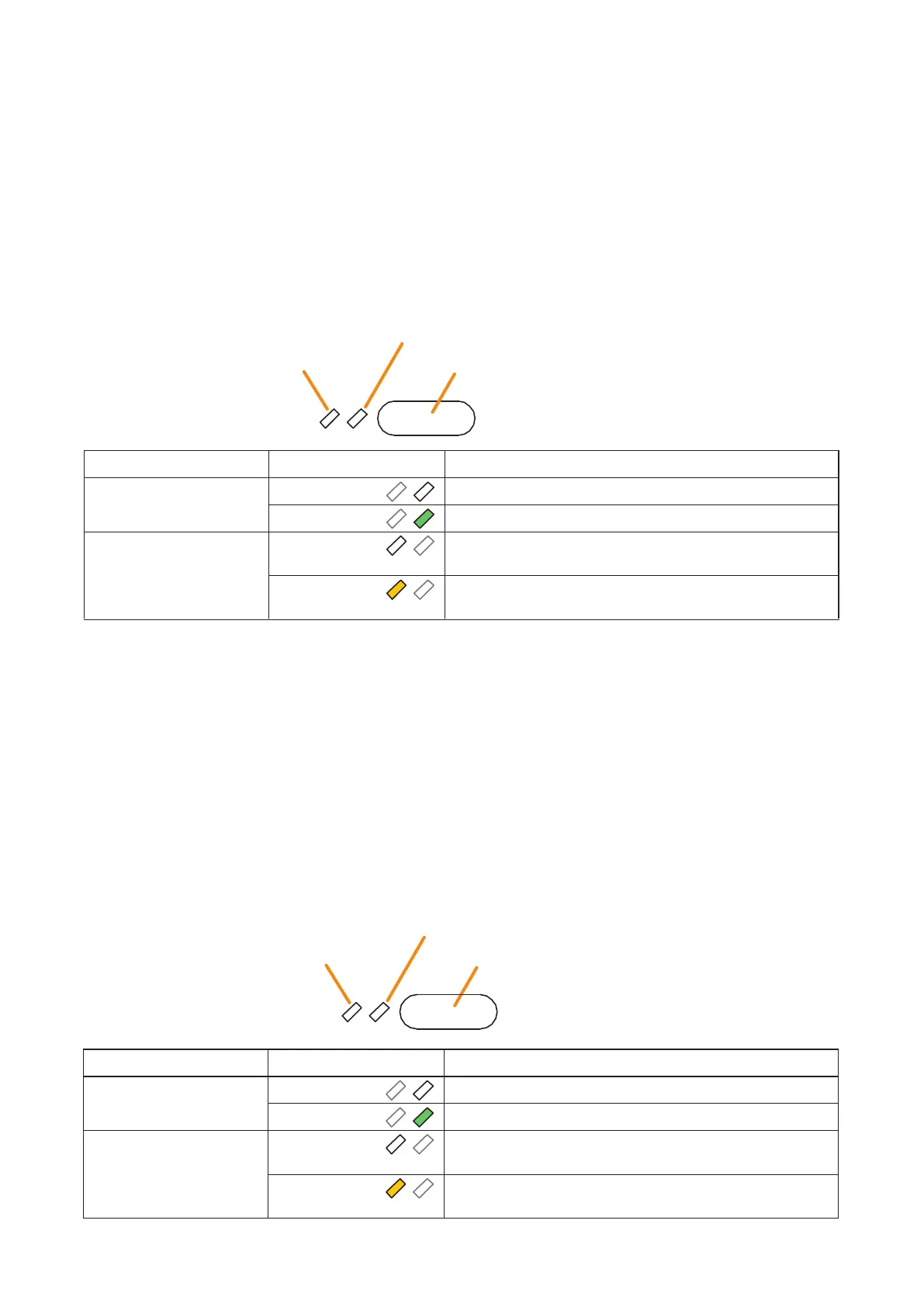
Control status indicator
Selection indicator
Function key (Intended control output [pulse] key)
Indicator Status Meaning
Selection indicator Unlit
When the function key is not pressed
Lights green
When the function key is pressed
Control status indicator Unlit
When the Control output pattern assigned to this function key
is not activated
Lights yellow
When the Control output pattern assigned to this function key
is being activated
Control status indicator
Selection indicator
Function key (Intended control output [level] key)
1.19.IndicatorStateattheTimeofIntendedControlOutput(Level)
When the intended control output (level) function is assigned to the function key, the preset control output is
turned ON while this key is held down. It is turned OFF when this key is released.
When an intended control output (level) function has been assigned to a function key, the 2 indicators to the left
of the key indicate its selection and control statuses.
Note
Operation may become invalid even if you press the function key when the Control status indicator is lighting.
This is such a case when the Control output pattern is being activated by other Event.
Wait until the Control status indicator goes off, then press the function key again.
Function key operation is always active as long as the Control status indicator is unlit.
Indicator Status Meaning
Selection indicator Unlit
When the function key is not pressed
Lights green
When the function key is pressed
(as long as it is pressed)
Control status indicator Unlit When the Control output pattern assigned to this function key
is not activated
Lights yellow
When the Control output pattern assigned to this function key
is being activated



 To Next Page