IDVisor Smart V2 User Guide Page 16 of 28
Rev 6.1 - December 15, 2020
5 Setup Menu
The setup menu is used to inialize the device and set the parameters required to enable all
the funconality.
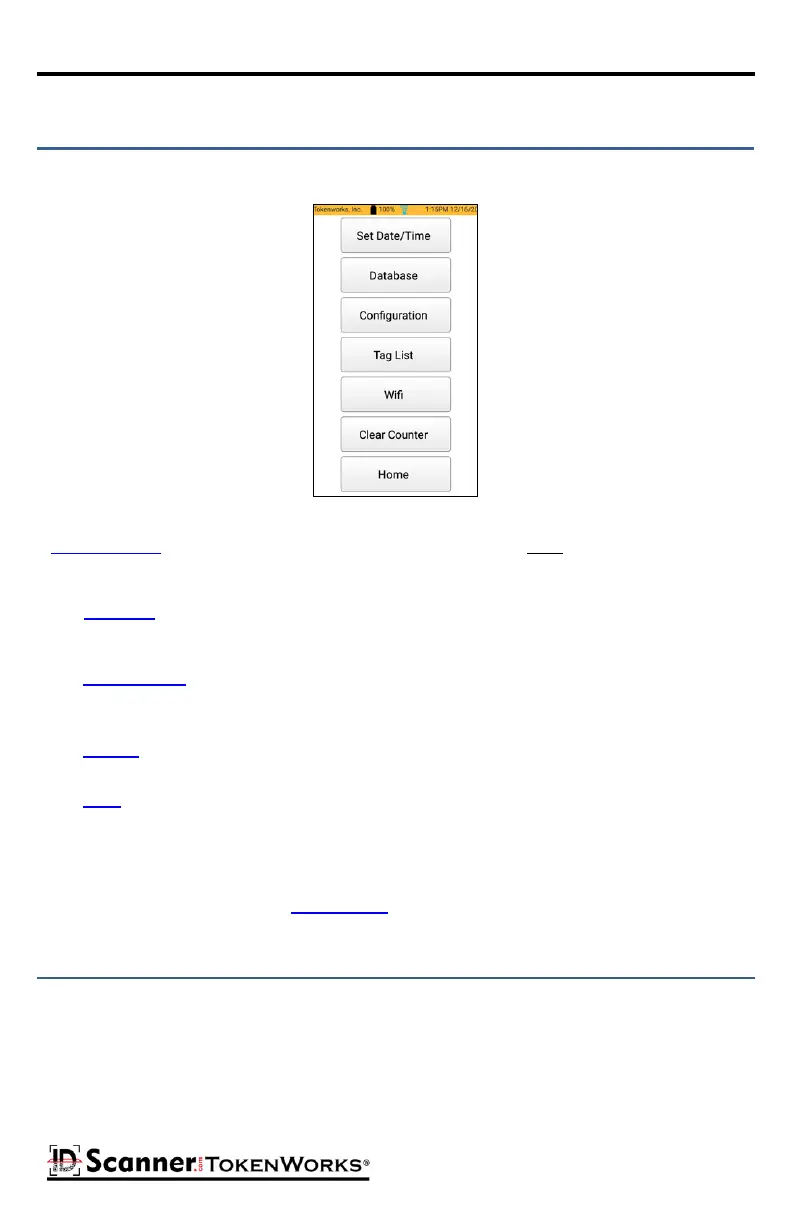
Setup Menu
Set Date/Time is the rst buon, and the system date and me must be set correctly to calcu-
late the correct age from IDs.
The Database buon brings up a menu of acons for managing the database, like exporng
data, clearing scan data, and restoring and creang backups.
The Conguraon buon brings up a screen to enable or disable major features and funcon-
ality (age vericaon, an-passback, Tag feature, etc.) and set age thresholds.
The Tag List buon brings up the Tag editor.
The Wi-Fi buon brings up the Wi-Fi sengs.
The Clear Counter buon clears the scan counter and resets it to 0 (THIS DOES NOT CLEAR THE
DATA).
The Home buon returns to the Home Screen.
Set the Date and Time to ensure Age calculaon will be correct.
If you set the me/date in the past, the calculated age of the person will be incorrect. Always
ensure the correct date/me is displayed in the top right corner of the main ID Scanning
screen.



 To Next Page