IDVisor Smart V2 User Guide Page 3 of 28
Rev 6.1 - December 15, 2020
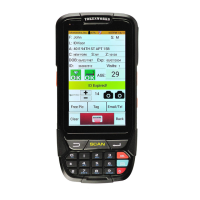
This document describes how to use the TokenWorks IDVisor Smart V2 mobile ID Scanner.
Building upon Tokenworks’ classic military-grade durability and color-coded alerts, the IDVisor
Smart V2 is TokenWorks low cost, fully featured Android-based age vericaon ID Scanner,
adding a high-performance point-and-shoot style barcode scanner, an integrated high-
resoluon camera, and a physical keyboard – along with audible alerts, customer tagging, and
more.
The IDVisor Smart V2 supports all US and Canadian driver licenses, state issued ID cards, plus
government and military issued IDs. It provides quick age vericaon by simply poinng the
scanner at an ID’s 2D barcode. The device quickly calculates age based on the date of birth
read from the ID and clearly indicates to the operator if the person is of age. Mulple age
categories are supported for businesses selling products or services with dierent age limits,
such as 18/21 for entry/alcohol, etc.
Oponal Add-ons/Upgrades include:
VIP/Banned Upgrade
An-PassBack Upgrade
Photos Upgrade
Charger Cradle
Extra Baery
1-Year Extended Warranty
hps://www.idscanner.com/product/idvisor-smart-v2-id-scanner/
1 Introduction
This document is designed based on the form hierarchy of the applicaon. Each chapter
begins with the top-level menu, form or screen and the sub paragraphs are dedicated to
the lower-level menus, forms or screens that are accessible from the higher level.



 To Next Page