IDVisor Smart V2 User Guide Page 22 of 28
Rev 6.1 - December 15, 2020
Tag Check Enable: Enable/Disable checking tags
An Passback Enable: Enable/Disable the An Passback feature
An Passback Time: Set the An Passback me period
Alcohol Age Check: Enable/Disable primary age check
Alcohol Age: Select the primary age threshold
Tobacco Age Check: Enable/Disable secondary age check
Tobacco Age: Select the secondary age threshold
Note the primary and secondary age types (Alcohol, Tobacco, Dispensary, Vape, Cards,
Slots, General) are set in the Advanced sengs as described below.
Backlight Timer: View/Change backlight mer and other display sengs
Do not save any data: Set to ON if you do not want to save any scanned data (may be
required in some jurisdicons)
Volume: Adjust the device volume for alerts
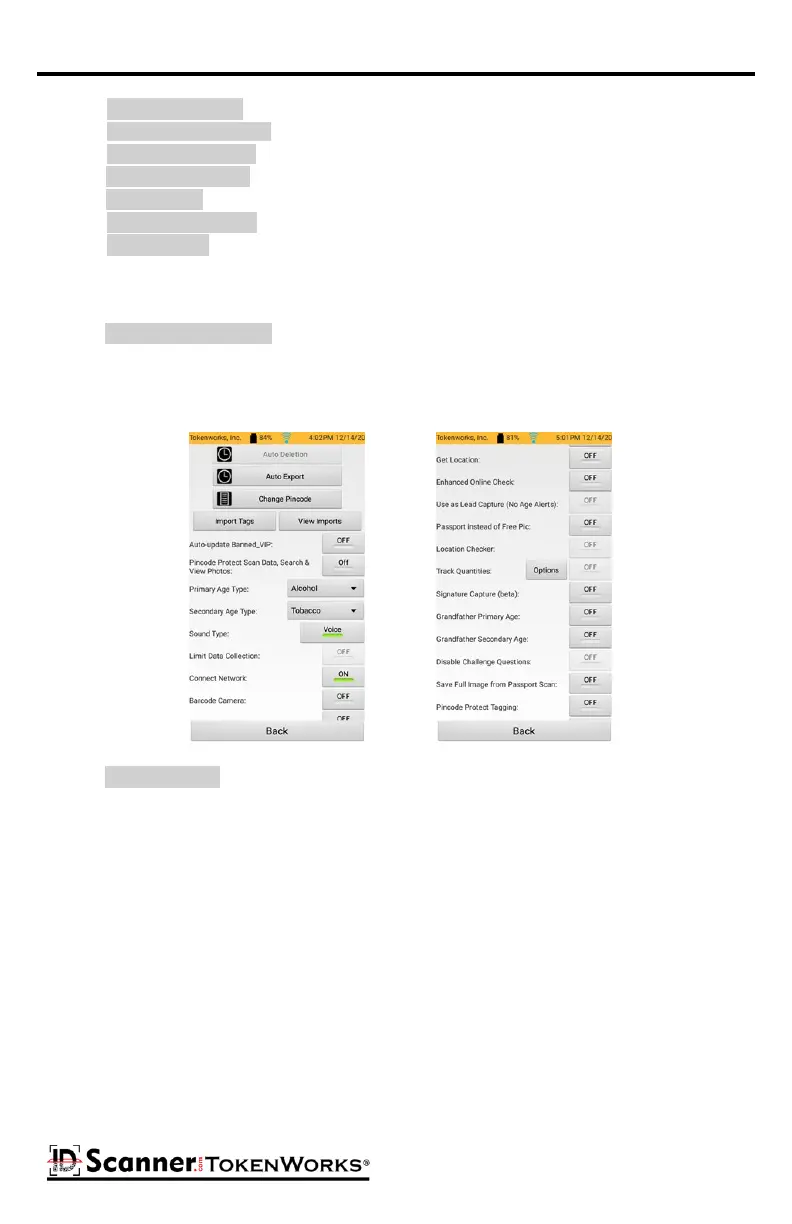
The Advanced buon will display a screen with opons for advanced users.
Conguraon Screen - Advanced
Auto Deleon: Oponal seng to automacally delete data aer a specic me period
Auto Export: Oponal seng to automacally export ID scans and/or customers aer a
specic me period
Change Pincode: For changing the pincode of the device (see below)
Tag Check Enable:
An Passback Enable:
An Passback Time:
Alcohol Age Check:
Alcohol Age:
Tobacco Age Check:
Tobacco Age:
Auto Deleon:
Do not save any data:



 To Next Page