IDVisor Smart V2 User Guide Page 27 of 28
Rev 6.1 - December 15, 2020
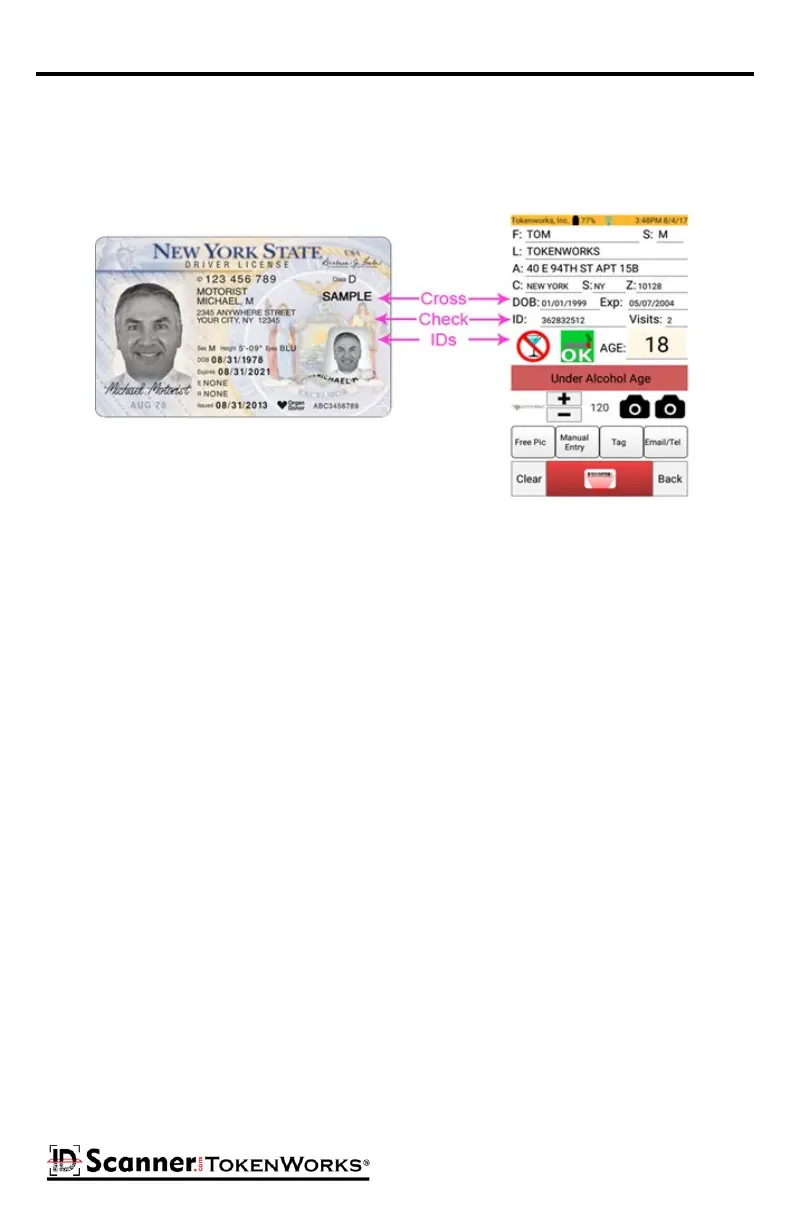
Cross Check Data
Always cross check the data displayed on the scanner versus what is shown on the front of
the ID. Some fake IDs have a 'cloned' data stripe of someone who is ‘of age’.
The "F.E.A.R." method of carding from the PA Liquor Control Board.
1. FEEL FOR:
* Glue line or bumpy surfaces by the picture or birth date.
* Pin holes on the surface.
* Thickness of an ID. If it's been re-laminated, it may be thicker.
2. EXAMINE:
* The photo and physical descripon. They should match the person handing you the ID.
* The expiraon date. You CANNOT accept an expired ID.
* The birth date. Do your math. Are they 21?
* Whether or not the ID is a duplicate. If it is, ask for another form of ID.
* The state logo. If it's parally missing or appears altered, the ID might be fake.
* The hologram. Is it a genuine hologram or a basic hologram added to a fake ID?
* The card's reverse side leering. Some ID-makers neglect the back side of the ID. Look for
blurred leering or a cut out piece of paper.
* Whether it is an out-of-state license. Use an ID checking guide when you're looking at an
unfamiliar license.
3. ASK:
* About basic informaon on the card, such as the birth date, middle inial, zip code, age, etc.
* For a second form of ID. People with fakes rarely carry back-up idencaon.
4. RETURN:
* If you are sased that the proof of age is valid, you may permit the individual to be served.



 To Next Page