18
Utility: general function
4.2 Measurement
4.2.1 DC Voltage
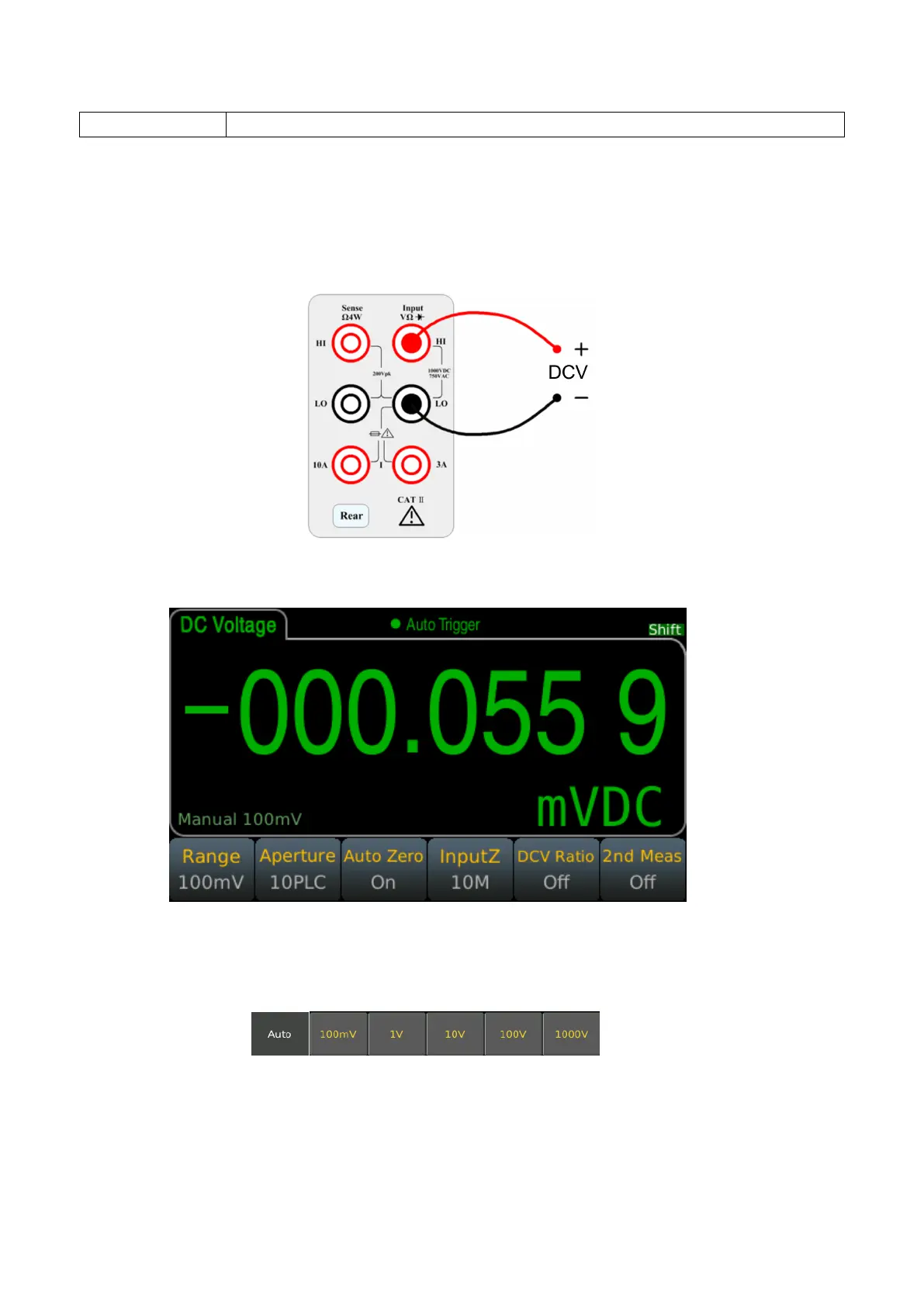
Step 1: Connect the input terminals correctly and the specific connection is as shown below.
Step 2: Enter the measurement interface and press the [DCV] button on the front panel to enter the DCV
measurement function.
Step 3: Range selection.
Press Range and select the range. Auto range (Auto) can automatically selects the appropriate range for
measurement based on the input signal. The auto range is adjusted upwards to 120% of the current range and
down to 10% of the current range.
Step 4: Set the integration time.
The setting of the integration time affects the measurement speed and measurement accuracy. The longer the
integration time, the higher the accuracy but the slower the measurement. 1PLC, 10PLC, 100PLC can inhibit the
power supply noise. Selecting 100PLC can provide the best noise rejection, but at a slower rate.



 To Next Page