27
OPERATION OF Ez Capture for DC-4
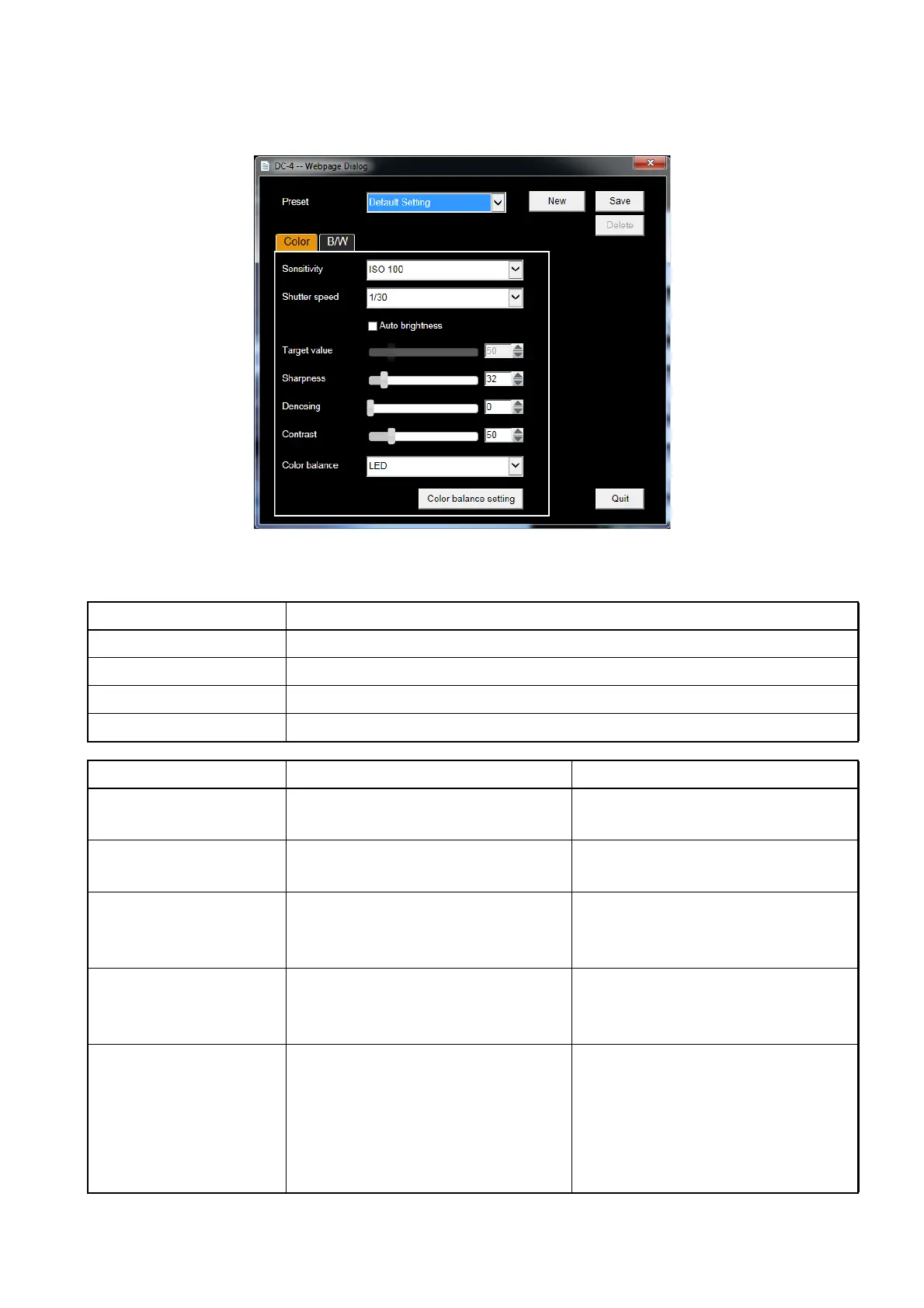
Functions of the photography parameters setting dialog box
On "Photography parameters setting dialog box", you can add or delete the preset data and set the
details of the photography parameters for each preset data.
Button Description
New Makes new preset data for the photography parameters.
Save Saves the selected preset data.
Delete Deletes the selected preset data.
Quit Closes the dialog box.
Item Description Set value
Preset Changes the preset data of the
photography parameters to be set.
Default Setting
(You can add the setting optionally.)
Sensitivity Sets the ISO sensitivity. ISO 100 / ISO 200 / ISO 400 /
ISO 800
Shutter speed Sets the shutter speed. 1/15 / 1/20 / 1/25 / 1/30 / 1/40 /
1/50 / 1/60 / 1/80 / 1/100 / 1/125 /
1/160 / 1/200 / 1/250
Auto brightness Place a mark in the checkbox. The
auto brightness adjustment function
is valid.
ON/OFF
Target value Sets the aimed value of brightness
when the auto brightness adjust-
ment is valid.
When the value is lower, the image
is darker. When the value is higher,
it is brighter.
2 - 253
Photography parameters setting dialog box












 To Next Page