15
Introduction
3.3 Operating Keys
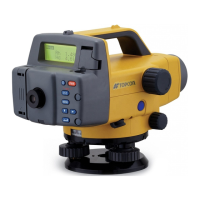
Learn main key operations here.
• Power ON/OFF
: Power the instrument ON
(hold) + : Power the instrument OFF
• Light up the display
: Switch the display backlight ON / OFF
• Measurement start / stop
: Start measurement
/ : Stop measurement (in repeat, average or tracking
mode)
: Cancel measurement
• Select / cancel (return to former procedure) menus and options
/ : Scroll to next position (JOB selection, item selection,
etc.)
: Accept the option
: Enter Menu mode
: Return to former procedure or to Status mode
• Value input / cancel
: Advance the numeral
Toggle the +/- sign
: Change the position of the inverted cursor
: Accept the input value
• The fractional/decimal display format for distance measurements
depends on the setting in measuring mode only.
Note:
DL502-503.book 15 ページ 2010年4月5日 月曜日 午前9時47分



 To Next Page