Managing Recorded Data
49
13. Displaying Recorded Data
Data recorded in Height difference measurement mode or Elevation
measurement mode can be edited.
Use the Record Setting Mode to check data and display the number of
recorded points.
13.1 Data Check and Edit
Check the contents saved in the currently selected JOB.
Attributes can be changed.
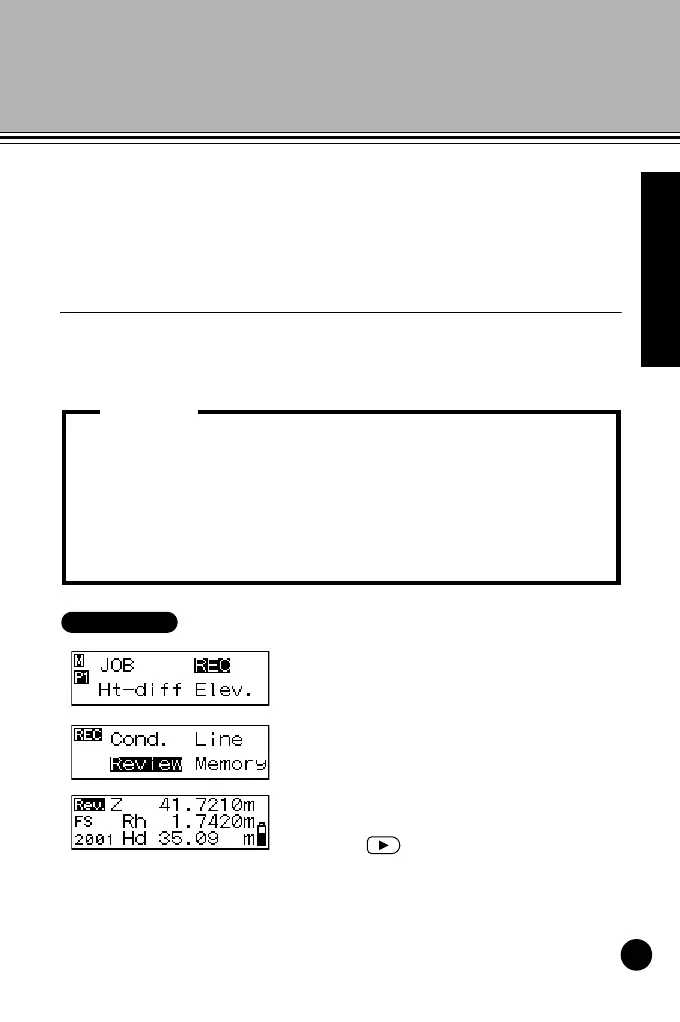
1 In menu mode, select "REC" and
then select "Review."
The last recorded data in the
currently selected JOB is displayed.
2 Display the data that you want to
review.
Press to display the previously
displayed data.
• Attributes can be changed in the following order only: BS
(backsight point) Æ FS (foresight point) Æ IS (intermediate sight)
Æ FIX (fixed point) Æ Off Æ DEL (delete). (Example: Data
recorded as IS (intermediate sight) can be changed to FIX (fixed
point), Off or DEL (delete), but not to BS (backsight point) or FS
(foresight point).
• Point number and measurement results cannot be edited.
Important:
DL502-503.book 49 ページ 2010年4月5日 月曜日 午前9時47分



 To Next Page