31
Surveying
8.2 Record Conditions
Select the method for recording measurement data.
In the menu mode, select "REC," and then "Cond."
* Manual: When measurement is completed, check and
record the data
Auto: Data is automatically recorded for foresight point
measurements (check and record backsight
point measurements manually)
Off: Data cannot be recorded.
0123456789
ABCDEFGHIJ
KLMNOPQRST
UVWXYZ.+-
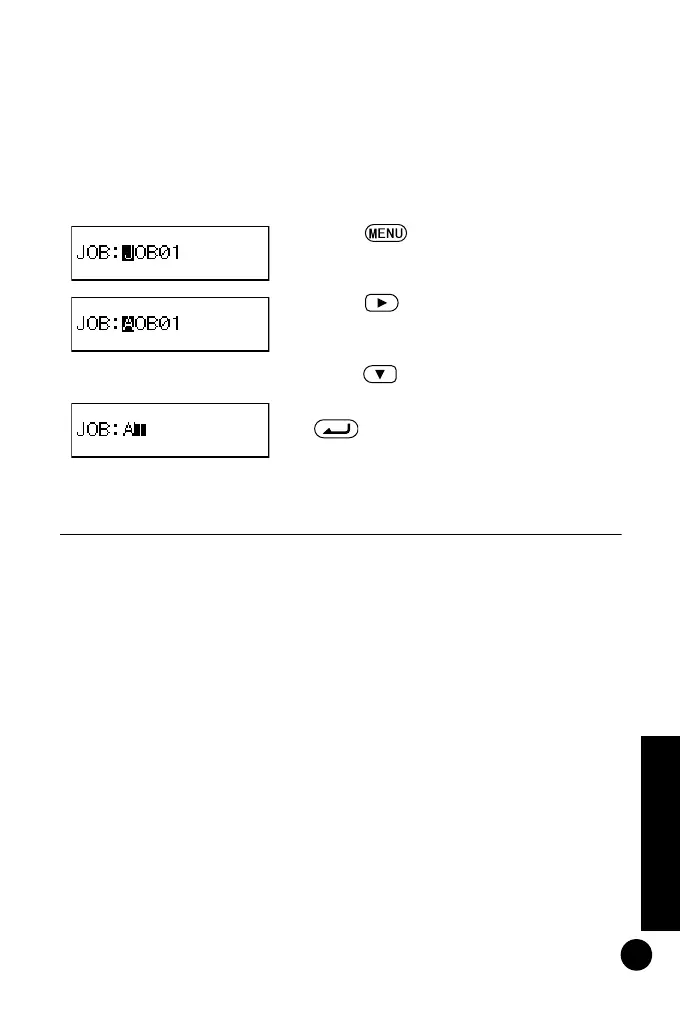
Example: Displaying the word AT
2 Press four times to display "A."
3 Press to move the cursor to the
next character.
4 Press five times to display "T."
5
When the word has been input, press
to record the JOB name.
DL502-503.book 31 ページ 2010年4月5日 月曜日 午前9時47分



 To Next Page