Managing Recorded Data
51
14. JOB Delete
Delete the JOB and the contents of the JOB.
Carry out JOB deletion in the JOB setting mode. (JOBs cannot be
deleted when the battery is LOW.)
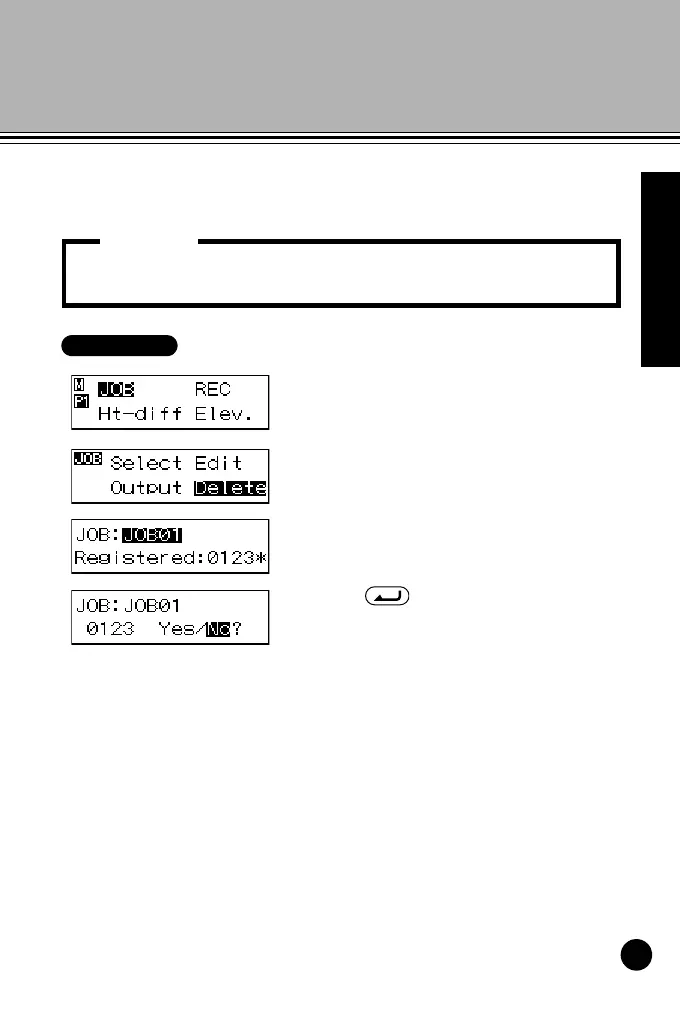
1 In menu mode, select "JOB" and
then "Delete."
The currently selected JOB and
number of data recorded in the JOB
are displayed.
2 Display the JOB you want to delete.
3 Press , and then select "Yes."
The selected JOB and contents of
the JOB are deleted.
• JOBs that cannot be output (indicated by * next to JOB) cannot
be deleted.
Important:
DL502-503.book 51 ページ 2010年4月5日 月曜日 午前9時47分



 To Next Page