117
19. OFFSET MEASUREMENT
5. Sight the offset point and press
[MEAS] in the first page of the
OBS mode screen to begin
measurement.
The measurement results are
displayed. Press [STOP] to stop
the measurement.
6. Accurately sight the direction of
the target point and press [OK].
The distance and angle of the
target point are displayed.
7. After finishing measurement,
press [YES] to return to <Offset>.
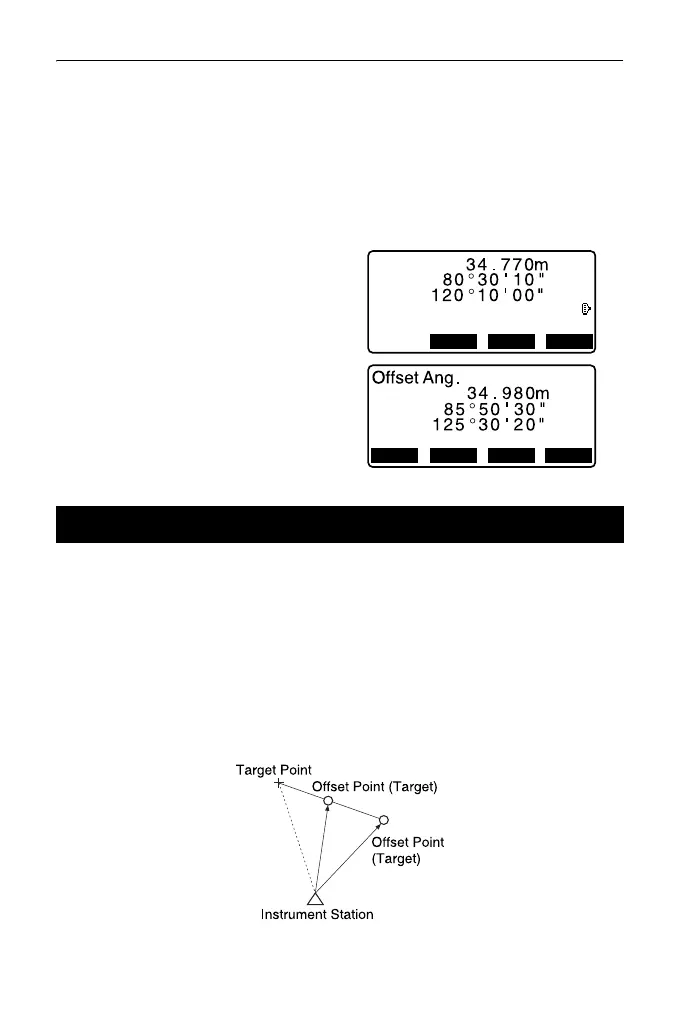
By measuring the distances between the target point and the two offset points.
Install two offset points (1st target and 2nd target) on a straight line from the target
point, observe the 1st target and 2nd target, then enter the distance between the
2nd target and the target point to find the target point.
• It is possible to make this measurement easily using the optional equipment:
the 2-point target (2RT500-K). When using this 2-point target, be sure to set
prism constant to 0.
"7.2 Levelling"
19.3 Two-distance Offset Measurement
XYZ MEAS OK
SD
ZA
HA-R
2nd meas. OK ?



 To Next Page