24
INDICATION OF CHART
Special function (Plural rate character contrast)
Different contrast rate is given to each column of the chart and, in this condition, the chart can be indi-
cated.
The example of use is shown below.
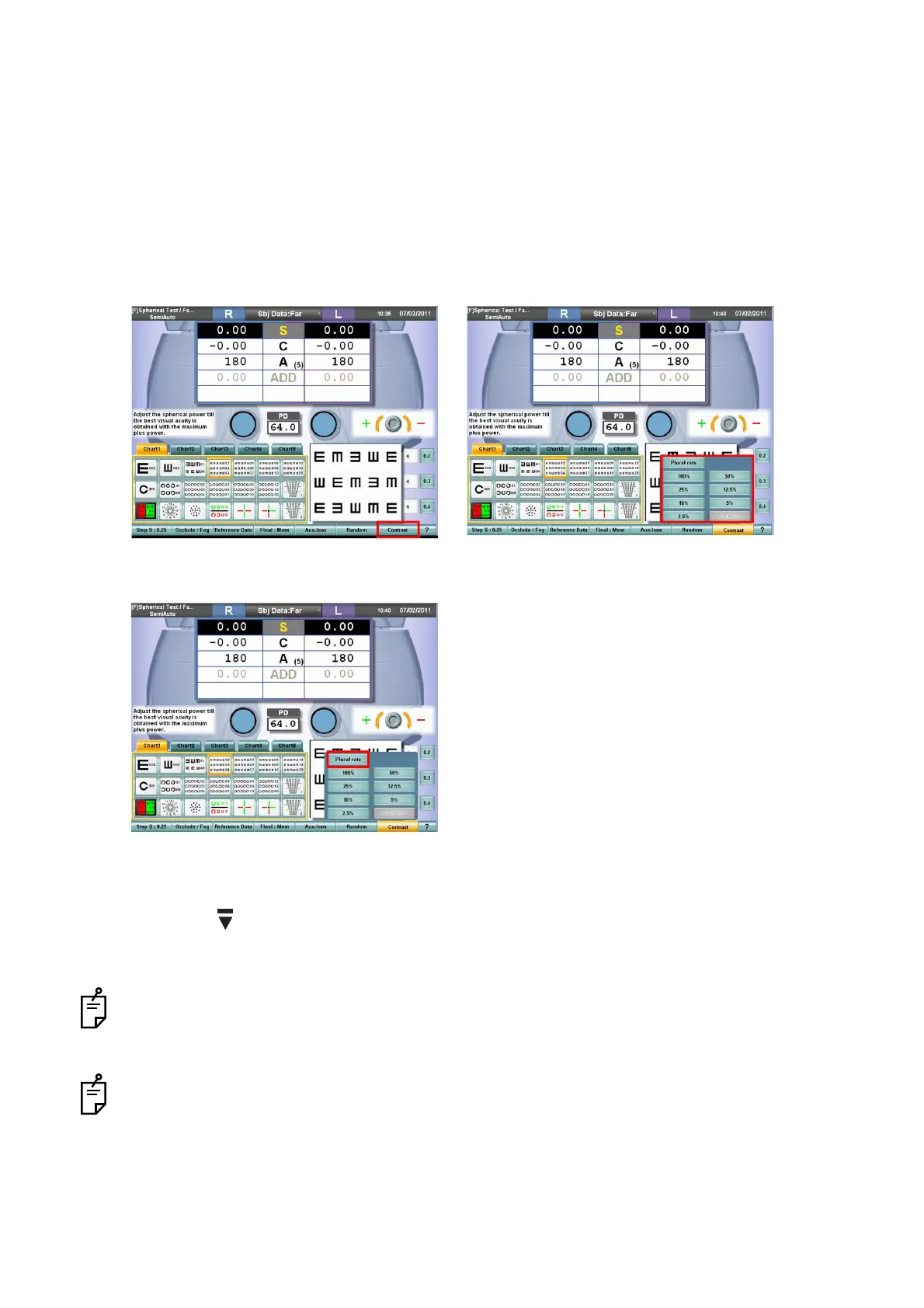
1 Indicate the tumbling E chart [0.2-0.4].
2 Touch the [Contrast] button among the function buttons.
The contrast selection menu is displayed.
3 Touch the [Plural rate] button on the contrast selection menu.
The tumbling E chart [0.2-0.4] in which the columns are different in contrast by stages, "25%",
"12.5%", "10%", "5%" and "2.5%" from the leftmost one is displayed.
4 Press the [ ] switch.
The tumbling E chart [0.5-0.7] having the plural rate contrast is indicated.
Select the chart having 3 lines and 5 columns from the chart page. The chart can be changed in
the contrast condition. Touch the [Exit] button on the contrast selection menu, and contrast is can-
celed.
While the character chart or the chart having 2 lines and 3 columns is being indicated, it is not pos-
sible to select the [Plural rate] button on the contrast selection menu.



 To Next Page