Auto-close time setting:
1. Turn and ONLY turn DIP Switch #3 and #6 to ON (All the other DIP switches of SW1 shall be turned
OFF. They can be turned ON after the timer setting).
2. Press the button “ONE” to increase the timer from 1 second (Every time the timer will be start from 1
second when entering into the timer setting). Each press of the “ONE” button will increase the timer by 1
second. The time can be set up to 250 seconds.
3. Turn DIP Switch #6 to OFF to finish the setting.
Factory default setting is OFF.
Important Note: When the auto close function is enabled, the photocell sensor is highly
recommended to be installed with the gate opener for safety.
DIP Switch #4: Enable/disable Soft Stop
ON – Soft stop enabled (Effective only after travel learning)
OFF – Soft stop disabled
Travel Learning:
1. Turn and ONLY turn DIP Switch #4 and #6 to ON (All the other DIP switches of SW1 shall be turned
OFF. They can be turned ON after the timer setting).
2. Press and hold the button “ONE” until the gate opener starts running automatically and then release. It will
run for a complete opening & closing cycle and then stop automatically. The buzzer will beep for 2 sounds to
indicate that the travel learning is completed successfully.
3. Turn DIP Switch #6 to OFF to finish the setting. You would achieve the soft stop in your next
opening/closing cycle.
Factory default setting is OFF.
NOTE: The soft stop period is fixed 3 seconds if soft stop is enabled. The soft stop speed can be
adjusted by the Potentiometer A.
DIP Switch #5: Enable/disable Start with Full Speed
ON –Start with full speed enabled (The gate opener runs with full speed when starting)
OFF –Start with full speed disabled (The gate opener runs with soft start at a slower speed for 2 seconds)
Factory default setting is OFF.
DIP Switch #6: Setting Switch
Work together with DIP switch #3 or DIP switch #4 to set the auto close time or travel learning.
Factory default setting is OFF.
DIP Switch #7: Stop/Reverse in Case of Obstruction during Gate Closing
ON –The gate opener reverses in case of obstruction during gate closing.
OFF –The gate opener stops in case of obstruction during gate closing.
NOTE: The gate opener will always stop in case of obstruction during gate opening.
Factory default setting is ON.
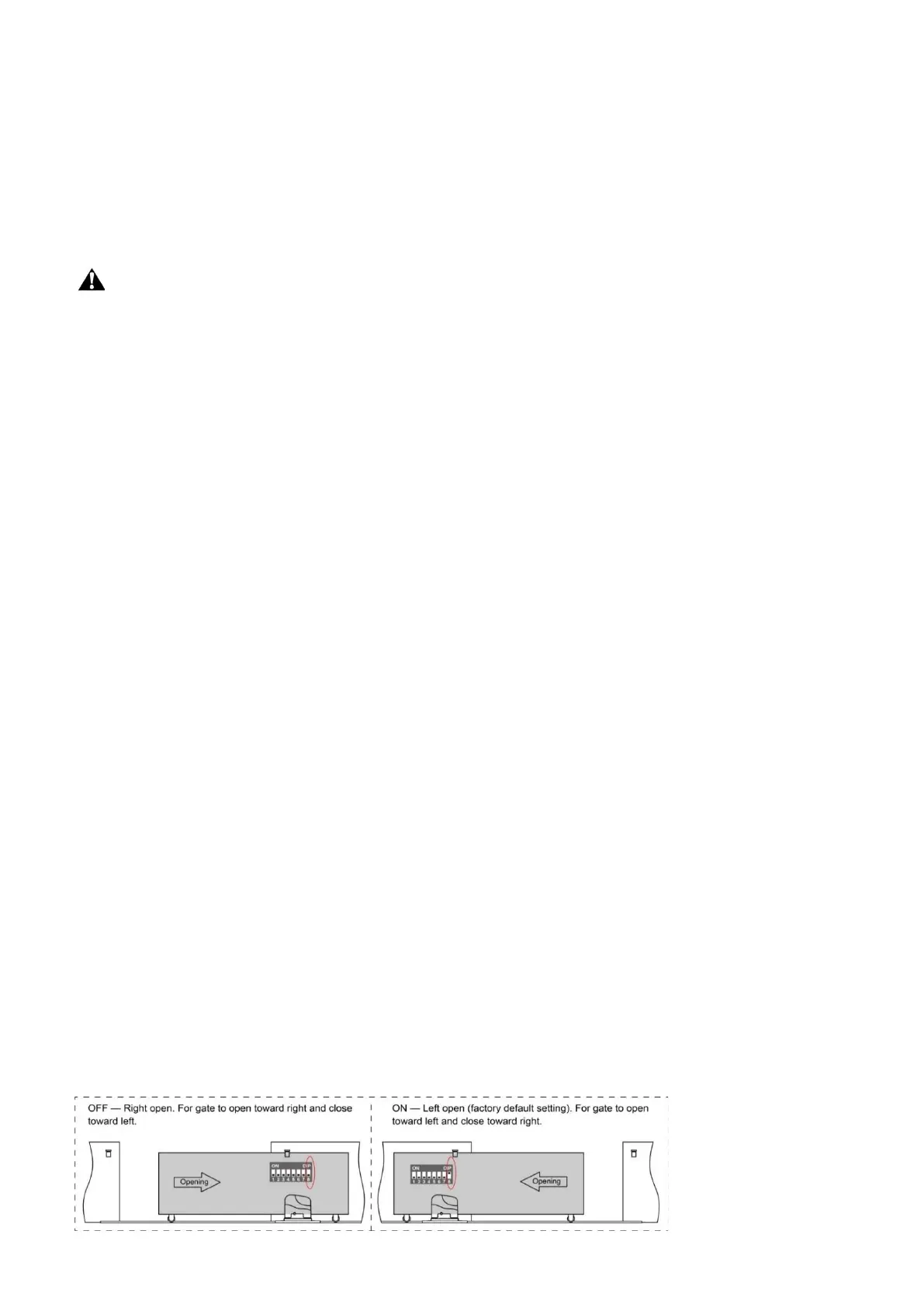
DIP Switch #8: Left/Right open


 To Next Page