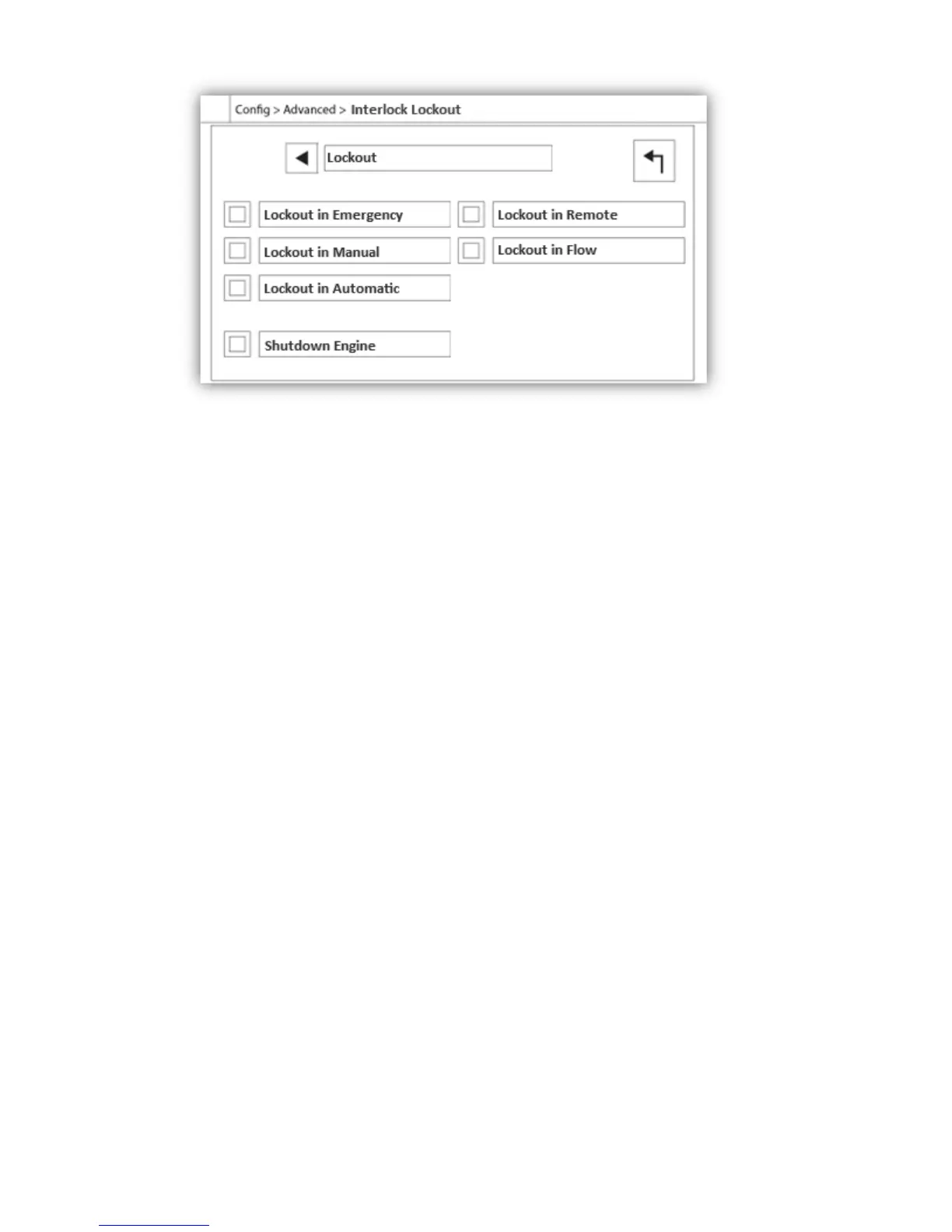
These pages allow to configure the Lockout input and the interlock output parameters. To be active, those options
need to be assigned to an Input or an Output on the I/O board.
Lockout is an Input that disables the engine from starting.
- Enable in emergency: If checked, this option will prevent the electronic assistance on an Emergency start.
- Enable in manual mode: If checked, this option will prevent the Manual start.
- Enable in automatic mode: If checked, this option will prevent the Automatic start.
- Enable in remote manual mode: If checked, this option will prevent the Remote Manual start.
- Enable in "start/stop" mode: If checked, this option will prevent the "start/stop" mode.
- Shutdown Engine: If enabled, the lockout signal will also act as a shutdown and will stop the engine if it is running.
Interlock is an Output that prevents a second engine from starting.
- Enable in emergency: If checked, this option will activate the output "interlock" on an Emergency start.
- Enable in manual mode: If checked, this option will activate the output "interlock" on a Manual start.
- Enable in automatic: If checked, this option will activate the output "interlock" on a Automatic start.
- Enable in Remote Manual mode: If checked, this option will activate the output "interlock" on a Remote Manual
start.
- Enable in "start/stop" mode: If checked, this option will activate the output "interlock" on a "start/stop" mode.
- Engine Run required: If enabled, the controller will wait to have the Engine Run signal before activating the
Interlock output.


 To Next Page