23
Address Setup
To find an indoor unit’s position from its address
When checking unit numbers controlled as a group
(Execute it while the units are stopped.)
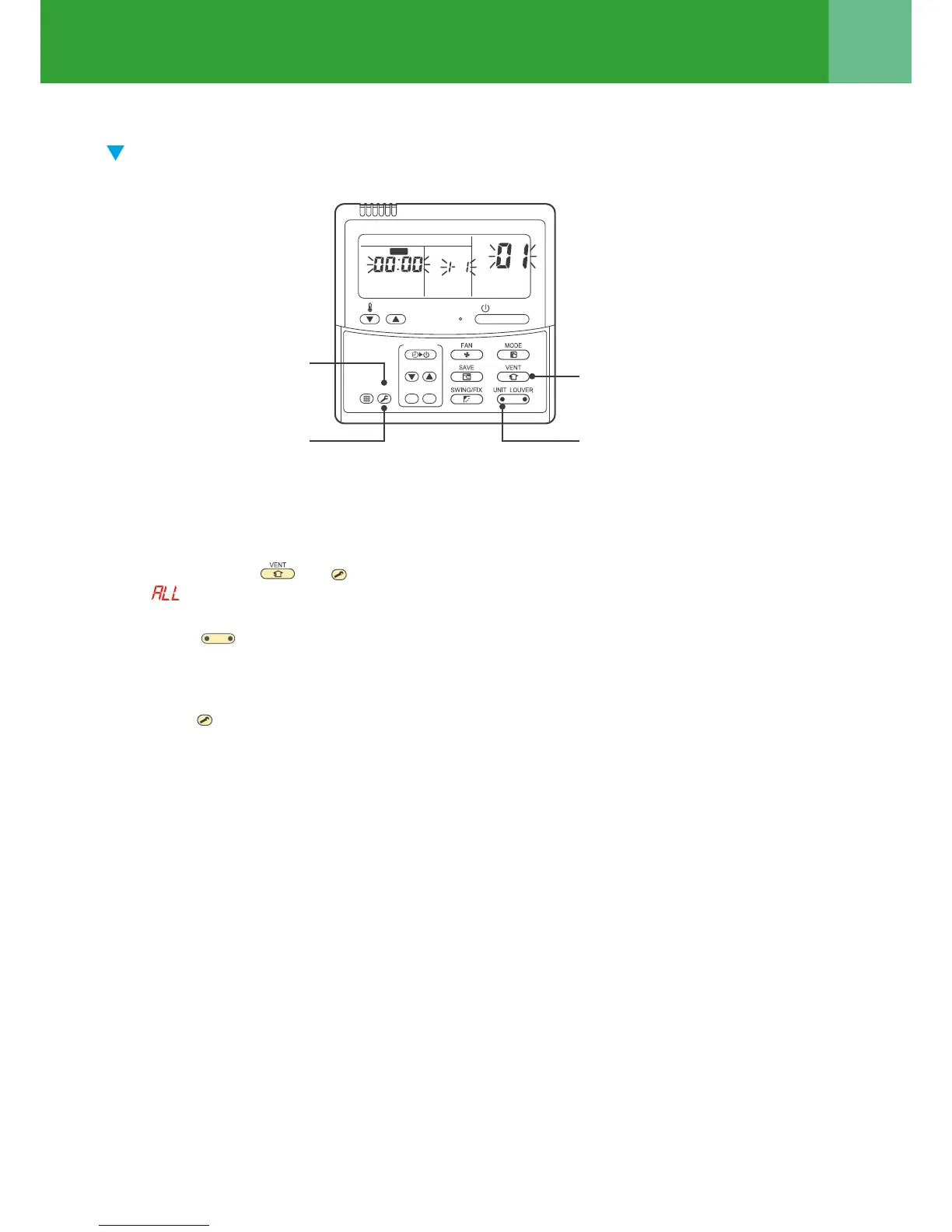
The indoor unit numbers in a group are indicated one after another. The fan and louvers of the indicated units are
activated.
1 Push and hold the and
TEST
buttons at the same time for more than 4 seconds.
• appears on UNIT No. on the LCD display.
• The fans and louvers of all the indoor units in the group are activated.
2 Push the
UNIT LOUVER
button (left side of the button). Each time you push the button, the indoor unit numbers
are indicated one after another.
• The first-indicated unit number is the address of the header unit.
• Only the fan and louvers of the indicated indoor unit are activated.
3 Push the
TEST
button to finish the procedure.
All the indoor units in the group stop.
3
1
2
1
ON / OFF
TEMP.
TIME
SET CL
FILTER
RESET
TEST
TIMER SET
CODE No.
UNIT No.
SETTING
DATA
SET
R.C. No.
Stop




 To Next Page