39
Monitor Function
When using a remote controller with the model name RBC-AMT32E
the following monitor functions can be used.
Calling of display screen
<Content>
The sensor temperature or operation status of the remote controller, indoor unit, or the outdoor unit can be
known by calling up the service monitor mode from the remote controller.
[Procedure]
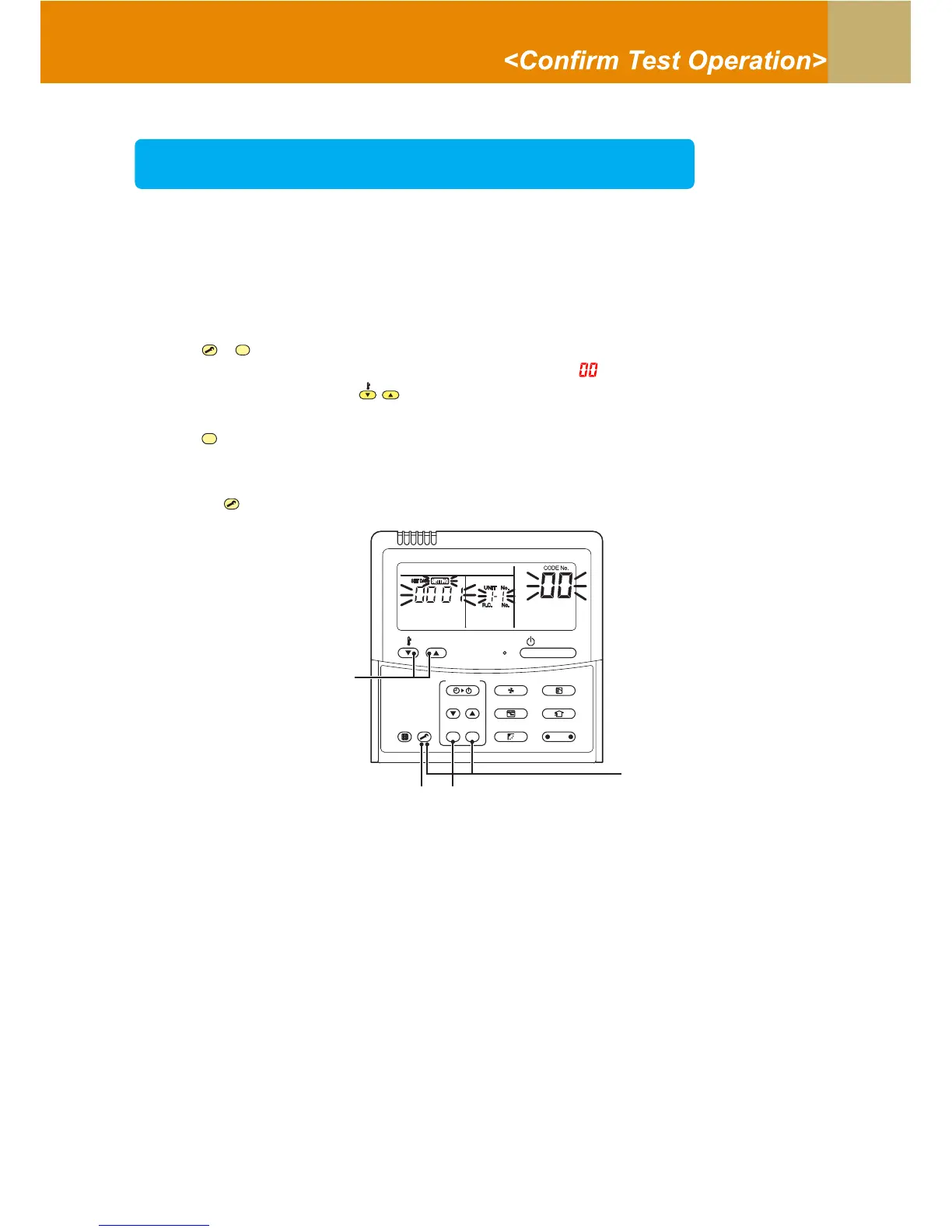
1 Push
TEST
+
CL
buttons simultaneously for 4 seconds or more to call up the service monitor mode.
The service monitor goes on, and temperature of the CODE No. is firstly displayed.
2 Push the temperature setup
TEMP
buttons to select the CODE No. to be monitored.
For displayed codes, refer to the table next page.
3 Push
SET
button to determine the item to be monitored.
Then monitor the sensor temperature or operation status of indoor unit and the outdoor unit in the
corresponding refrigerant line.
4 Pushing
TEST
button returns the display to the normal display.
SET
TIME
TIMER SET
TEST
FILTER
RESET
TEMP.
CL
FAN
SAVE
SWING/FIX
VENT
MODE
ON / OFF
UNIT LOUVER
1
4
2
3




 To Next Page