33
Test Operation
The cooling/heating test operation check can be performed on both the indoor remote control and the outdoor
header unit interface PC board.
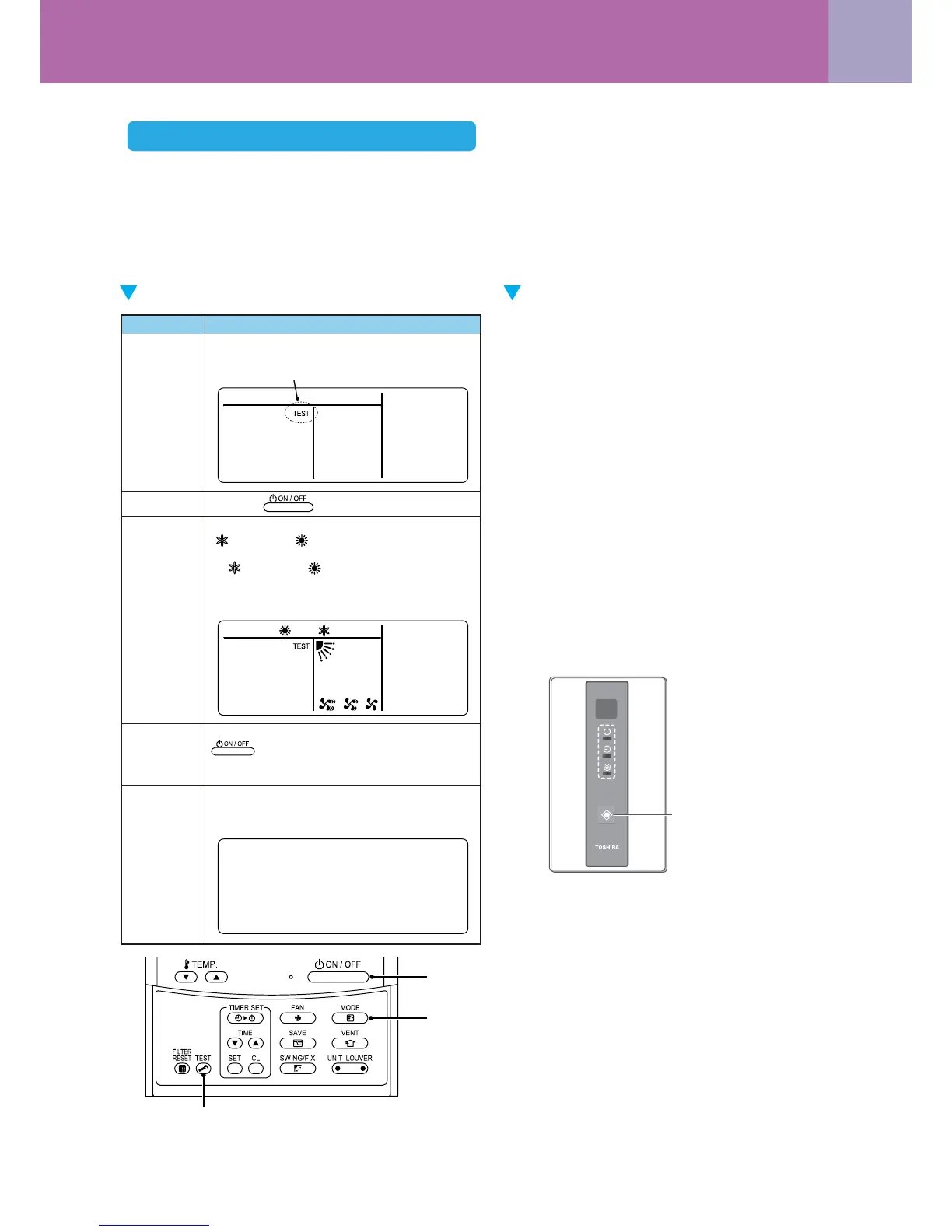
(1) Test operation start/stop operation
Test operation from the indoor remote control
• Wired remote control: Refer to the items below in “Test operation” of the wired remote control.
• Wireless remote control: Refer to the items below in “Test operation” of the wireless remote control.
Wired remote control Wireless remote control (Except the 4-way
Cassette type and the Ceiling type)
Test run (Forced cooling operation)
Requirement:
• Finish the forced cooling operation in a short time
because it applies excessive strength to the air
conditioner.
How to perform forced cooling operation
1. When TEMPORARY button is pushed for 10 sec-
onds or more, “Pi!” sound is heard and the operation
changes to a forced cooling operation.
After approx. 3 minutes, a cooling operation starts
forcedly.
Check cool air starts blowing. If the operation does
not start, check wiring again.
2. To stop a test operation, push TEMPORARY button
once again (Approx. 1 second).
• Check wiring / piping of the indoor and outdoor
units after forced cooling operation.
1, 5
3
2, 4
Operation contentProcedure
1
2
When the Test button is pushed for 4 seconds or
more, “TEST” is displayed in the display section,
and the unit enters test operating mode.
5
Push the Test button to clear the test operating mode.
(“TEST” disappears from the display section, and
the status returns to the normal stopped status.)
3
Using the Select Mode button, select the
“ COOL” or “ HEAT” operating mode.
• Do not use an operating mode other than
“ COOL” or “ HEAT”.
• Temperature adjustment is unavailable during
test operation.
• Error is detected as usual.
Push the button.
4
When the test operation has finished, push the
button to stop the operation.
(The same display as in procedure 1 appears in
the display section.)
TEMPORARY- Button
<Setup Remote Controller>
Cooling / heating test operation check




 To Next Page