88
NFC (Comminication)
SMMS WAVE TOOL FOR SMARTPHONE
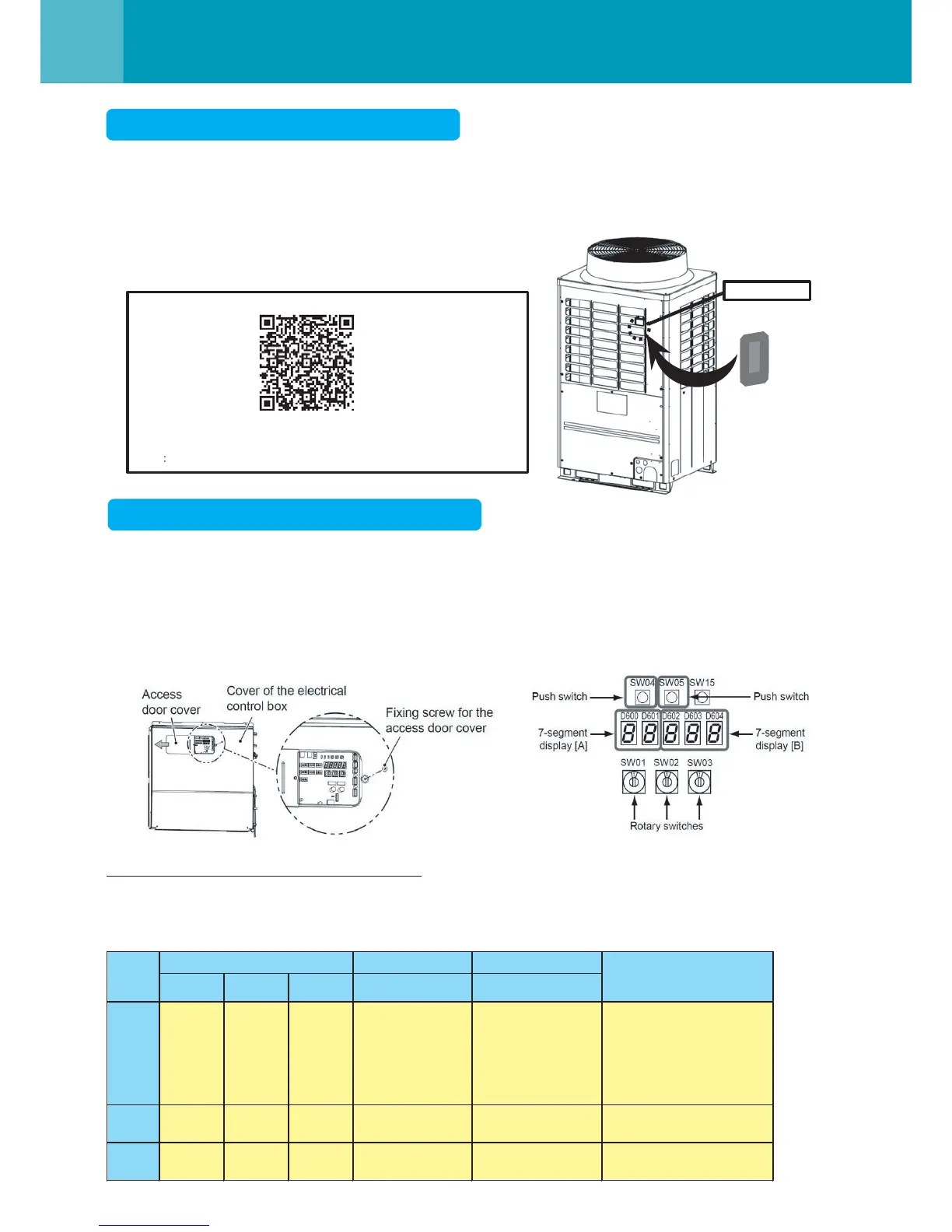
The NFC TAG DEVICE of the Outdoor unit communicates with SMARTPHONE that simplifies the install, the test
operation and the maintenance of the SMMS-e. *NFC (Near Field Communication)
As for the details, refer to the Operation Manual of “SMMS WAVE TOOL FOR SMARTPHONE”
• You can download the Application and the Operating Manual from the below URL or QR code.
Prohibition/Permission of the NFC Setting
• This Application enables the functions of the auto-address setup and the test operation of the outdoor unit with
Smartphone within 48 hours from the power input to the outdoor unit.
• You should decide whether to make use of the functions of the auto-address setup and test operation at its own
responsibility and also be sure to confirm notices in the Operating
Manual before performing the test operation.
• If you want to disable the functions of the auto-address setup and the test operation, perform the following operations.
Switch setting of some functions prohibition
How to set the NFC operation all time prohibition
Follow the below procedure.
QR code
URL http://www.toshiba-carrier.co.jp/global/appli/smms_wave_tool/
NFC TAG DEVICE
SMART PHONE
Push switch 7-segment display
SW01 SW02 SW03 SW04 [ A ] [ B ]
(1) 2 1 14 - [ nF] [ c.00 ]
(Default setting)
After the power input,
:below 48 hours
[NFC operation permit]
:more than 48 hours
[NFC operation prohibit]
(2) 2 1 14
Press for more
than 5 secs
[ nF] [ c.01 ]
NFC operation
all time prohibition
(3) 1 1 1 - [ U.1. ] [ - - - ] Return the switch
Step
Rotaly switch
NFC operation
setting




 To Next Page