TD-W8980 N600 Wireless Dual Band Gigabit ADSL2+ Modem Router User Guide
59
¾ Disable Wireless Security: If you do not want to use wireless security, check this radio
button. But it’s strongly recommended to choose one of the following modes to enable
security.
¾ WPA/WPA2-Personal - It’s the WPA/WPA2 authentication type based on pre-shared
passphrase. The modem router is configured by this security type by default.
• Authentication Type: You can choose the type for the WPA/WPA2-Personal security on
the drop-down list. The default setting is Auto, which can select WPA-PSK
or WPA2-PSK
authentication type automatically based on the wireless station's capability and request.
• Encryption: You can select Auto, TKIP or AES as Encryption.
• Wireless Password: You can enter ASCII characters between 8 and 63 characters or 8 to
64 Hexadecimal characters. The default password is the same with the default PIN code,
which is labeled on the bottom of the Router or can be found in Figure 4-32.
• Group Key Update Period: Specify the group key update interval in seconds. The value
should be 30 or above. Enter 0 to disable the update.
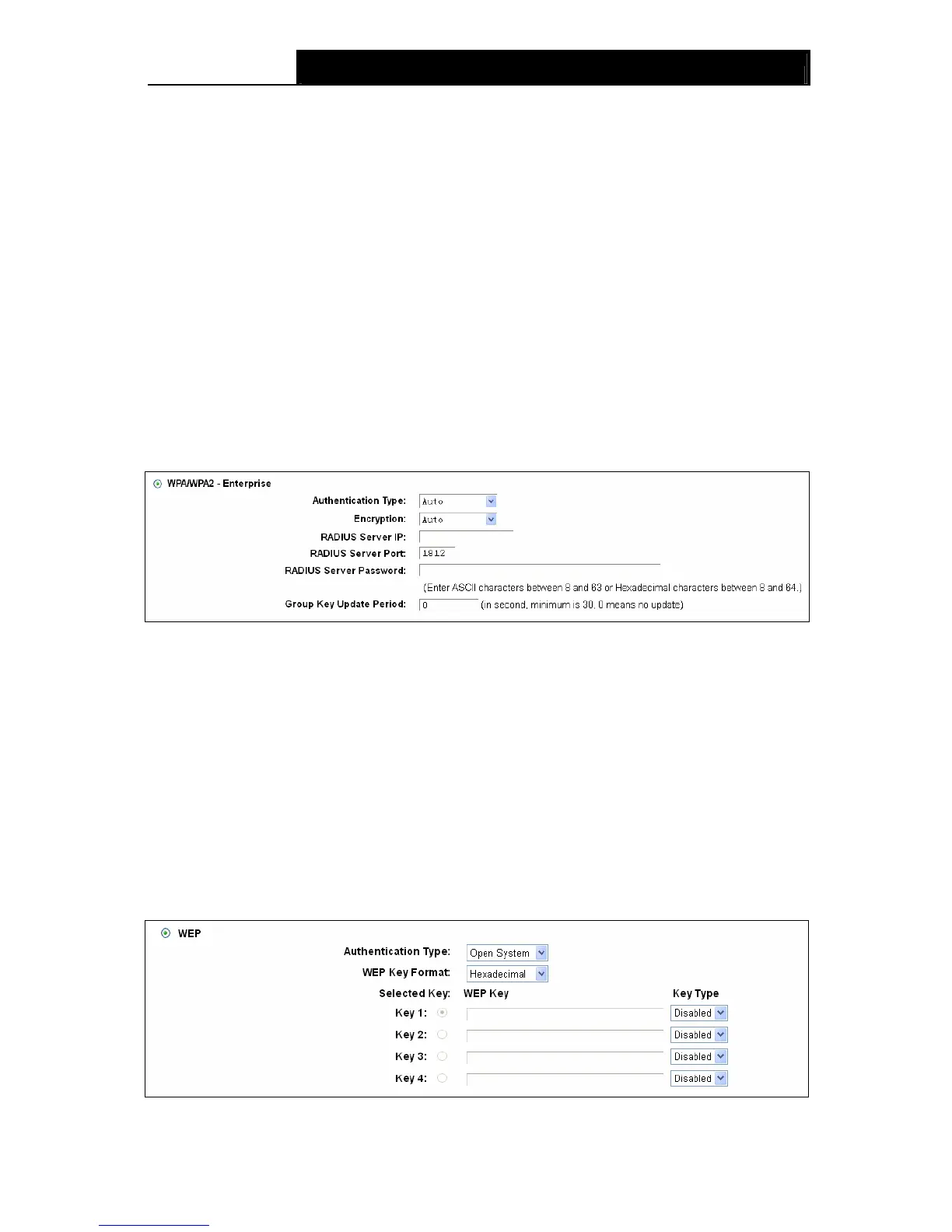
¾ WPA/WPA2 – Enterprise: It’s based on Radius Server.
• Authentication Type: Authentication Type: You can choose the type for the
WPA/WPA2-Personal security on the drop-down list. The default setting is Auto, which can
select WPA-PSK
or WPA2-PSK authentication type automatically based on the wireless
station's capability and request.
• Encryption: You can select Auto, TKIP or AES as Encryption.
• RADIUS Server IP: Enter the IP address of the Radius Server.
• RADIUS Server Port: Enter the port that radius service used.
• RADIUS Server Password: Enter the password for the Radius Server.
• Group Key Update Period: Specify the group key update interval in seconds. The value
should be 30 or above. Enter 0 to disable the update.
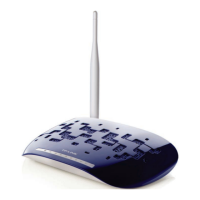
¾ WEP: It is based on the IEEE 802.11 standard.









 To Next Page