TD-W8980 N600 Wireless Dual Band Gigabit ADSL2+ Modem Router User Guide
68
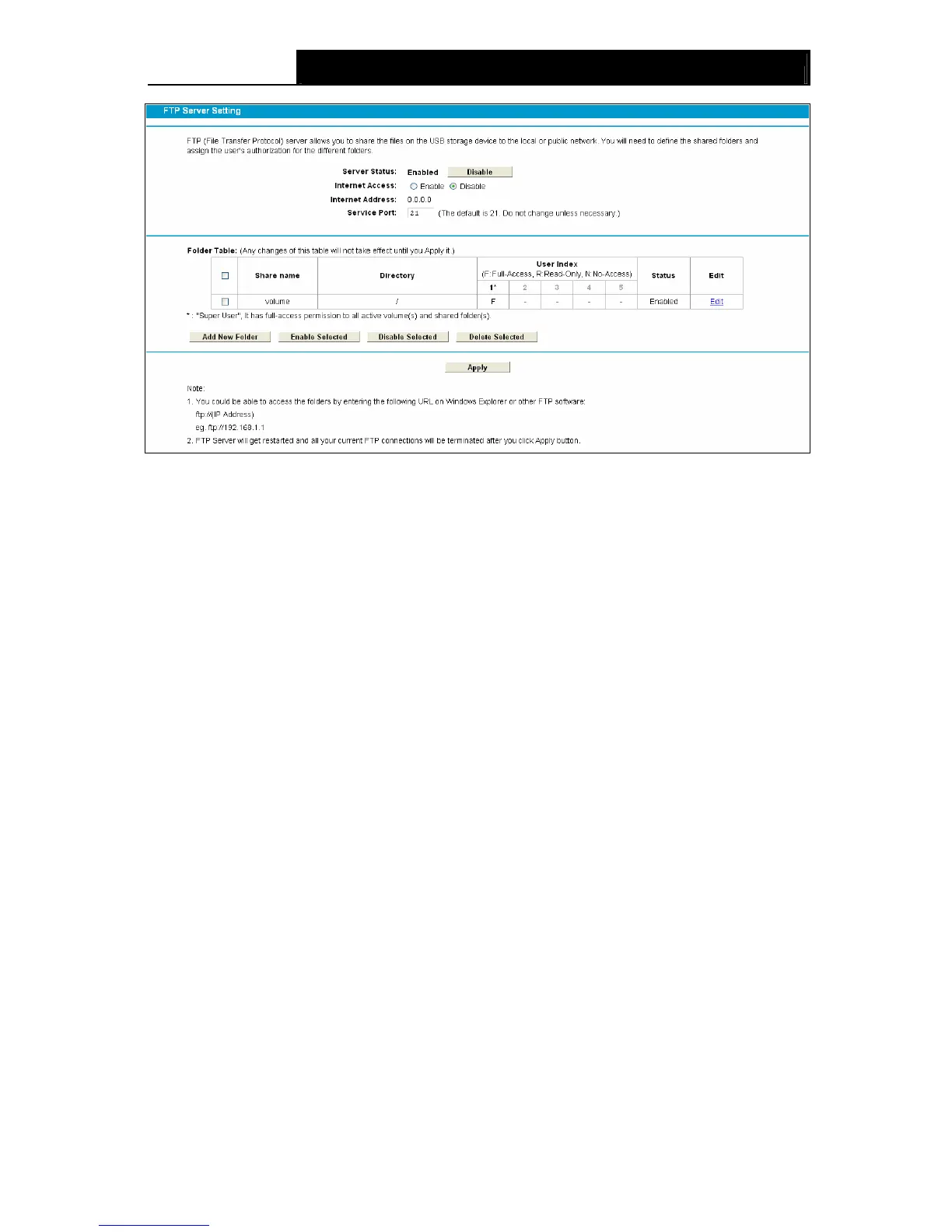
Figure 4-53
¾ Server Status: Indicates the FTP Server's current status.
¾ Internet Access: If Internet Access is enabled, user(s) in public network can access FTP
server via Internet Address.
¾ Internet Address: If Internet Access is enabled, WAN IP will be displayed here.
¾ Service Port: Enter the FTP Port number to use. The default is 21.
¾ Share Name: This folder's display name.
¾ Directory: The real full path of the specified folder.
¾ User Index: The authorization of the user is displayed.
¾ Status: The status of the entry is enabled or disabled.
¾ Edit: Click Edit in the table, and then you can modify the entry.
To add a new folder, follow the instructions below.
1. Click Add New Folder in Figure 4-53.









 To Next Page