Home
TP-Link
Switch
TL-SG2216WEB
Page 30
TP-Link TL-SG2216WEB - Page 30
75 pages
Manual
Save Page as PDF
To Next Page
To Next Page
To Previous Page
To Previous Page
Loading...
2
3
W
e
b
S
m
a
r
t
G
i
g
a
b
i
t
S
w
i
t
c
h
F
a
m
i
l
y
U
s
e
r
'
s
G
u
i
d
e
T
L
-
S
G
2
2
1
6
W
E
B
/
T
L
-
S
G
2
2
2
4
W
E
B
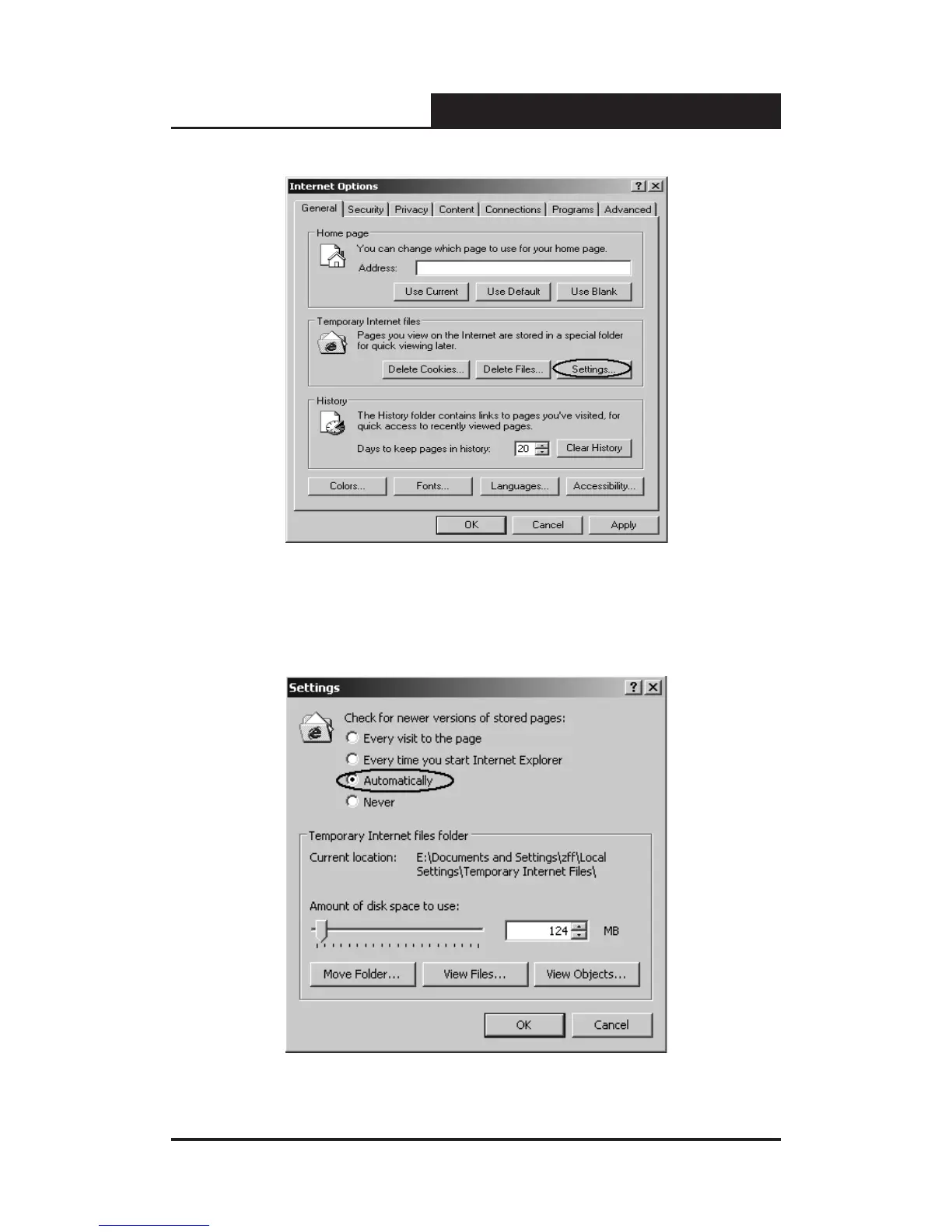
Fig
ure
5-1
Int
erne
t O
ptio
ns
Di
alo
g
Sec
ondl
y
,
click
the
“Se
tti
ngs”
button
hinted
in
gure
5-1
,
a
new
dialog
wil
l
dis
play
:
Fig
ure
5-2
Set
ting
s D
ialo
g
29
31
Table of Contents
Main Page
Default Chapter
2
Fcc Statement
2
Safety Notices
3
Table of Contents
4
Package Contents
8
Chapter 1: Introduction
9
Intended Audience
9
Agreement
9
Guide Overview
9
Chapter 2: Device Description
11
Introduction to the Device
11
Features and Technical Specifications
11
Features
11
Technical Specifications
12
Chapter 3: Mounting Device
14
Install the Device
14
Desktop or Shelf Installation
14
Rack Installation
14
AC Power
15
Switch Aspect Description
15
Front Panel
15
Back Panel
16
SFP Module
17
Note
17
Chapter 4: Function Description
18
System Setting
18
System Information
18
File Transfer
18
Reboot & Reset
18
User
19
Port Setting
19
Port Parameter
19
Duplex Mode
19
Flow Control
19
Port Security
19
Port Statistic and Port Status
20
Storm Control
20
Port Description
20
Network Setting
21
Switch IP Address
21
Aging Time and Dynamic Address Table
22
Static MAC Address Table
22
Filtering MAC Address Table
23
Dynamic Binding
23
Ping
24
VLAN Setting
24
VLAN Mode
24
Port Trunking
26
Priority Setting
26
Priority Mode
26
Port-Based Priority
27
Port Default Priority
27
802.1P Priority
27
Port Mirroring
27
Virtual Cable Test
27
Chapter 5: WEB Management
29
Overview
29
Connecting to the Device
29
Getting Started
29
Login the Switch
33
Setting the Device
33
System Setting
37
System Information
37
File Transfer
38
Reboot & Reset
39
User
40
Port Setting
40
Port Parameter
40
Port Statistic
43
Port Status
45
Storm Control
46
Port Description
47
Network Setting
48
Switch IP Address
48
Static MAC Address
49
Filtering MAC Address
51
Dynamic Binding
52
Bound MAC Address
55
Aging Time
56
Ping
57
VLAN Setting
57
VLAN Mode
57
Port VLAN Setting
58
Tag VLAN Global Setting
60
Tag VLAN Setting
61
MTU VLAN Setting
63
Port Trunking
64
Priority Setting
64
Priority Mode
65
Port-Based Priority
65
Port Default Priority
66
802.1P Priority Class
66
Port Mirroring
67
Virtual Cable Test
68
Appendix A Pin Explain for RJ-45 Connector
70
Appendix B Table of Factory Defaults
72
Appendix C Table of Function Differences of Switch Family
74
Related product manuals
TP-Link TL-SG2216
183 pages
TP-Link TL-SG2218
20 pages
TP-Link TL-SG2210P
2 pages
TP-Link TL-SG2210MP
24 pages
TP-Link Jetstream TL-SG2218
24 pages
TP-Link JetStream TL-SG2210P
861 pages
TP-Link TL-SG2200
24 pages
TP-Link TL-SG2008
153 pages
TP-Link TL-SG2452
961 pages
TP-Link TL-SG2008P
2 pages
TP-Link TL-SG2428P
961 pages
TP-Link TL-SG2424P
176 pages










 To Next Page