36
Web Smart Gigabit Switch Family User's Guide
TL-SG2216WEB/TL-SG2224WEB
Notice:
Though the SFP module support hot-plugging,but the configuration of
Duplex Mode could not change automatically,after switching between
UTP,100M SFP and 1000M SFP on the combo port,please modify
its Duplex Mode manually or re-electrify the switch to make sure the
conguration is correct. The 100M SFP should be set to "100M FD" and the
1000M SFP should be set to "AUTO" or "1000M FD".
Further explanation:
1) By operating on elds in the All Ports line expediently, you can set the
values of all ports in the corresponding eld. Some other setting pages
offer the same function.
2) Parameters of Trunk member ports are congured with default values
(see the Appendix B table) and cannot be congured here (see port 5
and 6 in the gure for example).
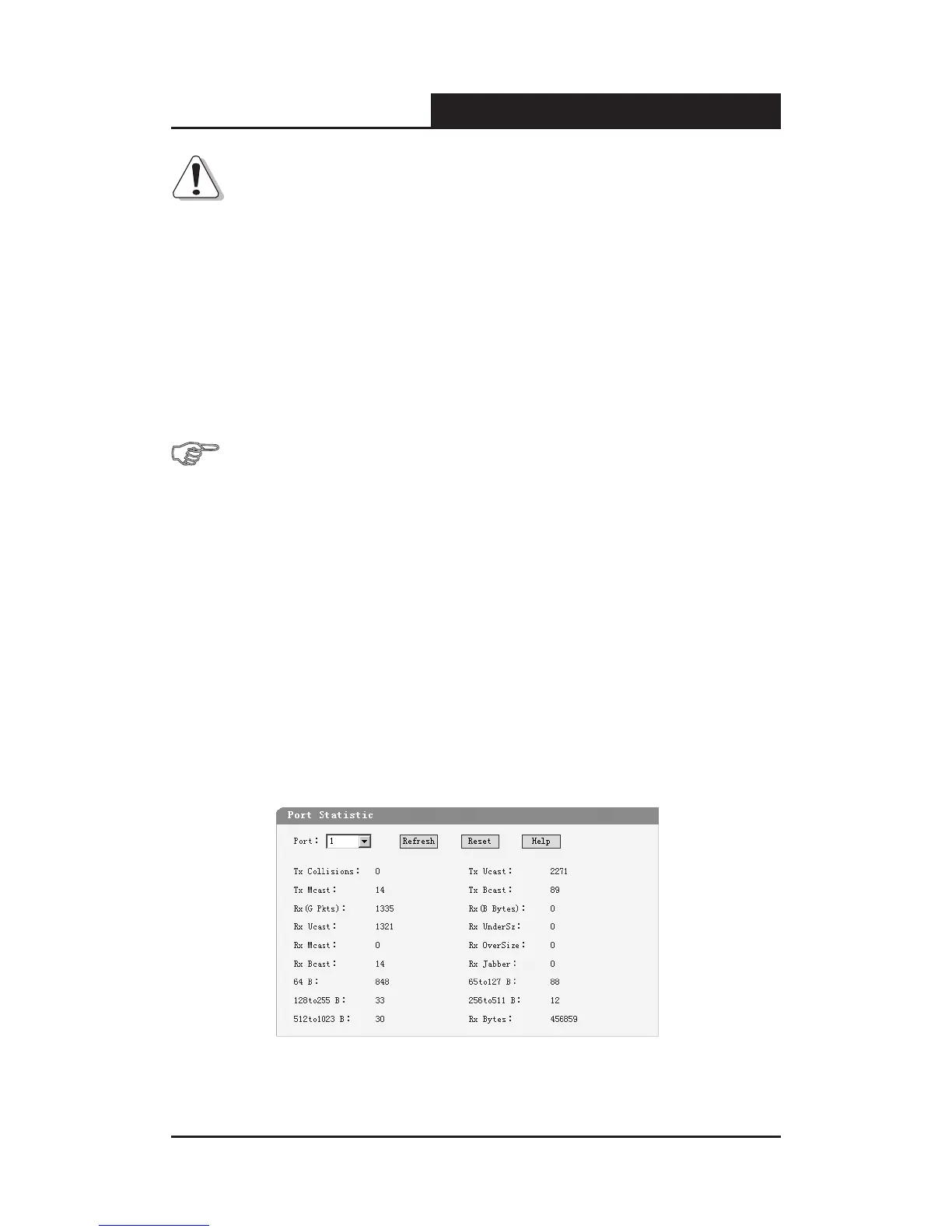
5.3.2.2 Port Statistic
This page displays the port statistic, it contains the following entries:
Figure 5-19 Port Statistic










 To Next Page